
Text Ape | Video Summarizer & YouTube Transcript Generator
YouTube Video Summarizer & YouTube Transcript Generator: Use AI to summarize YouTube videos and extract transcripts.
As of May 2026, Text Ape | Video Summarizer & YouTube Transcript Generator has 662 users and a 3.67/5 rating from 12 reviews in the Productivity category.
Usersdown 2.5 percent−2.5%
662
662
Ratingdown 2.7 percent−2.7%
3.67
12 reviews
Reviewsdown 7.7 percent−7.7%
12
Version
1.1.2
Manifest V3
History
2 snapshotsTracking since Apr 27, 2026.
View as table
| Date | Users | Rating | Reviews | Version |
|---|---|---|---|---|
| Apr 27, 2026 | 679 | 3.77 | 13 | 1.1.2 |
| May 24, 2026 | 688 | 3.67 | 12 | 1.1.2 |
| Now | 662 | 3.67 | 12 | 1.1.2 |
Permissions & access
- Permissions
- activeTabscriptingstorageidentityidentity.email
- Host access
- https://textape-d59a44fd2170.herokuapp.com/*, https://www.youtube.com/*, https://accounts.google.com/*, https://buy.stripe.com/*, https://billing.stripe.com/*
Screenshots



About
Tired of scrubbing through endless videos to find that one key point? Text Ape cuts through the noise. It’s your go-to YouTube video summarizer and YouTube transcript generator, powered by Claude, ChatGPT, and DeepSeek. Summarize YouTube videos with AI, extract full transcripts with timestamps, and see top comments—all in a clean, distraction-free interface. No fluff. Just what you need.

What You Get:

👉 A Video Summarizer – A powerful, easy-to-use AI video summarizer that pulls out key insights from any YouTube video, even the marathon 10-hour ones. Because no one has time for that.

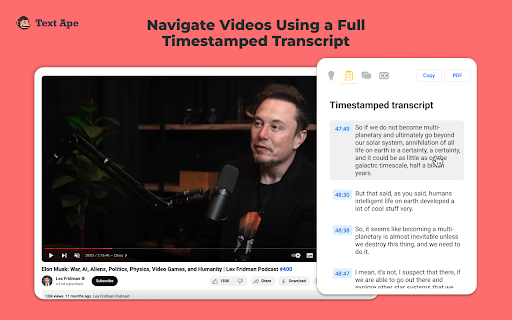
👉 YouTube Transcripts – Instant YouTube transcript extractor with timestamps. Perfect for quick YouTube transcript search and content repurposing. Like having x-ray vision for video content.

👉 YouTube CC – Download YouTube closed captions (CC) with a single click. Use it with a YouTube CC converter or wherever you need it. That’s it.

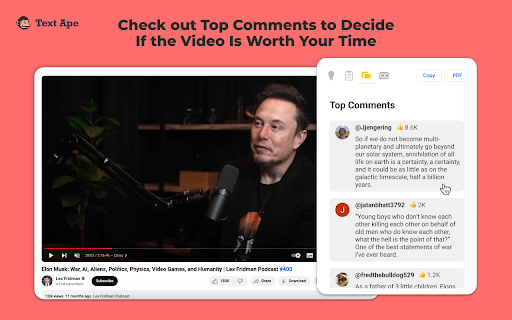
👉 Top Comments – Skip the scroll-a-thon. See what matters most without getting lost in a sea of replies. Stay in the loop with community highlights.

👉 PDF Export – Keep what matters. Download YouTube transcripts and summaries in a tidy PDF. Save it. Share it. Put it to work. Perfect for research, study notes, or business reports.

👉 Copy & Paste Freedom – Copy any YouTube summary or transcript straight into Notion, Google Docs, Word, or any editor you prefer. Organize your insights with ease.

👉 Customizable Summaries – Bullet points or detailed breakdowns? You decide. Tailor the summary to fit your workflow and preferences.

Everything lives neatly on the right side of your YouTube video. No popups. No new tabs. No clutter. Just the content you care about.

Who Is Text Ape For?

✅ Busy Professionals – Extract insights fast without watching full videos. Stay sharp. Save time. Perfect for market research, trend analysis, and efficient learning.

✅ Content Creators – Repurpose video content for newsletters, blogs, and social posts—without the heavy lifting. Fuel your content strategy effortlessly.

✅ Investors & Traders – Cut through the noise. Get straight to the point of earnings calls, financial reports, and market updates.

✅ VC & Tech Enthusiasts – Skip the filler. Zero in on key takeaways from science, tech, and AI videos. Stay ahead in fast-evolving industries.

✅ Students & Researchers – Review lectures, summarize YouTube videos, prep for exams. Study smarter, not harder. Ideal for academic research and exam prep.

✅ Podcast & Long-Form Video Fans – Get the gist of discussions, interviews, and podcasts without the full-time commitment. Catch the highlights while saving hours.

✅ Language Learners – Use transcripts to boost language skills. Learn faster. Understand deeper. Great for vocabulary building and comprehension practice.

How To Start Using Text Ape

1. Install the Text Ape Chrome extension.
2. Open a YouTube video.
3. Click the Get Summary button.
4. Boom. AI-generated summary, transcript, and top comments in seconds.

Why Choose Text Ape?

✅ Works on All YouTube Videos, including:

- Podcasts and interviews
- Lectures, tutorials, and educational materials
- Science, tech, and AI content
- Business, entrepreneurship, and trend analyses
- Finance and trading insights
- Health and wellness discussions

✅ No Popups or New Tabs – Everything stays in a neat interface on the right side of the video. No jumping around. Just seamless productivity.

✅ Exports to PDF – Save it. Share it. Put it to work. Refer back anytime. Keep your insights organized and accessible.

Text Ape is here to save your time, boost your productivity, and make YouTube work for you. Whether you're a professional, a student, or just someone who loves learning, you’ll love how simple and effective it is.

Cut the fluff. Get to the point. Try Text Ape Now.

Marie, Founder of Text Ape

P.S. Got feedback? Reach me on X @mariestrauchman. I’d love to hear from you.
Technical
- Version
- 1.1.2
- Manifest
- V3
- Size
- 204KiB
- Min Chrome
- 88
- Languages
- 44
- Featured
- Yes
Metadata
- ID
- kpddpnnhfdifaecnhfeeeolccmobmdjd
- Developer ID
- uf5a77caf772a2d4a1ddea7c19a80e1ba
- Developer Email
- [email protected]
- Created
- Nov 25, 2024
- Last Updated (Store)
- Feb 15, 2025
- Last Scraped
- May 24, 2026
- Website
- textape.io
- Support URL
- https://www.textape.io/
- Privacy Policy
- https://www.textape.io/privacy-policy
Similar extensions
Alternatives to Text Ape | Video Summarizer & YouTube Transcript Generator, ranked by description similarity.

YouTube Transcript & AI Summary Generator – Powered by ChatGPT
Transcribe YouTube videos and create AI-powered summaries. Simple, accurate, and free.
216
★ 3.0

AI YouTube Video Summarizer
Try AI YouTube Video Summarizer today. Get precision transcription online of any video and summarize it in a single click.
80

Youtube Video Summarizer AI
Start youtube video summarizer ai and create quick youtube summary in one click. Launch summarizer ai to save your time!
368
★ 4.4

YouTube Summary & Transcript Generator, Mind Map Generation
Summarize YouTube videos and convert transcripts into structured AI-powered notes.
23

TubeOnAI - YouTube Summary, Webpages & PDF Summary
Quickly summarize YouTube videos, articles, PDFs, and more with TubeOnAI. Save time and boost your productivity today.
495
★ 3.5

YouTube Video Summarizer
📝 Effortlessly summarize YouTube videos with 'YouTube Video Summarizer', your AI video-to-text converter and Chat GPT tool
910
★ 4.2

Sumrify : AI YouTube Video Summarizer
Summarize YouTube videos with AI. Save time on long videos — instantly get high-quality summaries
144
★ 5.0

Transcript Youtube Video
Use Transcript Youtube Video to summarize youtube content. Get accurate youtube transcription and full video summary easily.
465
★ 3.7
Data sourced from the Chrome Web Store · last verified May 24, 2026.