
Survey Copilot
AI survey assistant with voice recording, personalized recommendations, and text-to-speech features.
As of June 2026, Survey Copilot has 13 users in the Productivity category.
Usersup 8.3 percent+8.3%
13
13
Ratingno change0%
—
— reviews
Reviewsno change0%
—
Version
1.0
Manifest V3
History
4 snapshotsTracking since Apr 20, 2026.
View as table
| Date | Users | Rating | Reviews | Version |
|---|---|---|---|---|
| Apr 20, 2026 | 12 | — | — | 1.0 |
| May 4, 2026 | 13 | — | — | 1.0 |
| May 14, 2026 | 14 | — | — | 1.0 |
| Jun 8, 2026 | 12 | — | — | 1.0 |
| Now | 13 | — | — | 1.0 |
Permissions & access
- Permissions
- activeTabscriptingstoragenotifications
- Host access
- http://*/*, https://*/*
Screenshots
About
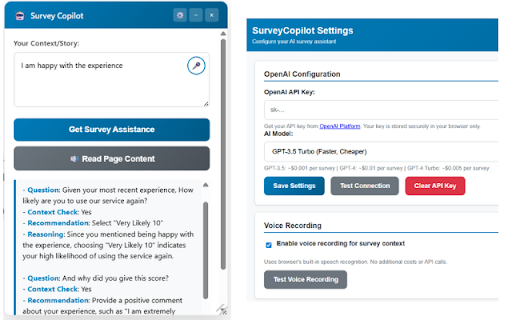
Transform your survey experience with SurveyCopilot - the intelligent assistant that makes completing surveys faster, easier, and more accessible.

🎤 VOICE RECORDING
- Speak your context instead of typing lengthy responses
- Automatic speech-to-text conversion
- Perfect for capturing detailed experiences quickly

🤖 AI-POWERED ASSISTANCE
- Get personalized response recommendations based on your context
- Smart analysis of survey questions
- Authentic, contextual suggestions that sound like you wrote them

🔊 TEXT-TO-SPEECH
- Listen to survey content read aloud
- Accessibility support for visual impairments
- Hands-free survey review

✨ KEY FEATURES
- Drag & drop resizable interface
- Secure OpenAI API integration
- Auto-saves your context between sessions
- Works on all survey platforms (Qualtrics, Medallia, Question Pro, SurveyMonkey, etc.)
- Privacy-focused - your data stays local

📋 PERFECT FOR
- Market research participants
- Customer feedback providers
- Academic survey respondents
- Anyone who regularly completes surveys
- Users seeking accessibility features

🔒 PRIVACY & SECURITY
- API keys stored securely in your browser
- No data sent to our servers
- Voice processing happens locally when possible
- Full control over your information

SETUP REQUIRED: You'll need an OpenAI API key (get one free at platform.openai.com). Detailed setup instructions included.

Transform tedious surveys into effortless conversations with SurveyCopilot!


The "Failed to analyze survey: API request failed" error is most likely one of these common issues:
🔍 Most Common Causes:
1. API Key Issues (90% of cases):
Incorrect key format - Missing characters when copy/pasting
Expired or revoked key - OpenAI deactivated the key
Trial credits exhausted - Free tier limits reached
Billing issues - Payment method problems

2. Network/Firewall Issues:
Corporate firewall blocking OpenAI API calls
VPN interference - Some VPNs block API requests
Browser extensions interfering with requests

3. Rate Limiting:
Too many requests - OpenAI rate limits exceeded
Concurrent usage - Multiple people using same key

🛠️ Quick Diagnostic Steps for Your Friend:
Step 1: Verify API Key
Go to OpenAI Platform
Check if the key is still active (not revoked)
Copy a fresh key directly (don't retype)

Step 2: Test Connection in Settings
Open extension settings
Paste the fresh API key
Click "Test Connection"
See what specific error appears

Step 3: Check Account Status
Go to OpenAI Usage Dashboard
Verify there are credits/usage available
Check if billing is set up correctly

Step 4: Network Test
Try from a different network (mobile hotspot)
Disable VPN temporarily
Test from a different browser

💡 Quick Fixes to Try:
Fresh API Key - Generate a new one from OpenAI
Different Network - Mobile hotspot test
Wait 1 hour - Rate limit cooldown
Technical
- Version
- 1.0
- Manifest
- V3
- Size
- 25.7KiB
- Min Chrome
- 88
- Languages
- 1
- Featured
- No
Metadata
- ID
- kpdbmhebnejiiidjijapacgojinalnnf
- Developer ID
- u7e2088d14e7c13db46313cda82f565e4
- Developer Email
- [email protected]
- Created
- Aug 13, 2025
- Last Updated (Store)
- Aug 22, 2025
- Last Scraped
- Jun 8, 2026
- Website
- —
- Support URL
- —
- Privacy Policy
- https://sites.google.com/view/surveycopilot?usp=sharing
Similar extensions
Alternatives to Survey Copilot, ranked by description similarity.

Survey Tester QPro
Survey testing tool for QuestionPro. Automate QA with smart auto-fill, real-time logic checks, and JSON export support.
30
★ 5.0

Copilotly: Your Personal AI Copilot
Unlock your potential with Copilotly. Navigate the digital realm with an AI copilot that understands your unique needs.
9.0K
★ 4.8

OA Copilot by Interviews Chat
Interviews Chat Copilot for Online Assessments
746

Message Analyzer
AI-powered conversation analysis for Airbnb, Slack, email and more. Requires OpenAI API key.
2

Career Copilot: Unlocking Your Brilliance
AI-driven career companion that enhances your meetings – providing real-time insights and guidance for a success journey.
31
★ 5.0

AI Copilot for LinkedIn
AI LinkedIn assistant: sales outreach, warm intros from connections, create content, write comments on posts.
5

Interview Copilot by Interviews Chat
Interviews Chat Copilot for Video Interviews
1.0K

AI Prompt Copilot — Better Prompts, Better AI
One-click prompt improvement for ChatGPT, Claude, Gemini & Grok. Deep optimization, 9 modes, prompt history.
3
Data sourced from the Chrome Web Store · last verified Jun 8, 2026.