
Clinical Case Log → ACGME Export
Export your surgical cases from Clinical Case Log Pro directly into the ACGME Case Log System (ADS). Built by a practicing surgeon.
As of June 2026, Clinical Case Log → ACGME Export has — users in the Workflow & Planning category.
Usersno change0%
—
—
Ratingno change0%
—
— reviews
Reviewsno change0%
—
Version
1.0.0
Manifest V3
History
6 snapshotsTracking since Apr 2, 2026.
View as table
| Date | Users | Rating | Reviews | Version |
|---|---|---|---|---|
| Apr 2, 2026 | — | — | — | 1.0.0 |
| Apr 17, 2026 | — | — | — | 1.0.0 |
| Apr 27, 2026 | 1 | — | — | 1.0.0 |
| May 10, 2026 | 2 | — | — | 1.0.0 |
| May 16, 2026 | 1 | — | — | 1.0.0 |
| Jun 4, 2026 | 2 | — | — | 1.0.0 |
| Now | — | — | — | 1.0.0 |
Permissions & access
- Permissions
- activeTabstorage
- Host access
- https://clinicalcaselog.com/*, https://apps.acgme.org/*
Screenshots


About
Stop double-entering your surgical cases.

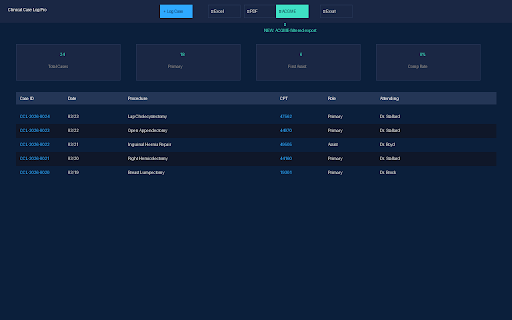
Clinical Case Log → ACGME Export connects your Clinical Case Log Pro account directly to the ACGME Case Log System (ADS). Select cases, click export, and auto-fill the ACGME entry form — in seconds, not minutes.

How it works:

1. Connect your Clinical Case Log Pro account (clinicalcaselog.com)
2. Select cases you want to report to ACGME
3. Click "Export to ACGME" — the extension opens ADS and shows a helper panel
4. Click "Fill Next Case" to auto-populate the ACGME form fields
5. Review and submit. Done.

ACGME-compliant field filtering — exports ONLY valid ACGME fields:
• Date of Procedure
• CPT Code
• Role (SC, SJ, TA, FA)
• Attending Surgeon
• Site/Institution
• Case ID
• Patient Type

Non-ACGME fields (patient age, sex, diagnosis, ICD-10, EBL, OR time, complications, notes) are automatically stripped to prevent data corruption in ADS.

Built for surgical residents, by a practicing surgeon.
Learn more at clinicalcaselog.com
Technical
- Version
- 1.0.0
- Manifest
- V3
- Size
- 22.38KiB
- Min Chrome
- 88
- Languages
- 1
- Featured
- No
Metadata
- ID
- kpadhlfeenhmchinijpabmnjpfbjcolh
- Developer ID
- uc07e88951b2ff41e57f9fba9c0a30dcd
- Developer Email
- [email protected]
- Created
- Apr 1, 2026
- Last Updated (Store)
- Apr 1, 2026
- Last Scraped
- Jun 10, 2026
- Website
- —
- Support URL
- https://clinicalcaselog.com
- Privacy Policy
- https://clinicalcaselog.com/privacy
Data sourced from the Chrome Web Store · last verified Jun 10, 2026.