
Botodachi
Chat with AI about YouTube and Netflix videos using real-time subtitles. Privacy-focused, no tracking.
As of June 2026, Botodachi has — users in the Entertainment category.
Usersno change0%
—
—
Ratingno change0%
—
— reviews
Reviewsno change0%
—
Version
0.1.2
Manifest V3
History
5 snapshotsTracking since Apr 17, 2026.
View as table
| Date | Users | Rating | Reviews | Version |
|---|---|---|---|---|
| Apr 17, 2026 | 4 | — | — | 0.1.2 |
| Apr 27, 2026 | 6 | — | — | 0.1.2 |
| May 7, 2026 | 5 | — | — | 0.1.2 |
| May 23, 2026 | 6 | — | — | 0.1.2 |
| Jun 2, 2026 | 7 | — | — | 0.1.2 |
| Now | — | — | — | 0.1.2 |
Permissions & access
- Permissions
- storage
- Host access
- *://*.youtube.com/*, *://*.netflix.com/*
Screenshots

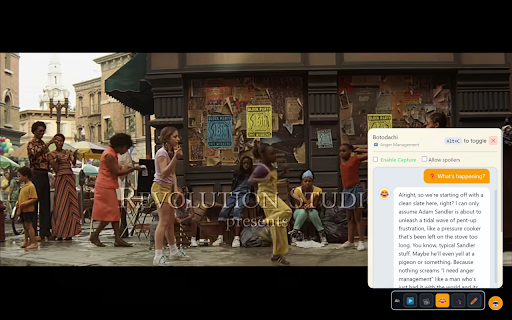


About
Watch with AI personalities who follow the story with you — using your own AI key stored safely in your browser.
Botodachi understands the scene in real time (via subtitles) and provides answers, commentary, trivia, summaries, and even YouTube comment analysis using Gemini, OpenAI, or local Ollama.

WHAT IT DOES
As you watch videos, Botodachi captures subtitles and uses them as context for AI-powered answers. Ask about characters, plot points, trivia, or request summaries—all without pausing your video.

The AI sees what you're watching and responds based on actual dialogue and events, not just general knowledge about the movie or show.
Botodachi keeps a 30-minute rolling buffer of captions for context (shorter for Ollama local AI).

WHY YOU SHOULD INSTALL IT
We all watch videos while doing a million other things—checking emails, scrolling on our phones, cooking dinner. It's easy to miss key moments or lose track of what's happening.

Botodachi solves this:
  • Never watch alone - Want someone to chat with about the movie? Your Botodachi friends are always there to discuss, joke, and keep you company
  • Missed something? - Ask "wait, who is that character?" or "what just happened?" and get instant answers
  • Distracted viewing - Don't rewind. Just ask your AI buddy to catch you up
  • Understand complex content - Foreign films, dense documentaries, or confusing plots become easier to follow
  • Learn more - Get instant trivia, actor names, historical context, and background information
  • Avoid spoilers - Built-in spoiler protection prevents the AI from revealing future plot points
  • Summarize YouTube comments - See what thousands of viewers think in seconds instead of scrolling

Perfect for late-night viewing sessions when you want someone to talk to about what's happening on screen.

HOW TO USE IT
  1. Install the extension and open settings (click extension icon)
  2, Chrome menu → Extensions → Details → Extension Options
  3. Choose a free AI provider - Google Gemini recommended (no credit card needed)
  3. Get a free API key from aistudio.google.com and paste it in settings
  4. Watch any YouTube or Netflix video with subtitles enabled
  5. Press Alt+C to open Botodachi and start asking questions
OLLAMA
   1. Install Ollama: https://ollama.com
   2. Configure CORS (Required for browser extensions):
   3. Pull a model
   4. In extension options:
         - Provider: Ollama (Local)
         - API Base: http://localhost:11434
         - Model: llama3.2` (or whatever you pulled)
         - API Key: (leave empty)
   5. Verify it's running:
         - Open terminal: ollama list (should show your models)
         - Or visit: http://localhost:11434 (should see "Ollama is running")

AI PERSONALITIES
  Switch between different response styles:
  • YouTube - Casual, internet-savvy responses
  • Movie Buff - Enthusiastic film expert analysis
  • Comedy - Sarcastic, humorous takes on what's happening
  • Professor - Educational, informative explanations
  • Custom - Define your own AI personality

PRIVACY & COST
Your API key stays in your browser and is never sent to Botodachi servers. The extension has no tracking, no analytics, and no data collection.

Free options available: Google Gemini offers generous free API limits, or run AI completely offline with Ollama on your own computer.

REQUIREMENTS
  • Chrome or Chromium-based browser
  • Free AI API key (Google Gemini) or local Ollama installation
  • Videos must have subtitles/captions enabled for the extension to work

  Open source on GitHub: https://github.com/jovanDjordje/cine-companion
  Privacy Policy URL: https://jovandjordje.github.io/cine-companion/

  Botodachi - Your AI movie buddy who's always paying attention, even when you're not.
Technical
- Version
- 0.1.2
- Manifest
- V3
- Size
- 46.85KiB
- Min Chrome
- 88
- Languages
- 1
- Featured
- No
Metadata
- ID
- koodbpdmmnffidcaddecbejmfcligadj
- Developer ID
- u36e343c11694d85b9e920956d0e437ef
- Developer Email
- [email protected]
- Created
- Nov 12, 2025
- Last Updated (Store)
- Dec 3, 2025
- Last Scraped
- Jun 2, 2026
- Website
- —
- Privacy Policy
- https://jovandjordje.github.io/cine-companion/
Similar extensions
Alternatives to Botodachi, ranked by description similarity.

YouTube Transcript & AI Summary
Get YouTube transcripts and AI summaries instantly. Supports ChatGPT, Gemini, Claude API, and on-device translation.
73
★ 5.0

SummaryMonkey: YouTube Summary
Easily summarize YouTube video content using AI.
7
★ 5.0

YouTube Labels
Add labels to YouTube videos
23
★ 5.0

Popcorn 🍒
Step into the premier hub for iconic films, genre-defining storytelling, and cinematic AI companions that decode every frame.
9
FlickWhisper Companion
AI commentary sync for streaming platforms with FlickWhisper webapp
13

Music Summary
AI-powered music companion that enhances your YouTube Music experience with intelligent commentary and insights
2

VidScio
Instantly identify movies & TV shows on any webpage. AI-powered, fast results, with watchlist management.
38

ZsIRAF's SUMMARIZER
AI-powered YouTube summarizer. Supports multiple languages, verbatim, and timestamped modes.
14
Data sourced from the Chrome Web Store · last verified Jun 2, 2026.