
Asana Load All Custom Fields
For many users, whenever they open an Asana task page, the Custom Fields default to collapsed. Asana doesn't have a setting for…
As of May 2026, Asana Load All Custom Fields has 42 users in the Workflow & Planning category.
Usersup 16.7 percent+16.7%
42
42
Ratingno change0%
—
— reviews
Reviewsno change0%
—
Version
1.1.0
Manifest V3
History
2 snapshotsTracking since Apr 27, 2026.
View as table
| Date | Users | Rating | Reviews | Version |
|---|---|---|---|---|
| Apr 27, 2026 | 36 | — | — | 1.1.0 |
| May 24, 2026 | 39 | — | — | 1.1.0 |
| Now | 42 | — | — | 1.1.0 |
Permissions & access
- Permissions
- None declared
- Host access
- None declared
Screenshots
About
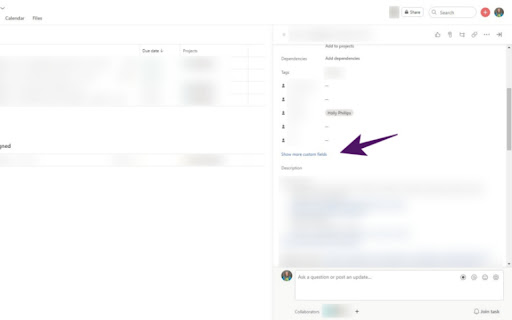
For many users, whenever they open an Asana task page, the Custom Fields default to collapsed. Asana doesn't have a setting for this. When you have this extension installed and turned on, it will make sure that Asana tasks automatically load all the custom fields when the task is opened. No actions needed on your part. Just turn it on and get back into your work day.

This saves users at least a click every time they navigate to a new task, which can result in a lot of saved time and increased productivity by the end of a work day. With this extension, you don't have to waste any time searching for custom fields just to find that the info has been collapsed by Asana automatically. Always see your custom fields when you open a task.
Technical
- Version
- 1.1.0
- Manifest
- V3
- Size
- 3.68KiB
- Min Chrome
- 88
- Languages
- 1
- Featured
- No
Metadata
- ID
- konmagemlkaajjmglgpmhnjejokjoccb
- Developer ID
- uc9ba7ba88b7231a5051a2d783b7c7c62
- Developer Email
- [email protected]
- Created
- Oct 6, 2022
- Last Updated (Store)
- Oct 6, 2022
- Last Scraped
- May 24, 2026
- Website
- —
- Support URL
- —
- Privacy Policy
- https://hooleymcknight.com/privacy-policy/
Similar extensions
Alternatives to Asana Load All Custom Fields, ranked by description similarity.

Asana Redirect Tab Closer
Automatically closes Asana desktop app redirect tabs after a configurable delay
22
★ 5.0

Track That Plan
A comprehensive task management extension that allows you to view, create, and synchronise your Track That Plan tasks.
4
★ 5.0

Asana
Easily create and search for Asana tasks from anywhere in your browser.
100.0K
★ 3.3

Minimal Asana
Chrome Extension to hide premium feature in Asana
19
★ 5.0

Asana Navigator
Enhance navigation for Asana -- less mouse moves and key presses.
344
★ 5.0

Opener for Asana
Searches for and opens an Asana task in the Chrome Omnibox or as an Alfred workflow
9

Basecamp Extension
Speed up Basecamp time entry and graph your time report.
720
★ 3.4
Tracking Time | Time Tracker Button
Enhance your preferred web project manager with the Time Tracker Button and get automatic timesheets.
30.0K
★ 4.4
Data sourced from the Chrome Web Store · last verified May 24, 2026.