
Google Results Collector
Automatically collects Google search results as you browse and exports to CSV
As of June 2026, Google Results Collector has 114 users and a 3.00/5 rating from 1 reviews in the Workflow & Planning category.
Usersup 3.6 percent+3.6%
114
114
Ratingno change0%
3.00
1 reviews
Reviewsno change0%
1
Version
0.1.0
Manifest V3
History
5 snapshotsTracking since Apr 20, 2026.
View as table
| Date | Users | Rating | Reviews | Version |
|---|---|---|---|---|
| Apr 20, 2026 | 110 | — | — | 0.1.0 |
| May 4, 2026 | 108 | — | — | 0.1.0 |
| May 14, 2026 | 118 | — | — | 0.1.0 |
| May 27, 2026 | 119 | — | — | 0.1.0 |
| Jun 8, 2026 | 116 | — | — | 0.1.0 |
| Now | 114 | 3.00 | 1 | 0.1.0 |
Permissions & access
- Permissions
- storageactiveTabdownloads
- Host access
- None declared
Screenshots

About
Google Search Results Collector - Automate Your Research

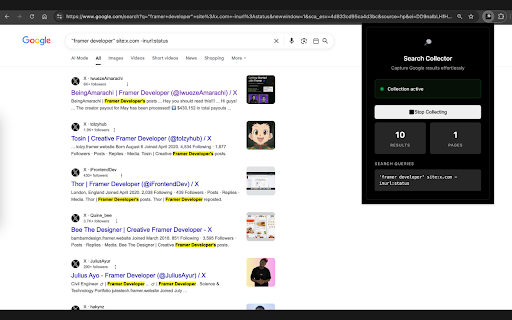
Effortlessly collect and export Google search results to CSV files. Perfect for researchers, marketers, competitive analysts, and anyone who needs to gather search data systematically.

🔍 Key Features:
• One-Click Collection - Simply start collecting and browse Google normally
• Automatic Export - CSV downloads automatically when you stop collecting
• Smart Deduplication - No duplicate results, even across multiple pages
• Multi-Query Support - Collect results from different search terms in one session
• Real-Time Stats - See results count and pages visited as you browse
• Clean Interface - Modern dark theme with intuitive controls

📊 What Gets Exported:
✓ Search result titles and descriptions
✓ URLs and page numbers
✓ Timestamps and search queries
✓ Collection metadata and statistics

💡 Perfect For:
- Market research and competitor analysis
- Academic research and data collection
- SEO analysis and keyword research
- Lead generation and prospecting
- Content research and curation

🚀 How It Works:
1. Click the extension icon and press "Start Collecting"
2. Search and browse Google results normally across multiple pages
3. Click "Stop Collecting" - your CSV downloads automatically!

Privacy First: All data is stored locally in your browser. Nothing is sent to external servers.

Transform hours of manual copying into seconds of automated collection. Start gathering search data smarter, not harder.
Technical
- Version
- 0.1.0
- Manifest
- V3
- Size
- 121KiB
- Min Chrome
- 88
- Languages
- 1
- Featured
- No
Metadata
- ID
- koijeigcalnbemnhkaeggcanclcpcdfg
- Developer ID
- u8b2e9da72615b201a4ba360659436be8
- Developer Email
- [email protected]
- Created
- Jul 6, 2025
- Last Updated (Store)
- Jul 6, 2025
- Last Scraped
- Jun 8, 2026
- Website
- —
- Support URL
- —
- Privacy Policy
- —
Similar extensions
Alternatives to Google Results Collector, ranked by description similarity.

Click and Scrape
A simple tool to click and scrape data from web pages to JSON or CSV in seconds, no coding required
45

Google Keyword Extractor
Instantly extract and copy search suggestions from Google Search results.
20

Google Sniper Pro - Bulk Search Tool free
Professional Bulk Search Tool for Google with Advanced Operators (Dorks) & File Filters free.
232
★ 4.9

SERP Expander
Expand Google search results and highlight links by type (internal, external, dofollow, nofollow).
169
★ 3.0

Data Scraper - AI Data Miner
With Data Scraper, you can extract website content in a few clicks. This web scraping tool delivers structured data without coding.
5.0K
★ 5.0

OneClick Data Extractor – Scrape Tables, Emails & Lists
Extract data from any website. Scrape tables, emails, lists, images. Auto-pagination, CSV/JSON export.
8
★ 5.0

Scribed Scraper — Extract Any Website with AI
Extract leads, products, jobs, and more from any website. Just describe what you need — AI does the rest.
43
★ 5.0

Email Extractor Pro
Beautiful, privacy-friendly email extractor for any site. Scan pages, preview results, and copy emails with one click.
25
Data sourced from the Chrome Web Store · last verified Jun 8, 2026.