
LT Debug
Best tool you can ask to debug and ship web based products faster!
As of June 2026, LT Debug has 4,000 users and a 3.40/5 rating from 10 reviews in the Developer Tools category.
Usersno change0%
4.0K
4,000
Ratingno change0%
3.40
10 reviews
Reviewsno change0%
10
Version
2.0.4
Manifest V3
History
1 snapshotsTracking since Apr 16, 2026.
View as table
| Date | Users | Rating | Reviews | Version |
|---|---|---|---|---|
| Apr 16, 2026 | 4.0K | 3.40 | 10 | 2.0.4 |
| Now | 4.0K | 3.40 | 10 | 2.0.4 |
Changelog
- May 13, 2026description
The best Chrome extension to debug web issues and accelerate your development 🔥🚀

LT Debug is a collection of free online web design, development, and debugging utilities enhanced with LambdaTest’s digital experience testing cloud to make your development efforts easier and faster.

⏺Replay on LambdaTest Cloud: Record user flow with Chrome Recorder panel (DevTools > More tools > Recorder), and replay or retest it as an automated test on 3000+ browser-os-resolution combinations on LambdaTest Cloud.

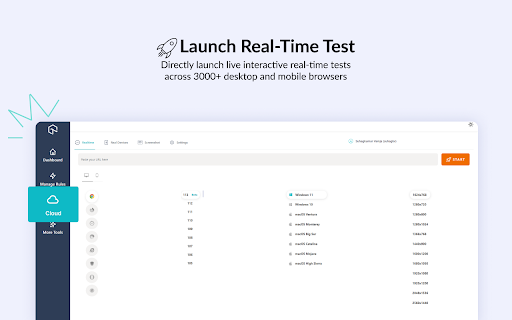
🚀Real Time Test: Directly launch live interactive real-time tests of your web apps or mobile pages, and test across 3000+ desktop and mobile browsers running on real devices.

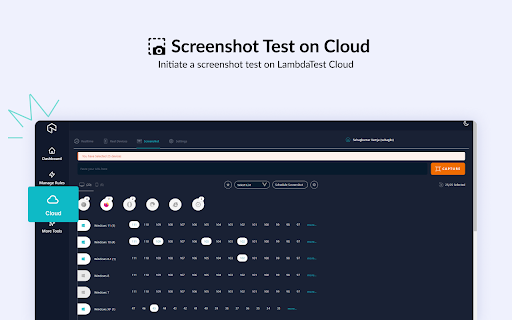
🖼Screenshot Test:  Initiate a screenshot test on LambdaTest Cloud. Take screenshots on up to 25 desktop or mobile browsers, resolution, and your preferred real or virtual devices.

Access free useful utilities like Add/Remove/Modify HTTP(s) Header Requests, Block URL requests, Add/Remove Query Param, Throttle the Page Response, Inject Scripts, Change User Agent, Redirect URLs, and many more..!!

🔥 Best free tool you can ask to debug and ship web-based products faster! 🔥

📄 Modify Header - Add, modify, or remove an HTTP request header on a desired website or URL. It helps you test a particular header for a request on a website.

🚦 Block Requests - Blocks HTTP Requests based on your specified URL specific conditions.

📶 Throttler - Throttle network speed for all network requests. Choose any URL to slow down, leaving others at normal speed. Control delay (in milliseconds) for desired URL.

⚙️ Add/Remove Query Param - Change, and manipulate URL query parameters. It reads and organizes the key, and value pairs on the current web page.

🔀 Redirect Requests - Specify a page that should be automatically redirected to another page. E.g. you want http://lambdatest.com/111 to redirect to http://lambdatest.com/222.

🕵 Change user Agent - Switch between user-agent strings quickly. Imitate, spoof or simulate other browsers, devices or search engine spiders.

💉 Insert script css/js - Simulate any web page's experience by injecting your own JavaScript or CSS script in console.

🟢 Allow CORS - Add (Access-Control-Allow-Origin: *) rule to the response header and easily perform cross-domain Ajax requests in web applications.

🛡️ Content Security Policy - Generate Content Security Policy headers on any website/web page of your choice

🎇Bonus🎇: Access 160+ free tools with a click of a button to help you with Tidying up code, Data Formatting, Random Data Generation, Hash Calculations, and Utilities
The best Chrome extension to debug web issues and accelerate your development 🔥🚀

LT Debug is a collection of free online web design, development, and debugging utilities enhanced with LambdaTest’s digital experience testing cloud to make your development efforts easier and faster.

⏺Replay on TestMu AI Cloud: Record user flow with Chrome Recorder panel (DevTools > More tools > Recorder), and replay or retest it as an automated test on 3000+ browser-os-resolution combinations on TestMu AI Cloud.

🚀Real Time Test: Directly launch live interactive real-time tests of your web apps or mobile pages, and test across 3000+ desktop and mobile browsers running on real devices.

🖼Screenshot Test:  Initiate a screenshot test on TestMu AI Cloud. Take screenshots on up to 25 desktop or mobile browsers, resolution, and your preferred real or virtual devices.

Access free useful utilities like Add/Remove/Modify HTTP(s) Header Requests, Block URL requests, Add/Remove Query Param, Throttle the Page Response, Inject Scripts, Change User Agent, Redirect URLs, and many more..!!

🔥 Best free tool you can ask to debug and ship web-based products faster! 🔥

📄 Modify Header - Add, modify, or remove an HTTP request header on a desired website or URL. It helps you test a particular header for a request on a website.

🚦 Block Requests - Blocks HTTP Requests based on your specified URL specific conditions.

📶 Throttler - Throttle network speed for all network requests. Choose any URL to slow down, leaving others at normal speed. Control delay (in milliseconds) for desired URL.

⚙️ Add/Remove Query Param - Change, and manipulate URL query parameters. It reads and organizes the key, and value pairs on the current web page.

🔀 Redirect Requests - Specify a page that should be automatically redirected to another page. E.g. you want http://lambdatest.com/111 to redirect to http://lambdatest.com/222.

🕵 Change user Agent - Switch between user-agent strings quickly. Imitate, spoof or simulate other browsers, devices or search engine spiders.

💉 Insert script css/js - Simulate any web page's experience by injecting your own JavaScript or CSS script in console.

🟢 Allow CORS - Add (Access-Control-Allow-Origin: *) rule to the response header and easily perform cross-domain Ajax requests in web applications.

🛡️ Content Security Policy - Generate Content Security Policy headers on any website/web page of your choice

🎇Bonus🎇: Access 160+ free tools with a click of a button to help you with Tidying up code, Data Formatting, Random Data Generation, Hash Calculations, and Utilities
Permissions & access
- Permissions
- storagedeclarativeNetRequestdeclarativeNetRequestFeedbackdeclarativeNetRequestWithHostAccessdebuggerscripting
- Host access
- <all_urls>
Screenshots


About
The best Chrome extension to debug web issues and accelerate your development 🔥🚀

LT Debug is a collection of free online web design, development, and debugging utilities enhanced with LambdaTest’s digital experience testing cloud to make your development efforts easier and faster.

⏺Replay on TestMu AI Cloud: Record user flow with Chrome Recorder panel (DevTools > More tools > Recorder), and replay or retest it as an automated test on 3000+ browser-os-resolution combinations on TestMu AI Cloud.

🚀Real Time Test: Directly launch live interactive real-time tests of your web apps or mobile pages, and test across 3000+ desktop and mobile browsers running on real devices.

🖼Screenshot Test:  Initiate a screenshot test on TestMu AI Cloud. Take screenshots on up to 25 desktop or mobile browsers, resolution, and your preferred real or virtual devices.

Access free useful utilities like Add/Remove/Modify HTTP(s) Header Requests, Block URL requests, Add/Remove Query Param, Throttle the Page Response, Inject Scripts, Change User Agent, Redirect URLs, and many more..!!

🔥 Best free tool you can ask to debug and ship web-based products faster! 🔥

📄 Modify Header - Add, modify, or remove an HTTP request header on a desired website or URL. It helps you test a particular header for a request on a website.

🚦 Block Requests - Blocks HTTP Requests based on your specified URL specific conditions.

📶 Throttler - Throttle network speed for all network requests. Choose any URL to slow down, leaving others at normal speed. Control delay (in milliseconds) for desired URL.

⚙️ Add/Remove Query Param - Change, and manipulate URL query parameters. It reads and organizes the key, and value pairs on the current web page.

🔀 Redirect Requests - Specify a page that should be automatically redirected to another page. E.g. you want http://lambdatest.com/111 to redirect to http://lambdatest.com/222.

🕵 Change user Agent - Switch between user-agent strings quickly. Imitate, spoof or simulate other browsers, devices or search engine spiders.

💉 Insert script css/js - Simulate any web page's experience by injecting your own JavaScript or CSS script in console.

🟢 Allow CORS - Add (Access-Control-Allow-Origin: *) rule to the response header and easily perform cross-domain Ajax requests in web applications.

🛡️ Content Security Policy - Generate Content Security Policy headers on any website/web page of your choice

🎇Bonus🎇: Access 160+ free tools with a click of a button to help you with Tidying up code, Data Formatting, Random Data Generation, Hash Calculations, and Utilities
Technical
- Version
- 2.0.4
- Manifest
- V3
- Size
- 1.87MiB
- Min Chrome
- 88
- Languages
- 1
- Featured
- Yes
Metadata
- ID
- kofahhnmgobkidipanhejacffiigppcd
- Developer ID
- u3edeee1c5fbe05e5c2844fa054667251
- Developer Email
- [email protected]
- Created
- Jun 22, 2022
- Last Updated (Store)
- May 12, 2026
- Last Scraped
- Jun 17, 2026
- Website
- testmuai.com
- Support URL
- https://www.testmuai.com/contact-us
- Privacy Policy
- https://www.testmuai.com/legal/privacy
Similar extensions
Alternatives to LT Debug, ranked by description similarity.

TestMu AI (formerly LambdaTest)
Perform Live Interactive and Automated Cross Browser Testing on 2000+ Real Browsers and Operating Systems
6.0K
★ 4.3

Dev Tools - Web Dev Tools Suite
Essential web dev tools: code formatter, minifier, base64 encoder, regex, color picker, JSON syntax validator, QR generator & more.
161
★ 5.0

InspectX - Advanced Web Development Assistant
Streamline your development workflow with powerful inspection, testing, and debugging tools built for modern web development.
10

Tuello
Intercept and modify HTTP Requests, Track ressources, search elements and record and replay user's browser actions
10
★ 5.0

DevTools
40+ developer tools: JSON formatter, Base64/URL encoder, hash generator, JWT debugger, regex tester, and more
78
★ 1.0

Kameleoon Debug Assistant
Instantly see live experiments, feature flags, and personalization campaigns on your site and verify everything is firing correctly.
2.0K
★ 5.0

DevTools Suite
A collection of useful tools for developers and designers.
1.0K
★ 5.0

Designer's Little Helper
Developer & designer toolkit: Grid, CSS Inspector, Color Picker, Contrast Checker, Responsive Testing & more.
20
Data sourced from the Chrome Web Store · last verified Jun 17, 2026.