
Quick Copy - most powerful clipboard manager
A superpowered clipboard inside your browser.
As of May 2026, Quick Copy - most powerful clipboard manager has 9,000 users and a 3.96/5 rating from 47 reviews in the Productivity category.
Usersno change0%
9.0K
9,000
Ratingdown 1.5 percent−1.5%
3.96
47 reviews
Reviewsup 2.2 percent+2.2%
47
Version
2.4.2
Manifest V3
History
2 snapshotsTracking since Apr 26, 2026.
View as table
| Date | Users | Rating | Reviews | Version |
|---|---|---|---|---|
| Apr 26, 2026 | 9.0K | 4.02 | 46 | 2.4.2 |
| May 24, 2026 | 9.0K | 3.98 | 48 | 2.4.2 |
| Now | 9.0K | 3.96 | 47 | 2.4.2 |
Permissions & access
- Permissions
- storageclipboardRead
- Host access
- None declared
Screenshots
About
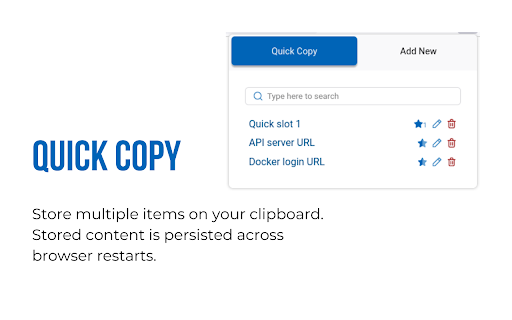
Quick copy allows you to save multiple items on your clipboard and access them using shortcuts. You can label, search, edit, delete previously saved clipboard contents.

Management
Use the popup UI for managing clipboard contents. The popup allows easy editing of existing clipboard items. Click on any of the items to copy it to clipboard.

Quick Slots
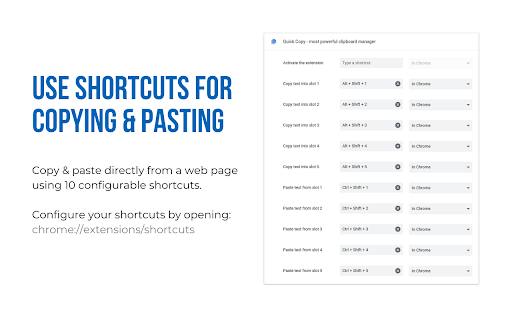
Access items by using the popup or paste directly into webpages on most websites. Inside a web page, just select the text you want to copy and use the shortcuts. Configure up to 10 shortcuts for copying and pasting with quick slots.

Recommended shortcuts are:
Alt+Shift+1 ... Alt+Shift+5 for copying into the 5 quick slots
Ctrl+Shift+1 ... Ctrl+Shift+5 for pasting from the 5 quick slots

Note: Shortcuts need to be enabled from the extensions page before they can be used.
Technical
- Version
- 2.4.2
- Manifest
- V3
- Size
- 209KiB
- Min Chrome
- 88
- Languages
- 1
- Featured
- Yes
Metadata
- ID
- koedeplaimlocjhkpcjnfpfpmmaheacf
- Developer ID
- u2292a65d92a5358676bcbee5ef995bca
- Developer Email
- [email protected]
- Created
- Aug 4, 2020
- Last Updated (Store)
- Jan 24, 2025
- Last Scraped
- May 24, 2026
- Website
- —
- Support URL
- https://github.com/ramitmittal/quick-copy
- Privacy Policy
- —
Similar extensions
Alternatives to Quick Copy - most powerful clipboard manager, ranked by description similarity.

Clipboard History & Quick-Paste
Keep track of your clipboard history and quickly paste previous entries.
—

Quick Paste Pro
Quickly paste text from Side Panel and context menu
4

Smart Clipboard
Ultimate productivity tool: Auto-copy selections, quick-paste (Alt+Click), and access clipboard history seamlessly on any site.
10
★ 5.0

Multi-Clipboard Manager
Manage multiple clipboard items easily. Save, edit, delete, and quickly copy past clips directly from your browser.
—

Smart Clipboard Manager
Save, paste, and manage multiple clipboard items easily.
2

ShortcutPaste
Quick paste favorite clipboard item
7

Multi Clipboard
Multi copy-paste extension with 5 slots
—

Easy QuickCopy - Form Filler & Saver
Perfect for filling forms, addresses, emails, and more.
2
Data sourced from the Chrome Web Store · last verified May 24, 2026.