
Component to Code
Select any button, card, or form on a webpage and instantly generate HTML, React, Vue, and Tailwind code.
As of July 2026, Component to Code has — users in the Developer Tools category.
Usersno change0%
—
—
Ratingno change0%
—
— reviews
Reviewsno change0%
—
Version
0.1.0
Manifest V3
History
1 snapshotsTracking since Jul 20, 2026.
Not enough history yet for this metric — the chart fills in as we collect more snapshots.
View as table
| Date | Users | Rating | Reviews | Version |
|---|---|---|---|---|
| Jul 20, 2026 | — | — | — | 0.1.0 |
| Now | — | — | — | 0.1.0 |
Permissions & access
- Permissions
- activeTabscriptingstoragesidePanel
- Host access
- None declared
Screenshots


About
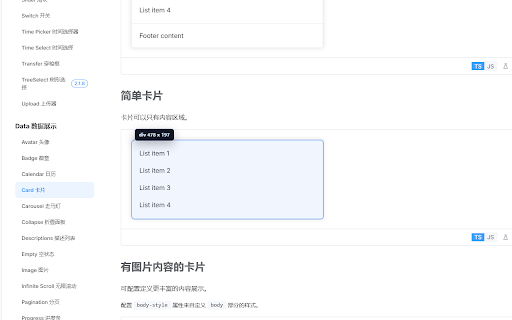
Component to Code lets you hover over any element on a webpage and instantly generate clean, reusable code.

**How it works:**
1. Click the extension icon and select "Start Picking"
2. Hover over any UI element — see a highlighted border with dimensions
3. Click to capture — get HTML + Tailwind, React, or Vue code in the side panel
4. Copy and paste into your project

**Features:**
-  Instant element selection with hover preview
-  Smart Tailwind class mapping (colors, spacing, typography)
-  One-click output: HTML + Tailwind / React / Vue
-  Shadow DOM isolated overlay — no style conflicts
-  All processing happens locally — no data leaves your browser

**Privacy:**
This extension reads DOM and computed styles only from the current active tab when you explicitly start picking. No data is collected, transmitted, or stored remotely.

**Permissions:**
- `activeTab`: To access the current page only when you start picking
- `scripting`: To inject the picker overlay on demand
- `storage`: To save your code style preferences
- `sidePanel`: To display the generated code
Technical
- Version
- 0.1.0
- Manifest
- V3
- Size
- 1.81MiB
- Min Chrome
- 114
- Languages
- 1
- Featured
- No
Metadata
- ID
- kocifinodachbcegbnlnbplhnofglinc
- Developer ID
- uac71e4765bd2633cf7eb6d108a58ece7
- Developer Email
- [email protected]
- Created
- Jul 19, 2026
- Last Updated (Store)
- Jul 19, 2026
- Last Scraped
- Jul 20, 2026
- Website
- —
- Support URL
- —
Data sourced from the Chrome Web Store · last verified Jul 20, 2026.