
Gemini Canvas Finder
Finds, lists, and opens canvas elements in a Gemini chat.
As of June 2026, Gemini Canvas Finder has 26 users and a 1.00/5 rating from 1 reviews in the Workflow & Planning category.
Usersno change0%
26
26
Ratingno change0%
1.00
1 reviews
Reviewsno change0%
1
Version
1.0
Manifest V3
History
5 snapshotsTracking since Apr 17, 2026.
View as table
| Date | Users | Rating | Reviews | Version |
|---|---|---|---|---|
| Apr 17, 2026 | 26 | 1.00 | 1 | 1.0 |
| May 2, 2026 | 25 | 1.00 | 1 | 1.0 |
| May 11, 2026 | 31 | 1.00 | 1 | 1.0 |
| May 24, 2026 | 25 | 1.00 | 1 | 1.0 |
| Jun 5, 2026 | 24 | 1.00 | 1 | 1.0 |
| Now | 26 | 1.00 | 1 | 1.0 |
Permissions & access
- Permissions
- None declared
- Host access
- None declared
Screenshots


About
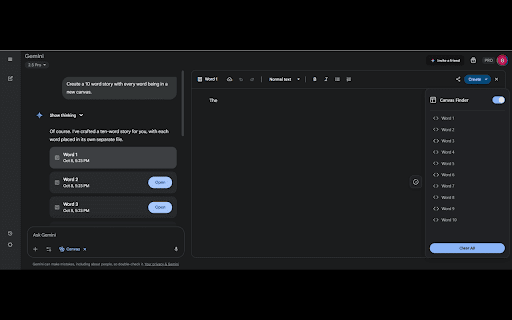
Tired of endlessly scrolling through your Google Gemini chats, searching for that specific canvas you created? Gemini Canvas Finder solves this common frustration by providing a sleek, intuitive sidebar that lists every canvas as you scroll through your conversation. Never lose track of your documents or code again!

Key Features:

One-Click Access: Instantly open any canvas in your Gemini chat with a single click.

Dynamic Canvas Detection: Detects and lists canvas elements in real-time as you scroll through the chat.

Clean Sidebar Interface: A non-intrusive, easy-to-read sidebar that keeps your canvases organized.

Light & Dark Mode Support: Seamlessly integrates with your Gemini theme, ensuring a consistent user experience.

Boost Productivity: Save time and enhance your workflow by quickly finding and referencing your documents or code.

How to Use:

Install the Gemini Canvas Finder extension from the Chrome Web Store.

Open any Google Gemini chat.

Click the Gemini Canvas Finder icon in your browser toolbar to open the sidebar.

As you scroll through your chat, new canvases will automatically appear in the sidebar list.

Simply click on a canvas title in the sidebar to instantly open that canvas.

Streamline your Gemini experience and keep your workflow uninterrupted. Install Gemini Canvas Finder today and make canvas navigation a breeze!
Technical
- Version
- 1.0
- Manifest
- V3
- Size
- 11.2KiB
- Min Chrome
- 88
- Languages
- 1
- Featured
- No
Metadata
- ID
- kobnokfiofjfemmhkinngbakcmcjgane
- Developer ID
- u71430a0f9a1d3a3f5bde46693503b0a7
- Developer Email
- [email protected]
- Created
- Oct 10, 2025
- Last Updated (Store)
- Oct 10, 2025
- Last Scraped
- Jun 5, 2026
- Website
- —
- Support URL
- https://ko-fi.com/workflowarchitect
- Privacy Policy
- —
Similar extensions
Alternatives to Gemini Canvas Finder, ranked by description similarity.

Gemini Chat Organizer
Organize your Gemini chats into folders with a beautiful, premium UI. Features include folders, search, import/export, and more.
—

UI Enhancer for Gemini
Enhances Gemini interface with useful tools: Wide Mode, Snippets, Multi-Quote & Message Sidebar.
376
★ 4.8
Enhance Gemini
Enhance Chrome's integration with Gemini. Quick Search, Context Menus, And more!
10.0K
★ 4.1

GemList: The Ultimate Sidebar for Gemini
Supercharge Gemini with a sidebar! Sync Gems, pin chats, edit titles, and export Markdown. Lightweight & privacy-first.
220
★ 5.0

Gemini Folders, Bookmarks & Search - Gemfolders: Chat Organizer
A chrome extension to organize your Gemini chats
186
★ 5.0

Gemini Organizer
Drag and drop folders, save favorite answers as PDF, build a custom prompt library, and use a scratchpad.
755
★ 5.0

Gemini Chat Organizer
Organize Gemini chats with folders, sub-folders, drag-and-drop, search, color-coding, prompt library, and backup/restore.
1.0K
★ 4.3

AI Floating Messenger
Chat with Gemini and ChatGPT anywhere without switching tabs.
6
Data sourced from the Chrome Web Store · last verified Jun 5, 2026.