
Salesforce Share
A browser extension that will allow sharing session-based Salesforce URLs for direct login.
As of May 2026, Salesforce Share has 456 users and a 3.00/5 rating from 2 reviews in the Productivity category.
Usersup 6.8 percent+6.8%
456
456
Ratingno change0%
3.00
2 reviews
Reviewsno change0%
2
Version
0.0.0.2
Manifest V3
History
2 snapshotsTracking since Apr 26, 2026.
View as table
| Date | Users | Rating | Reviews | Version |
|---|---|---|---|---|
| Apr 26, 2026 | 427 | 3.00 | 2 | 0.0.0.2 |
| May 24, 2026 | 429 | 3.00 | 2 | 0.0.0.2 |
| Now | 456 | 3.00 | 2 | 0.0.0.2 |
Permissions & access
- Permissions
- tabscookies
- Host access
- https://*.salesforce.com/, https://*.force.com/, https://*.site.com/
Screenshots


About
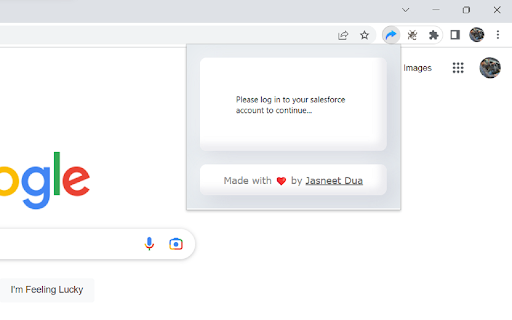
The Salesforce Share (chrome extension) is a tool designed to enhance the functionality of your org, a cloud-based customer relationship management platform. It works with both Lightning and Classic Experience and allows users to share session-based URLs, which provide a direct login to specific org records or pages. This helps streamline the process of accessing important information, eliminating the need to manually log in and navigate to the desired record or page.

This extension integrates seamlessly with the your org, providing an intuitive and user-friendly interface. With just a few clicks, users can generate and share a session-based URL, making it easier for others to access important information quickly and efficiently. The extension is designed to ensure the security of sensitive information, with robust security protocols and data encryption technology in place to protect user data.

This extension is an invaluable tool for users, providing a more efficient and streamlined way to share information and collaborate with others. Whether it's sharing information with colleagues, partners, or customers, the extension makes it easy to share session-based URLs, providing a direct and secure route to the desired information. Whether working remotely or in a traditional office setting, this extension is an essential tool for anyone using the Salesforce platform.

Whether collaborating with colleagues, partners, or customers, this extension remains indispensable. Share session-based URLs securely and efficiently, facilitating direct access to critical information. Whether working remotely or within a traditional office setup, this extension remains a must-have for anyone leveraging the Salesforce platform.

Additionally, we're excited to announce extended support for digital experience sites. Now, sharing session-based URLs isn't limited to internal records or pages; you can seamlessly share access to your digital experience site, promoting collaboration beyond organizational boundaries.

Now, not only can you effortlessly share session-based URLs for direct logins to specific org records or pages, but you can also capitalize on two new features.

The first addition is the ability to access your org directly from the extension's popup. No more navigation hassle; jump straight into your org with a simple click, saving precious time and effort.

Moreover, leveraging the power of REST APIs is easier than ever. You can now copy the access token directly from the extension, simplifying its usage in REST API explorers. This streamlines your workflow, allowing quick access to APIs for smoother interactions.
Technical
- Version
- 0.0.0.2
- Manifest
- V3
- Size
- 100KiB
- Min Chrome
- 88
- Languages
- 1
- Featured
- Yes
Metadata
- ID
- koaaaaidkhaabciffhnpfoadehbenagj
- Developer ID
- ubac80262c4405c3274eefb4b26916f0a
- Developer Email
- [email protected]
- Created
- Feb 4, 2023
- Last Updated (Store)
- Nov 20, 2023
- Last Scraped
- May 24, 2026
- Website
- —
- Privacy Policy
- —
Similar extensions
Alternatives to Salesforce Share, ranked by description similarity.

Sharing Button for Salesforce
Adds a 'Sharing' button next to the global actions on Salesforce pages that opens Classic Sharing Detail for the current record.
57

Salesforce Record Redirector
Quickly navigate to Salesforce records by pasting their IDs
16
★ 5.0

Salesforce Utils
Log in anonymously and inspect/edit Salesforce record data directly in your browser. The ultimate developer & admin toolkit.
36
★ 5.0

Salesforce Shortcuts
A Salesforce shortcut extension for admins
14
★ 5.0

Salesforce OrgPilot
Salesforce OrgPilot: An Extension for environment watermarks and fast navigation in Salesforce orgs.
—

Salesforce Tab Organizer
Effortlessly manage multiple Salesforce instances with Salesforce Tab Organizer.
717
★ 5.0

Salesforce History Lens
See who changed what and when on any Salesforce record, in one click.
—

Quick Share via Marketing Spark
Share any webpage via Gmail with one click.
4
★ 5.0
Data sourced from the Chrome Web Store · last verified May 24, 2026.