
Video Downloader professional
Download online videos in various formats from any websites. Video Downloader save video and watch it later.
As of May 2026, Video Downloader professional has 100,000 users and a 3.65/5 rating from 402 reviews in the Functionality & UI category.
Usersno change0%
100.0K
100,000
Ratingno change0%
3.65
402 reviews
Reviewsdown 0.2 percent−0.2%
402
Version
1.0.7
Manifest V3
History
1 snapshotsTracking since Apr 26, 2026.
View as table
| Date | Users | Rating | Reviews | Version |
|---|---|---|---|---|
| Apr 26, 2026 | 100.0K | 3.65 | 403 | 1.0.7 |
| Now | 100.0K | 3.65 | 402 | 1.0.7 |
Permissions & access
- Permissions
- tabsdownloadsstoragewebRequest
- Host access
- <all_urls>
Screenshots



About
Video Downloader professional for fast downloading online videos from any webpages. The popular Chrome extension supports many video formats.

Watch favorite moments with friends or show useful guides to business partners even if you aren't online. Save interested video files to review them later on your PC.

You can try Video Downloader professional and notice the difference! Use extension for free without any registration. Save in different available formats and qualities according to your needs.

How video downloader works?
- After installing the extension, go to a website that contains video resources.
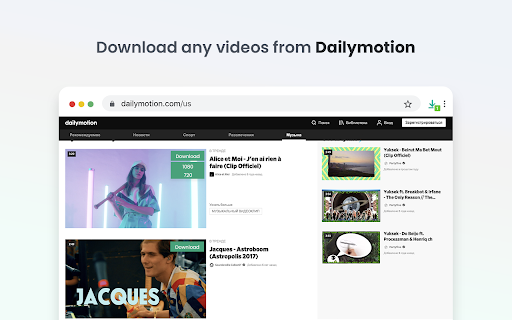
- All available video files that are on the page will be detected by the extension. Once found, an number mark is shown on the extension icon indicating that media file is available for download.
- A green Download button will appear on the video itself, along with all the available video file sizes.
- You just have to choose the size of the video you want to download.
- Nothing complicated!

You do not need to register an account to use this video saver. You can download any video or audio without register.

Download using popup icon:
Available for downloading video files are shown after clicking popup icon of the extension. Number shown on popup icon of the extension corresponds to q-ty of video available for downloading on page.

Note:
Video Downloader is not a Youtube Downloader. Due to restrictions of the Google Web Store Policies and Developer Program Policies we can not download Youtube Videos. Thank you for understanding.

We really hope that our extension will be useful to you! We look forward to your feedback and ratings! Also write your suggestions for improving the functionality.
Technical
- Version
- 1.0.7
- Manifest
- V3
- Size
- 128KiB
- Min Chrome
- 88
- Languages
- 20
- Featured
- Yes
Metadata
- ID
- knkpjhkhlfebmefnommmehegjgglnkdm
- Developer ID
- u8661aa07caaaef25a0dd606195424fe5
- Developer Email
- [email protected]
- Created
- Nov 1, 2021
- Last Updated (Store)
- Jan 24, 2025
- Last Scraped
- May 24, 2026
- Website
- —
- Support URL
- —
Similar extensions
Alternatives to Video Downloader professional, ranked by description similarity.

Image Downloader - Save photos and pictures
Find, choose and download images you need from any web pages or select all to bulk image download.
707
★ 5.0

Instagram Downloader - Download Reels, Story & Highlights
Download Instagram videos, reels, stories, and highlights directly to your device in high quality with just one click.
1.0K
★ 3.3

Video Speed Controller – Speed Up & Slow Down Videos
Control video playback speed on any website. Speed up or slow down videos on YouTube, Netflix, online courses, and more.
673
★ 5.0

Meet Saver
Download Google Meet recordings from Google Drive
4

Advanced Download Manager ADM
Integrates Advanced Download Manager ADM with Chrome for seamless downloading. Internet Download Manager IDM Alternative
4.0K
★ 3.6

Social & Thumbnail Preview
Preview thumbnail and title of Tiktok and Youtube videos aswell as Tiktok and Instagram profiles by hovering over the link.
187
★ 5.0

Video Speedy
Control video playback speed with keyboard shortcuts across all websites.
8

Control Video Speed
Video Speed Control Extension
While watching videos on the web, sometimes you may want to speed up or slow down everything.…
53
Data sourced from the Chrome Web Store · last verified May 24, 2026.