
Overload Search - Advanced Google Search
Overload Search! Fast advanced Google Search
As of June 2026, Overload Search - Advanced Google Search has 5,000 users and a 4.47/5 rating from 15 reviews in the Productivity category.
Usersno change0%
5.0K
5,000
Ratingno change0%
4.47
15 reviews
Reviewsno change0%
15
Version
2.1.0
Manifest V3
History
3 snapshotsTracking since Apr 16, 2026.
View as table
| Date | Users | Rating | Reviews | Version |
|---|---|---|---|---|
| Apr 16, 2026 | 5.0K | 4.47 | 15 | 2.1.0 |
| Jun 1, 2026 | 5.0K | 4.47 | 15 | 2.1.0 |
| Jun 9, 2026 | 4.0K | 4.47 | 15 | 2.1.0 |
| Now | 5.0K | 4.47 | 15 | 2.1.0 |
Permissions & access
- Permissions
- activeTab
- Host access
- None declared
Screenshots


About
🔍 Fast Advanced Google Search. Find the results you need fast

Find what you're looking for on Google quickly by filtering search results with advanced Google search operators.

Quickly access and query using the many advanced google search operators with this Google search tool. No need for cheat sheets!

⭐ Site search - Search by the current site or domain

⭐ Query by file type

⭐ Query by Date range

⭐ Query by country & language

⭐ Exclude/filter out keywords

⭐ Shortcut Alt + G to open the search tool

⭐ Perform complex Google search query quickly

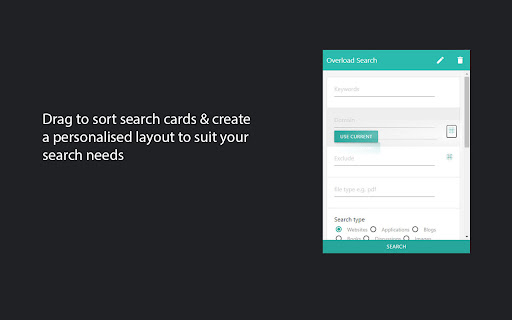
⭐ Drag to Order search parameters to best suit your use case

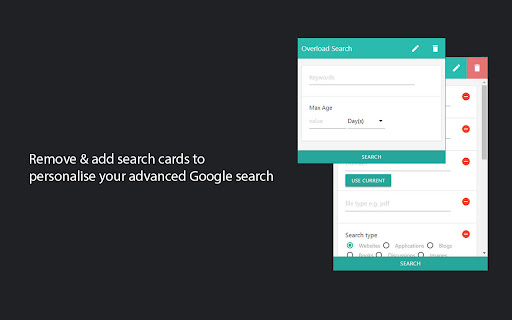
⭐ Enable & Disable cards to show only the relevant search parameters

⭐ Open a new tab or use the current tab option

⭐ OSINT open source intelligence investigations tool

⭐ Custom search experience

⭐ Remove query parameters you don't need quickly by pressing the bin icon and removing multiple search cards, so you can focus on the filters that matter most to you.

Supported query operators/parameters
 ▸ Exclude - multiple exclude using space separator
 ▸ Site search - search current site or search domain - includes use current domain button that will populate the field for you
 ▸ File type - filter by any file type e.g. pdf, docx, txt, xls, ppt etc
 ▸ Search type - websites, images, video etc
 ▸ Keywords within - Any, Page title, Body and Url
 ▸ Date Range - Before/After
 ▸ Date Range quick (Max Age of result)
 ▸ View google's cache of a website
 ▸ Turn off Google personalised search results
 ▸ Sites that contain link specified
 ▸ Related site search
 ▸ Turn off safe search
 ▸ Country support - see search results based on country
 ▸ Search by Language

Customize your Advanced Google search experience and gain higher quality search results.
Perform SEO research techniques quickly using this Google advanced search tool with the available operators/query parameters.

 ⭐ Find when google last indexed a website with the cache parameter

 ⭐ Discover hidden opportunities for internal linking by searching for phrases in your domain or website.

 ⭐ Conduct competitor SEO research, just use the "related sites" search operator followed by a website URL.

Permissions: The tabs permission is necessary for the populate domain and page buttons.

Get in touch! Have an idea or feature request? Contact us, feedback is always welcome!
Twitter: @PartialOverload

🚀 Release Notes
2.0.8
▸performance improvements
2.0.7
▸align radio/ok buttons
1.9.4
▸update style framework
1.9.1
▸Shortcut fix
1.9.0
▸Chrome v3 manifest support
1.8.0
▸ Search the current website quickly with the autofill domain option
1.6.0
 ▸ Clear query on close option added
 ▸ The search form will now open with the previous values by default. This can be disabled with the clear on close option
1.5.3
 ▸ Search by Language. Autocomplete with filter enabled
 ▸ Start typing in the new language input to quickly select a language from a list of supported languages in Google search
1.4.1
 ▸ Reduced permissions, previously the tabs permission was needed for domain/url retrieval
1.0
 ▸ Country support - filter search results based on country!
 ▸ keep search tool open & use current tab for query option
 ▸ Tweak your search parameters after submitting!
0.4
 ▸ Turn off safe search
 ▸ Related site search
 ▸ Sites that contain link specified
0.3:
 ▸ Turn off Google personalised search results
Technical
- Version
- 2.1.0
- Manifest
- V3
- Size
- 104KiB
- Min Chrome
- 88
- Languages
- 3
- Featured
- Yes
Metadata
- ID
- knihkdaajdhpjgeiadaefmjmpbnlojbg
- Developer ID
- u56c3331ba81fefc432822a8d6d3030e2
- Developer Email
- [email protected]
- Created
- Jul 2, 2020
- Last Updated (Store)
- Jan 16, 2026
- Last Scraped
- Jun 9, 2026
- Website
- partialoverload.com
- Support URL
- —
- Privacy Policy
- —
Similar extensions
Alternatives to Overload Search - Advanced Google Search, ranked by description similarity.

Trufflepiggy - Quick Search
The all-in-one search tool: select and search. Find on multiple websites at once. Easy anonymous setup. Cross-browser sync.
2.0K
★ 4.3

Search It All
Search across multiple search engines with one click - no retyping needed
936
★ 3.9

Google Search Keyboard Shortcuts
Adds keyboard shortcuts/hotkeys back to Google search results
9.0K
★ 4.6

Google Search Custom Sidebar
Customizable Google Search sidebar: quick filters (lang, time, filetype, country), site search, Verbatim & Personalization tools
112
★ 5.0

Ezyon Tech Bulk Search Opener
Open multiple search queries instantly with progressive loading, pause/resume controls, and smart duplicate detection
645
★ 3.0

SearchBarFindInPage
Find words in page
15
★ 3.0

Search Engine Simulator Pro
Simulate search engine queries with advanced parameters
201
★ 5.0

Quick Find for Google Chrome™
Port of Firefox Quick Find features + awesome new ones. Search results in one location. Navigate to links in just a few keystrokes.
4.0K
★ 4.1
Data sourced from the Chrome Web Store · last verified Jun 9, 2026.