
ID Bridge IA
Exposes tabId, windowId, groupId, a synthetic sessionId and the Chrome-profile user so browser-controlling agents know the context.
As of July 2026, ID Bridge IA has — users in the Developer Tools category.
Usersno change0%
—
—
Ratingno change0%
—
— reviews
Reviewsno change0%
—
Version
0.1.0
Manifest V3
History
1 snapshotsTracking since Jul 21, 2026.
Not enough history yet for this metric — the chart fills in as we collect more snapshots.
View as table
| Date | Users | Rating | Reviews | Version |
|---|---|---|---|---|
| Jul 21, 2026 | — | — | — | 0.1.0 |
| Now | — | — | — | 0.1.0 |
Permissions & access
- Permissions
- tabsstorageidentityidentity.email
- Host access
- None declared
Screenshots



About
ID Bridge IA — Tab identity for browser agents

Your AI agent is driving the browser. Does it actually know which tab it's in?

ID Bridge IA exposes the full identity of the active tab so agents driving your browser (through chrome-devtools-mcp or other automation tooling) always know exactly where they are operating — and so you can see and copy the same identifiers yourself.

★ Website: https://id-bridge-ia.maecly.com

WHAT IT EXPOSES

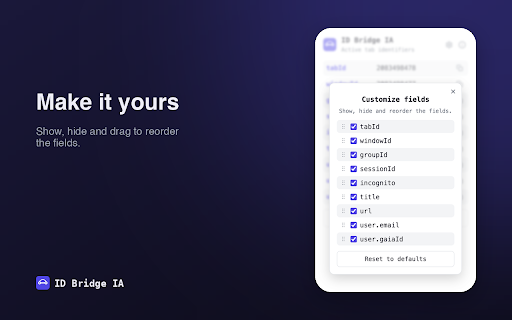
• tabId — the tab's identifier
• windowId — the window's identifier
• groupId — the tab group it belongs to (empty when ungrouped)
• sessionId — a synthetic per-tab identifier, stable for the whole browser session
• url and title — of the active tab
• incognito — whether the tab is in incognito mode
• user — the Chrome profile account (email and gaiaId), when signed in

WHY INSTALL IT

Agents automating a browser need something Chrome doesn't provide out of the box: a reliable answer to "which tab, window and session am I working in?". Without it, an agent can easily act on the wrong tab or lose track of context between steps.

• Stable session id: Chrome has no session id for open tabs. ID Bridge IA generates a UUID per tab and keeps it stable for the whole browser session.
• Cross-tool correlation: the agent reads the same identifiers you see in the popup, which makes debugging automations trivial.
• Tool-agnostic: works with any AI assistant or automation framework that can drive the browser through chrome-devtools-mcp — no vendor lock-in, no specific stack required.
• Zero friction: install it and it works. No setup, no accounts, no servers.

HOW IT WORKS

1) Popup for humans: click the toolbar icon to see every identifier of the active tab. Each field has its own copy button, and "Copy JSON" copies the full object ready to paste. From Settings (⚙) you can hide fields and drag to reorder them; your preferences sync with your Chrome profile. Light and dark themes included.

2) API for agents:
– Direct evaluation (the path external agents use): helpers are exposed on the extension's service worker — self.getIdsForTab(tabId) or self.idBridge.* — designed for tools like chrome-devtools-mcp.
– Messaging: from the extension's own contexts, chrome.runtime.sendMessage({ type: 'GET_IDS', tabId }) returns the full object.

Integration guide with code examples: https://id-bridge-ia.maecly.com/#agents

PRIVACY

• No data is collected or transmitted: everything is computed locally in your browser and only shown or copied when you ask for it.
• No analytics, no external servers, no remote code, no accounts.
• The sessionId lives in the browser's session memory and is wiped when you close it.

Full privacy policy: https://id-bridge-ia.maecly.com/privacy

PERMISSIONS

• tabs: read the active tab's url and title.
• storage: store the synthetic sessionId and your field preferences.
• identity and identity.email: read the Chrome profile account (read-only; empty when not signed in).

SUPPORT & CONTACT

• Questions and support: https://id-bridge-ia.maecly.com/contact
• Developers: [email protected] · General: [email protected]

Made by Miguel Angel Esparza Calero — MAECLY (https://www.maecly.com). Find it useful? You can support development on Ko-fi right from the popup.
Technical
- Version
- 0.1.0
- Manifest
- V3
- Size
- 17.47KiB
- Min Chrome
- 88
- Languages
- 1
- Featured
- No
Metadata
- ID
- knfgphmhijlbgdjhcciofodedgdifpij
- Developer ID
- uff39f4391b4bd6668ccc617ce11f88ae
- Developer Email
- [email protected]
- Created
- Jul 20, 2026
- Last Updated (Store)
- Jul 20, 2026
- Last Scraped
- Jul 21, 2026
- Support URL
- https://id-bridge-ia.maecly.com/contact
- Privacy Policy
- https://id-bridge-ia.maecly.com/privacy
Data sourced from the Chrome Web Store · last verified Jul 21, 2026.