
Eluvium
Eluvium Extension
As of June 2026, Eluvium has 6 users and a 5.00/5 rating from 1 reviews in the Productivity category.
Usersno change0%
6
6
Ratingno change0%
5.00
1 reviews
Reviewsno change0%
1
Version
3.4.0
Manifest V3
History
5 snapshotsTracking since Apr 17, 2026.
View as table
| Date | Users | Rating | Reviews | Version |
|---|---|---|---|---|
| Apr 17, 2026 | — | 5.00 | 1 | 3.4.0 |
| May 2, 2026 | 4 | 5.00 | 1 | 3.4.0 |
| May 11, 2026 | 4 | 5.00 | 1 | 3.4.0 |
| May 24, 2026 | 6 | 5.00 | 1 | 3.4.0 |
| Jun 5, 2026 | 7 | 5.00 | 1 | 3.4.0 |
| Now | 6 | 5.00 | 1 | 3.4.0 |
Permissions & access
- Permissions
- activeTabstoragetabscontextMenusscripting
- Host access
- <all_urls>
Screenshots
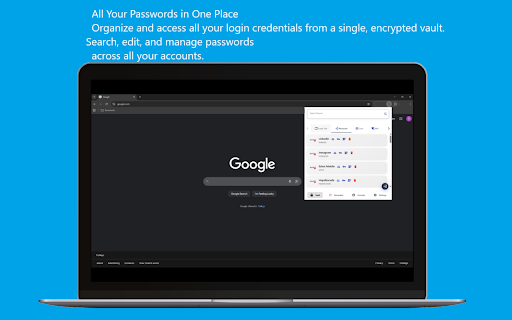


About
Eluvium - Open Source Password Manager & Data Protection

  Take control of your digital security with Eluvium, a fully open-source password manager that encrypts your passwords, credit cards, and sensitive data with military-grade AES encryption. Access your secure
  vault from any device - only you hold the keys to your data.

  Core Features:

 Secure Password Management
  - Automatic password capture and autofill on any website
  - Smart save password prompts when new credentials are detected
  - Strong password generator with customizable options
  - Password strength analyzer to ensure robust security
  - Import passwords from multiple browsers (Chrome, Edge, Opera, Firefox) via CSV
  - Right-click context menu for quick password generation
  - Instant search across all saved items (passwords, cards, servers, wifi)
  - Offline Mode: Access your encrypted vault even without an internet connection
  - Device management to track all devices connected to your account
  - Autofill and auto-submit your credit cards and passwords easily

  Comprehensive Data Protection
  - Store and autofill credit card information securely
  - Save server credentials and SSH keys
  - Manage WiFi passwords across devices
  - Add custom notes to any entry
  - Everything encrypted with AES-256

Advanced Security Features
  - Breach Detection: Checks passwords against 555+ million compromised passwords using K-Anonymity
 - Zero-Knowledge Architecture: Your master password never transmitted or stored on servers
  - Auto-Lock Protection: Customizable session timeouts (5, 15, 30, 60 minutes)
  - Lock on Browser Close: Automatically secures vault when browser closes
  - Two-Factor Authentication: Additional layer of security for your account
  - HTTPS Enforcement: Only operates on secure connections
  - Input Sanitization: Protection against XSS and injection attacks
 - Windows Hello Integration: Seamless biometric authentication with auto-start option
 - Phishing Protection: Advanced detection warns you before entering credentials on suspicious sites to prevent theft
 - Security Dashboard: Comprehensive password health monitoring with security score

  User Experience
  - Multi-language Support: Available in English and Turkish
  - Smart UI: Quick access via browser extension popup
  - One-Click Copy: Copy usernames, passwords, and card details instantly
  - Custom Notes: Add unlimited notes to any entry

  Cross-Device Sync
  - Seamless synchronization across all your devices
  - Browser extension (free) + Android app (paid)
  - Changes sync instantly and automatically
  - Secure cloud backup with end-to-end encryption

 Why Choose Eluvium?
  - 100% Open Source: Full transparency - audit our code on GitHub
  - Privacy First: Zero-knowledge encryption means we never see your data
  - No Ads, No Tracking: Your privacy is our priority
  - Modern Technology: Built with Angular and the latest Web APIs
  - Active Development: Regular updates and security improvements

 Important Security Notice:
  Your master password cannot be reset or recovered - this is by design to ensure maximum security. Choose a strong master password you'll remember, as even Eluvium support cannot access your vault.

  Perfect For:
  - Individuals seeking privacy-focused password management
  - Security-conscious users who want open-source solutions
  - Anyone tired of remembering dozens of passwords
  - People who value data ownership and encryption

  Get Started:
  1. Create your free account
  2. Set a strong master password
  3. Import existing passwords or add new ones
  4. Enable two-factor authentication for extra security
  5. Install on your other devices for seamless access

Learn more: http://eluvium.info/
Technical
- Version
- 3.4.0
- Manifest
- V3
- Size
- 3.92MiB
- Min Chrome
- 88
- Languages
- 1
- Featured
- No
Metadata
- ID
- knfgoejdefgibebmjpejljjbgiacphea
- Developer ID
- udd8d6d399d36109cefa36db8cb164f43
- Developer Email
- [email protected]
- Created
- Oct 9, 2020
- Last Updated (Store)
- Oct 17, 2025
- Last Scraped
- Jun 5, 2026
- Website
- —
- Support URL
- http://eluvium.info/Home/Contact
- Privacy Policy
- http://eluvium.info/Home/Privacy
Similar extensions
Alternatives to Eluvium, ranked by description similarity.

Intuitive Password®: Password Manager
Intuitive Password® streamlines your web login experience, allowing you to access any website with just a single click.
173
★ 5.0

VerityVault
Capture and securely store credentials to VerityVault.
7

Elpass for Windows and Linux
The extension for Elpass, a modern password manager you can fully control.
191
★ 3.0

VaultPlus - Password Manager
Secure password manager with autofill. Store and sync encrypted passwords, credit cards, and addresses across devices.
—

UpSignOn by Septeo
Generate, save, and automatically fill in your passwords securely.
4.0K
★ 3.5

JPK Password Locker
Secure password manager with AES-256 encryption. Store passwords, cards, and notes. Auto-fill logins.
3

AegisKey
Secure password manager with advanced encryption and cross-platform sync
8
★ 5.0

The Vault Password Manager
Autofill passwords from The Vault
—
Data sourced from the Chrome Web Store · last verified Jun 5, 2026.