
Typly
Customize font size, family, line height, and text color for any element type on any website.
As of June 2026, Typly has 5 users and a 5.00/5 rating from 2 reviews in the Productivity category.
Usersno change0%
5
5
Ratingno change0%
5.00
2 reviews
Reviewsno change0%
2
Version
1.1.0
Manifest V3
90-day change · In the last 90 days this extension 1 version update.
History
5 snapshotsTracking since May 7, 2026.
View as table
| Date | Users | Rating | Reviews | Version |
|---|---|---|---|---|
| May 7, 2026 | — | — | — | 1.0.0 |
| May 11, 2026 | — | — | — | 1.0.0 |
| May 17, 2026 | 3 | 5.00 | 1 | 1.0.0 |
| May 23, 2026 | 4 | 5.00 | 2 | 1.0.0 |
| May 30, 2026 | 5 | 5.00 | 2 | 1.0.0 |
| Now | 5 | 5.00 | 2 | 1.1.0 |
Changelog
- May 11, 2026description
Adjust font size of any element in your browser
Typly: Read the Web, Your Way
Tired of straining your eyes on poorly designed websites? Typly puts you in control of your reading experience. This lightweight Chrome extension lets you customize the appearance of any webpage—down to the individual HTML tag—so you can read comfortably, without distractions.
Why Typly?
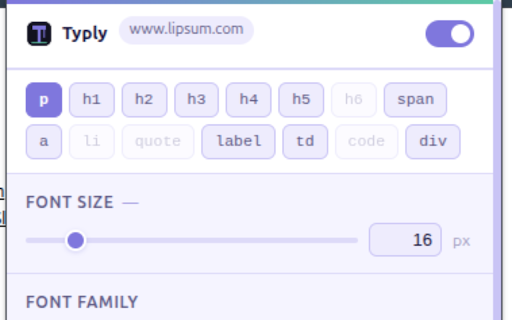
Per-Tag Customization: Adjust font size, family, line height, and text color for each HTML tag (e.g., <p>, <h1>, <div>). No more one-size-fits-all styling.

Accessibility First: Ideal for users with visual impairments, dyslexia, or anyone who prefers a tailored reading experience.

Instant Preview: See changes in real-time as you tweak settings.

Save Presets: Create and save your favorite styles for quick application across sites.

Lightweight & Fast: No slowdowns—Typly works seamlessly in the background.

How It Works
Install Typly from the Chrome Web Store.

Click the extension icon to open the Typly panel.

Select an HTML tag (e.g., paragraphs, headings, links) or use the global settings.

Customize font size, family, line height, and color to your liking.

Save your preferences and enjoy a consistent, comfortable reading experience everywhere.

Perfect For
Readers who want to reduce eye strain.

Developers/Designers testing typography on live sites.

Students/Researchers who spend hours reading online.

Anyone who values a distraction-free, personalized web.

Take control of your reading experience. Install Typly today!
Permissions & access
- Permissions
- storageactiveTab
- Host access
- None declared
Screenshots


About
Typly: Read the Web, Your Way
Tired of straining your eyes on poorly designed websites? Typly puts you in control of your reading experience. This lightweight Chrome extension lets you customize the appearance of any webpage—down to the individual HTML tag—so you can read comfortably, without distractions.
Why Typly?
Per-Tag Customization: Adjust font size, family, line height, and text color for each HTML tag (e.g., <p>, <h1>, <div>). No more one-size-fits-all styling.

Accessibility First: Ideal for users with visual impairments, dyslexia, or anyone who prefers a tailored reading experience.

Instant Preview: See changes in real-time as you tweak settings.

Save Presets: Create and save your favorite styles for quick application across sites.

Lightweight & Fast: No slowdowns—Typly works seamlessly in the background.

How It Works
Install Typly from the Chrome Web Store.

Click the extension icon to open the Typly panel.

Select an HTML tag (e.g., paragraphs, headings, links) or use the global settings.

Customize font size, family, line height, and color to your liking.

Save your preferences and enjoy a consistent, comfortable reading experience everywhere.

Perfect For
Readers who want to reduce eye strain.

Developers/Designers testing typography on live sites.

Students/Researchers who spend hours reading online.

Anyone who values a distraction-free, personalized web.

Take control of your reading experience. Install Typly today!
Technical
- Version
- 1.1.0
- Manifest
- V3
- Size
- 1.32MiB
- Min Chrome
- 88
- Languages
- 1
- Featured
- No
Metadata
- ID
- kmpnhejhcioalinojaaafghnafbgkdgo
- Developer ID
- ubdbefc19d23cc71543ead24dff60cdc8
- Developer Email
- [email protected]
- Created
- May 6, 2026
- Last Updated (Store)
- May 28, 2026
- Last Scraped
- Jun 13, 2026
- Website
- —
- Support URL
- —
- Privacy Policy
- —
Data sourced from the Chrome Web Store · last verified Jun 13, 2026.