
XaCi-leads
A tool to easy save urls in different categories
As of May 2026, XaCi-leads has 2 users in the Productivity category.
Usersdown 33.3 percent−33.3%
2
2
Ratingno change0%
—
— reviews
Reviewsno change0%
—
Version
0.0.0.1
Manifest V3
History
2 snapshotsTracking since May 1, 2026.
View as table
| Date | Users | Rating | Reviews | Version |
|---|---|---|---|---|
| May 1, 2026 | 3 | — | — | 0.0.0.1 |
| May 29, 2026 | — | — | — | 0.0.0.1 |
| Now | 2 | — | — | 0.0.0.1 |
Permissions & access
- Permissions
- activeTab
- Host access
- None declared
Screenshots


About
Xaci-leads
web-extension


 for this extension:
"A tool to easy save urls in different categories"

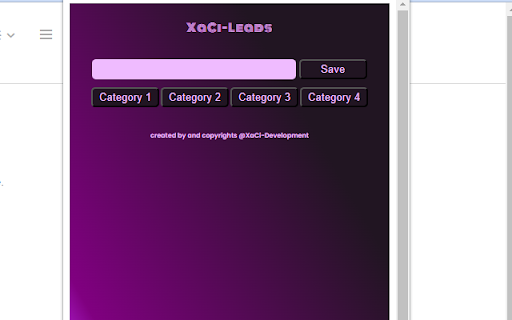
What is it? It's a tool to easy save url's. It is like a favorites light.
You can define your own categories and you can make 4 different categories for each search.

Lets say you are a recruiter and you go to linkedin to search for profiles.
You have 4 vacancies   you need to fill. You can add the vacancies as category and then search the web for candidates. If you found a candidate, you can save the url of the profile with some keywords or notes in the category of your choice.

If you saved profiles that doesn't match the vacancy, you can easy delete them, without deleting the rest of your search.

If you are done searching and you found the perfect candidate, you can delete the all urls of that category, rename the category if you want and start a new search.

How it works?

It is easy, install the extension in your browser and pin it to your toolbar.

Edit category:

Double click on the category buttons and a inputfield shows up, here you can type your new category and save by enter or the save button.

If you have changed all categories or the categories needed, you can start searching and save url's.

Note that if you change the category name, all urls that are collected under the old name will be deleted.

If you accidently doubleclick on the categorie, just click somewhere outside the inputfield and you return back to the startscreen and your categorie and urls will be saved.
So now its time, to get started

How to save a url?
When you find a url to save, you open XaCi-leads, add some keyword or note in the description. Select the category and click save or press enter
How to delete a url?
To delete only one url you can double click on the trashcan.
For deleting all urls, you can doubleclick on the delete all button.


i n
Technical
- Version
- 0.0.0.1
- Manifest
- V3
- Size
- 16.35KiB
- Min Chrome
- 88
- Languages
- 1
- Featured
- No
Metadata
- ID
- kmofgjahhfhaigmdbbdaignebjdbpmpf
- Developer ID
- u7f01ca32817dbfdf010212743e76078b
- Developer Email
- [email protected]
- Created
- Oct 23, 2023
- Last Updated (Store)
- Oct 23, 2023
- Last Scraped
- May 29, 2026
- Privacy Policy
- https://www.xaci-development.com/privacypolicy.html
Similar extensions
Alternatives to XaCi-leads, ranked by description similarity.

Linkidex
Bookmarks but better
5

Kool Kat URL Tracker
Introducing the URL Tracker Chrome Extension! This minimalist tool simplifies URL management while you browse, making it perfect…
4

Saved Links Manager
This extension saves your fav links to download them as a '.txt' file
17
★ 5.0

One Click Save and URL Bookmark Tool
Save and organize URLs with custom titles
9

Save Search Results
Easily save Google search results URLs with a single click!
Simple Search Saver is a lightweight and efficient Chrome extension…
1.0K
★ 4.7

Save to LinkySave
Save the current page to your LinkySave account with one click.
4

Save URL Check Later
A simple to-do list extension to save URLs and check them later.
25

Search Picker
Create and use omnibox shortcuts to quickly navigate to your favorite links.
—
Data sourced from the Chrome Web Store · last verified May 29, 2026.