
Place Saver
Save a place on a web page
As of May 2026, Place Saver has 3 users in the Accessibility category.
Usersdown 40.0 percent−40.0%
3
3
Ratingno change0%
—
— reviews
Reviewsno change0%
—
Version
1.0.1
Manifest V3
History
3 snapshotsTracking since Apr 1, 2026.
View as table
| Date | Users | Rating | Reviews | Version |
|---|---|---|---|---|
| Apr 1, 2026 | 5 | — | — | 1.0.1 |
| May 1, 2026 | 7 | — | — | 1.0.1 |
| May 29, 2026 | 6 | — | — | 1.0.1 |
| Now | 3 | — | — | 1.0.1 |
Permissions & access
- Permissions
- tabsstorage
- Host access
- None declared
Screenshots
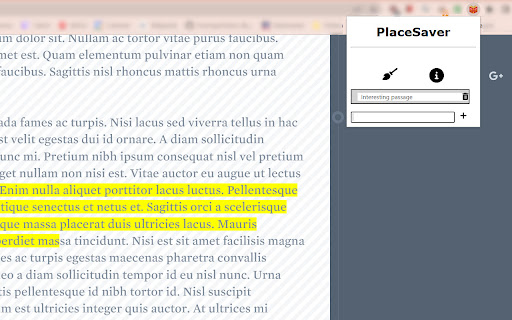
About
This extension allows users to highlight text on a page and save it to storage, like a bookmark within a page. It allows users to find the exact place they want on a page and provides a colour highlight, which can be customised in the options page.

The shortcut to bring up the Place Saver toolbar is Ctrl + Shift + H.
Technical
- Version
- 1.0.1
- Manifest
- V3
- Size
- 30.36KiB
- Min Chrome
- 88
- Languages
- 1
- Featured
- No
Metadata
- ID
- kmkngkcillbdklmmdkjffddbfdlnlfop
- Developer ID
- uf94eeb8fdd8e9489be1e894ab0e0f4c9
- Developer Email
- [email protected]
- Created
- May 17, 2022
- Last Updated (Store)
- Apr 7, 2023
- Last Scraped
- May 29, 2026
- Website
- —
- Support URL
- —
- Privacy Policy
- —
Similar extensions
Alternatives to Place Saver, ranked by description similarity.

Anchor Mark
Save selected text as anchored bookmarks (Ctrl+I) to quickly revisit the exact marked content later.
6
★ 1.0

Highlighter
Make creating ,viewing and managing highlight easier
1.0K
★ 3.7

Hide & Highlight
"Hide & Highlight" allows you to hide or highlight any text nodes on web pages for convenient display to other people.
152
★ 4.2

NoticeIT
Save notes for any website.
—

Accessible find in page
An accessibility-focused search tool with customizable colors, optional blinking, and bordered highlights.
36
★ 4.0

ADHD-Friendly Text Enhancer
Enhance article readability for ADHD by highlighting lines and boldening letters.
102
★ 3.3

Highlight - Little Helper
Highlight text, draw shapes, add sticky notes, and capture screenshots on any webpage.
15

Lightning Copy - URL
Copy URL by a click/pressing keys.
—
Data sourced from the Chrome Web Store · last verified May 29, 2026.