
CleanMark - Smart Markdown Extractor
Convert any webpage to formatted markdown. Includes 3 free daily extracts. Perfect for AI tools, docs, and note-taking.
As of June 2026, CleanMark - Smart Markdown Extractor has 16 users in the Workflow & Planning category.
Usersup 300.0 percent+300.0%
16
16
Ratingno change0%
—
— reviews
Reviewsno change0%
—
Version
2.0
Manifest V3
History
6 snapshotsTracking since Apr 20, 2026.
View as table
| Date | Users | Rating | Reviews | Version |
|---|---|---|---|---|
| Apr 20, 2026 | 4 | — | — | 2.0 |
| May 4, 2026 | 7 | — | — | 2.0 |
| May 10, 2026 | 9 | — | — | 2.0 |
| May 15, 2026 | 11 | — | — | 2.0 |
| May 21, 2026 | 15 | — | — | 2.0 |
| Jun 4, 2026 | 17 | — | — | 2.0 |
| Now | 16 | — | — | 2.0 |
Permissions & access
- Permissions
- storageactiveTabscriptingclipboardWrite
- Host access
- https://api.gumroad.com/*
Screenshots




About
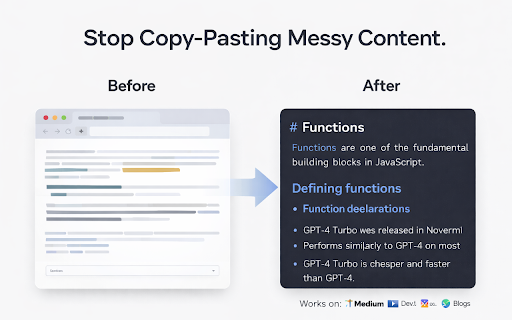
CleanMark extracts clean, properly formatted markdown from any webpage with one click.

HOW IT WORKS:
- Click Extract or press Ctrl+Shift+E on any webpage
- CleanMark strips ads, navigation, scripts, and clutter
- Get clean markdown with proper headings, lists, code blocks, and formatting
- Copy to clipboard, download as .md file, or use AI Copy for ChatGPT/Claude

FEATURES:
- One-Click Extraction: Uses Readability.js (same as Firefox Reader View) to isolate content
- Live Preview: Side-by-side markdown editor with real-time rendered preview
- Proper Markdown: Headings, bold, italic, lists, code blocks - all converted correctly
- 6 Keyboard Shortcuts: Ctrl+Shift+E (extract), Ctrl+Shift+C (copy), and more
- Dark Mode: Easy on the eyes for late-night work
- AI Copy: Adds source metadata for better AI prompts
- Export as .md: Download markdown files directly
- 100% Private: Everything runs locally in your browser. Zero data sent anywhere.

FREE TIER:
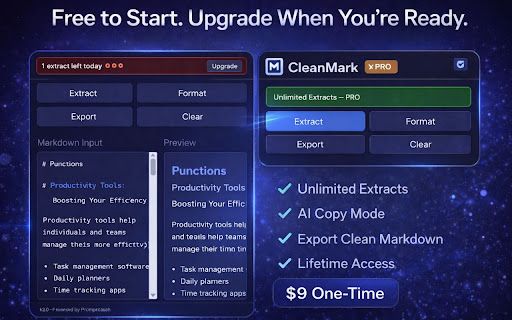
- 3 extracts per day, forever free
- All features included

PRO ($9 one-time):
- Unlimited daily extracts
- Lifetime license, no subscription
- Priority support

Perfect for developers copying documentation, writers saving articles, researchers feeding content to AI tools, and anyone who works with text.

Built by Promptcoach.
Technical
- Version
- 2.0
- Manifest
- V3
- Size
- 67.67KiB
- Min Chrome
- 88
- Languages
- 1
- Featured
- No
Metadata
- ID
- kmgjmniifjodmabecalkiioofmlkjmio
- Developer ID
- u506e313202f66b8b9fbfc4619c2fe024
- Developer Email
- [email protected]
- Created
- Mar 3, 2026
- Last Updated (Store)
- Mar 10, 2026
- Last Scraped
- Jun 10, 2026
- Website
- —
- Support URL
- https://cleanmarkpro.vercel.app
- Privacy Policy
- https://cleanmarkpro.vercel.app/privacy.html
Similar extensions
Alternatives to CleanMark - Smart Markdown Extractor, ranked by description similarity.

Copy as Markdown
Convert and copy text as Markdown with formatting preserved
201
★ 5.0

Markie - Copy as Markdown
It's super simple. Copy any selected content as Markdown.
89

Clipdown — Web to Markdown
Smart Markdown copier. Copy web content as clean Markdown with source citations, smart titles & reading time estimates.
14

Markdown Page Clipper
Copy the main content—or a selection—of any page to the clipboard in Markdown.
12

Any Page to MD
Convert any webpage to clean Markdown. Copy or save with one click.
76

Plain Markdown
Convert any webpage to clean Markdown with one click
—
★ 5.0

MarkSnip - Webpage to Markdown Clipper
One-click Markdown web clipper. Save articles, docs, code & tables as clean Markdown for AI agents & LLMs. Supports Obsidian & more.
20.0K
★ 4.6

MarkdownIt - Markdown Web Clipper
Markdown any web content
2.0K
★ 5.0
Data sourced from the Chrome Web Store · last verified Jun 10, 2026.