
YouTube Ad Muter & Skip
Mutes YouTube ads, plays background noise during ads, and auto-skips when possible.
As of June 2026, YouTube Ad Muter & Skip has 65 users and a 2.33/5 rating from 3 reviews in the Entertainment category.
Usersup 18.2 percent+18.2%
65
65
Ratingno change0%
2.33
3 reviews
Reviewsno change0%
3
Version
1.0.2
Manifest V3
History
5 snapshotsTracking since Apr 18, 2026.
View as table
| Date | Users | Rating | Reviews | Version |
|---|---|---|---|---|
| Apr 18, 2026 | 55 | 2.33 | 3 | 1.0.2 |
| Apr 28, 2026 | 60 | 2.33 | 3 | 1.0.2 |
| May 16, 2026 | 54 | 2.33 | 3 | 1.0.2 |
| May 29, 2026 | 59 | 2.33 | 3 | 1.0.2 |
| Jun 9, 2026 | 66 | 2.33 | 3 | 1.0.2 |
| Now | 65 | 2.33 | 3 | 1.0.2 |
Permissions & access
- Permissions
- storage
- Host access
- None declared
Screenshots
About
A Smoother, Uninterrupted Viewing Experience
Ads are everywhere on YouTube, and while they sometimes provide useful information, they can be a major disruption when you're in the zone. This extension works in the background to detect when an ad is playing and takes immediate action by muting the video. Instead of harsh silence or a sudden jolt of unwanted sound, it fills the gap with a pleasant background track that keeps your mood light and distraction-free. The result is a seamless transition that lets you focus on the content you actually came to see.

Intelligent and Adaptive Ad Skipping
Not only does the extension mute ads, but it also attempts to skip them entirely. Using smart timing strategies, it waits for a random period—emulating natural user behavior—and then clicks the “Skip Ad” button once, and even reattempts it after a similar delay if necessary. This means that even if an ad is longer than expected or if YouTube changes its ad layout, the extension is designed to adapt, reducing the time you spend watching ads.

Customizable Background Audio
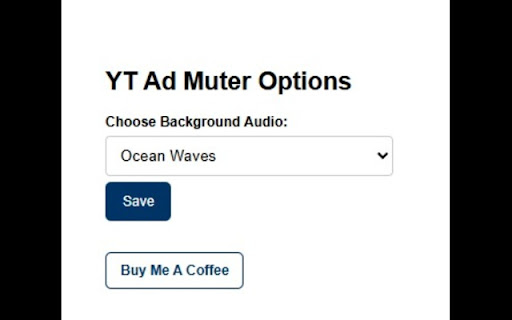
We all have different tastes in music and sounds. Whether you prefer calm instrumental tunes, lo-fi beats, or any other background noise, this extension allows you to choose from a list of sounds. This way, every time an ad is muted, you’re greeted with a soundscape that you enjoy—turning an otherwise irritating moment into something you can relax with. It’s not just about cutting out the noise; it’s about curating a more pleasant, personalized experience.

Efficiency and Productivity Boost
Time is precious. Every minute you save not watching ads adds up over time, allowing you to enjoy more content or get back to work faster. By automating the ad muting and skipping process, this extension minimizes the wasted moments that ads can cause, making your YouTube sessions more efficient. Whether you’re binge-watching tutorials, catching up on your favorite series, or using YouTube for research, this extension helps you reclaim those lost seconds and even minutes.

Seamless Integration with YouTube’s Interface
Worrying about compatibility issues? Don’t be. This extension has been carefully crafted to work harmoniously with YouTube’s player. It targets specific elements—like the mute button and skip ad button—ensuring that its actions do not interfere with your normal viewing experience. The design is both unobtrusive and intuitive, operating silently in the background so that you only notice the benefits, not the mechanics.

Enhanced Control and Flexibility
Many users appreciate having control over their digital environment. With the YouTube Ad Muter & Skip extension, you’re in charge. You can customize background audio choices via an easy-to-use options page. The extension gives you the flexibility to modify its behavior, ensuring that it aligns with your personal preferences and viewing habits. This isn’t a one-size-fits-all solution—it’s a tool you can tailor to fit your lifestyle.

Safe and Lightweight
Privacy and security are paramount. This extension is designed to work solely on your YouTube pages without collecting or transmitting any personal data. It’s lightweight, meaning it won’t slow down your browser or interfere with other applications. Instead, it quietly works in the background, ensuring that your browsing experience remains fast, secure, and uninterrupted.

Recap
In short, the YouTube Ad Muter & Skip extension is more than just an ad blocker—it’s an intelligent assistant that optimizes your YouTube experience. It cuts through the noise of unwanted ads, saves you time, enhances productivity, and adds a touch of personalization with its customizable background sounds. Whether you’re a casual viewer or a power user, this extension is a must-have tool to ensure that your YouTube sessions are as enjoyable and efficient as possible.

Give it a try and experience the difference firsthand—say goodbye to ad interruptions and hello to a smoother, more enjoyable YouTube journey.
Technical
- Version
- 1.0.2
- Manifest
- V3
- Size
- 24.41MiB
- Min Chrome
- 88
- Languages
- 1
- Featured
- No
Metadata
- ID
- kmgbplfehneejehebfekbjgomndeacpd
- Developer ID
- ubc3727f623901a1a6ddce415bfec52cd
- Developer Email
- [email protected]
- Created
- Mar 9, 2025
- Last Updated (Store)
- Nov 13, 2025
- Last Scraped
- Jun 9, 2026
- Website
- —
- Support URL
- —
Similar extensions
Alternatives to YouTube Ad Muter & Skip, ranked by description similarity.

AD Skipper for Youtube
Enhance your YouTube experience by auto-skipping video ads. You won’t feel any difference between blocking and skipping ads.
30.0K
★ 4.3

Seamless YouTube Ad Blocker
Blocks YouTube pre-roll, mid-roll, post-roll, overlays, sidebar, and sponsored results. No tracking.
697
★ 4.5

YouTube Ad Muter & Skipper
Automatically mutes YouTube ads and skips them when possible. Unmutes when your video resumes. Free, lightweight, no data collected.
—

Video Speed Booster & Ad Skipper
Boost video speed and skip ads on any website.
61

Amazon Video Ad-Mute™
Mutes audio during Amazon Video ads.
15

Youtube Please
Prevent youtube interruptions using this simple auto skip tool
54
★ 5.0

AdSkipper for YouTube
Make the unskippable skippable.
56

Ad Skipper - Automatic Ad Skipping
Automatic Ad Skipping: Speed-up and mute video ads to better your browsing experience.
105
★ 4.6
Data sourced from the Chrome Web Store · last verified Jun 9, 2026.