
CleverReply
Drafts short AI comments on LinkedIn,X(Twitter),and Instagram using your Google Gemini API key.Not affiliated with those platforms.
As of June 2026, CleverReply has 13 users and a 5.00/5 rating from 1 reviews in the Social & Communication category.
Usersno change0%
13
13
Ratingno change0%
5.00
1 reviews
Reviewsno change0%
1
Version
0.6.0
Manifest V3
90-day change · In the last 90 days this extension 1 version update, changed permissions.
History
8 snapshotsTracking since Apr 25, 2026.
View as table
| Date | Users | Rating | Reviews | Version |
|---|---|---|---|---|
| Apr 25, 2026 | — | — | — | 0.4.7 |
| May 2, 2026 | — | — | — | 0.4.7 |
| May 9, 2026 | 1 | — | — | 0.4.7 |
| May 13, 2026 | 3 | 5.00 | 1 | 0.6.0 |
| May 19, 2026 | 5 | 5.00 | 1 | 0.6.0 |
| May 25, 2026 | 9 | 5.00 | 1 | 0.6.0 |
| Jun 1, 2026 | 12 | 5.00 | 1 | 0.6.0 |
| Jun 7, 2026 | 11 | 5.00 | 1 | 0.6.0 |
| Now | 13 | 5.00 | 1 | 0.6.0 |
Changelog
- May 9, 2026description
Draft thoughtful LinkedIn comments with Gemini using your own API key. Local settings, custom prompts, and usage limits.
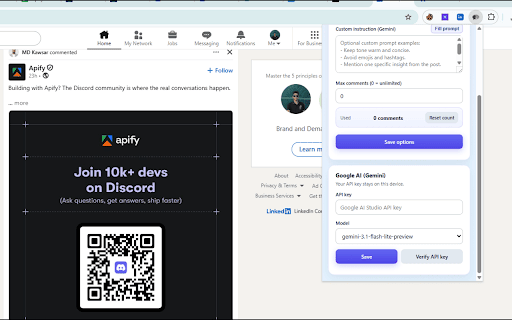
CleverReply is a Chrome extension that drafts AI-generated comments and replies on LinkedIn, X (Twitter), and Instagram using Google Gemini. You provide your own Gemini API key — it is stored only in your browser and never sent to any CleverReply server.
When you open a comment or reply field on a supported site, CleverReply injects a small button next to the composer. Click it and the extension reads the surrounding post text (and optionally post images), sends that context to Gemini, and inserts the generated reply directly into the field for you to review and post yourself.
Tone is adjusted per platform: professional on LinkedIn, short and natural on X, and casual on Instagram. You can further customize output with your own instructions, set a maximum character length, and optionally allow the extension to include post images as visual context for Gemini. A built-in usage counter lets you cap how many AI generations the extension performs. The extension is not affiliated with LinkedIn, X Corp., Meta, or Google.
- May 9, 2026short_description
Drafts shortAI comments for posts on LinkedIn.com using your Google Gemini API key.Independent tool,not affiliated with by LinkedIn.
Drafts short AI comments on LinkedIn,X(Twitter),and Instagram using your Google Gemini API key.Not affiliated with those platforms.
- May 9, 2026permissions
storage
storage, clipboardWrite
- May 9, 2026host_permissions
https://generativelanguage.googleapis.com/*, https://media.licdn.com/*, https://*.licdn.com/*
https://generativelanguage.googleapis.com/*, https://media.licdn.com/*, https://*.licdn.com/*, https://pbs.twimg.com/*, https://*.twimg.com/*, https://*.cdninstagram.com/*, https://*.fbcdn.net/*
Permissions & access
- Permissions
- storageclipboardWrite
- Host access
- https://generativelanguage.googleapis.com/*, https://media.licdn.com/*, https://*.licdn.com/*, https://pbs.twimg.com/*, https://*.twimg.com/*, https://*.cdninstagram.com/*, https://*.fbcdn.net/*
Screenshots

About
CleverReply is a Chrome extension that drafts AI-generated comments and replies on LinkedIn, X (Twitter), and Instagram using Google Gemini. You provide your own Gemini API key — it is stored only in your browser and never sent to any CleverReply server.
When you open a comment or reply field on a supported site, CleverReply injects a small button next to the composer. Click it and the extension reads the surrounding post text (and optionally post images), sends that context to Gemini, and inserts the generated reply directly into the field for you to review and post yourself.
Tone is adjusted per platform: professional on LinkedIn, short and natural on X, and casual on Instagram. You can further customize output with your own instructions, set a maximum character length, and optionally allow the extension to include post images as visual context for Gemini. A built-in usage counter lets you cap how many AI generations the extension performs. The extension is not affiliated with LinkedIn, X Corp., Meta, or Google.
Technical
- Version
- 0.6.0
- Manifest
- V3
- Size
- 2.76MiB
- Min Chrome
- 88
- Languages
- 1
- Featured
- No
Metadata
- ID
- klhkhgekdhfcbbckbhhbmimfdmnkaika
- Developer ID
- ua338f99e07e3ce074032ace884e9bece
- Developer Email
- [email protected]
- Created
- Apr 24, 2026
- Last Updated (Store)
- May 6, 2026
- Last Scraped
- Jun 7, 2026
- Website
- —
- Support URL
- https://www.bigibyte.com/contact
Data sourced from the Chrome Web Store · last verified Jun 7, 2026.