
Comparium ultimate cross browser testing tool
Check how your website looks and works under any operating system, browser and its version.
As of May 2026, Comparium ultimate cross browser testing tool has 638 users and a 4.50/5 rating from 8 reviews in the Developer Tools category.
Usersdown 3.8 percent−3.8%
638
638
Ratingno change0%
4.50
8 reviews
Reviewsno change0%
8
Version
1.2
Manifest V3
History
3 snapshotsTracking since Apr 1, 2026.
View as table
| Date | Users | Rating | Reviews | Version |
|---|---|---|---|---|
| Apr 1, 2026 | 663 | 4.50 | 8 | 1.2 |
| May 1, 2026 | 669 | 4.50 | 8 | 1.2 |
| May 29, 2026 | 663 | 4.50 | 8 | 1.2 |
| Now | 638 | 4.50 | 8 | 1.2 |
Permissions & access
- Permissions
- activeTabstorage
- Host access
- None declared
Screenshots



About
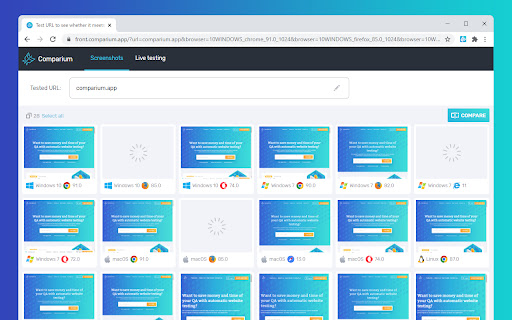
Comparium Extension allows you to capture screenshots of a web page and run real time tests with just a single click right from Google Chrome browser.

Perform cross browser testing across multiple browsers and operating systems with no need of installing and maintaining an expensive device lab. Analyze visual inconsistencies and functional errors, check the behavior of your online resource in real user conditions with ease and in a matter of seconds. Make sure your web resource looks the same no matter the platform and device.

Features offered in Comparium:
Instant access to multiple browsers and operating systems.
Wide range of screen resolutions.
Ability to perform real-time testing.
Unlimited number of screenshots per session.
Manual and automatic screenshots comparison mode.
Ability to compare screenshots with mockup.

To learn more, please visit our official site: https://comparium.app/

Please note that you need to have and be logged in to a Comparium account before using Comparium Chrome extension. If you don’t have an account you can create it from the extension or by following this link: https://front.comparium.app/?screen_hint=signUp
Technical
- Version
- 1.2
- Manifest
- V3
- Size
- 427KiB
- Min Chrome
- 88
- Languages
- 1
- Featured
- Yes
Metadata
- ID
- kldibjjclnnkcfihijhbmajpamjfcjaj
- Developer ID
- u24c6e807368e89c7170a698deef50dcb
- Developer Email
- [email protected]
- Created
- May 24, 2021
- Last Updated (Store)
- Jul 6, 2021
- Last Scraped
- May 29, 2026
- Website
- —
- Support URL
- https://howto.comparium.app/
- Privacy Policy
- https://comparium.app/privacy-policy.html
Similar extensions
Alternatives to Comparium ultimate cross browser testing tool, ranked by description similarity.

Test Companion
Captures webpage interactions with screenshots and URLs, sending data to Test Companion for test cases and bug reports.
227
★ 5.0
Preflight Recorder
Preflight Chrome Extension
823
★ 4.2

Comparador
Instant visual regression testing without the infrastructure
121
★ 5.0

TestingBot
Cross Browser Testing on multiple browsers and mobile devices.
218
★ 1.0

Exploratory Testing Chrome Extension
Exploratory Testing Session Using Chrome
250
★ 5.0

Flowmint Test Evidence
Record user actions with screenshots and export test evidence as PDF, HTML, or JSON. Built for QA and documentation.
—

TestMu AI (formerly LambdaTest)
Perform Live Interactive and Automated Cross Browser Testing on 2000+ Real Browsers and Operating Systems
6.0K
★ 4.3
CrossBrowserTesting Local Connection
CrossBrowserTesting Local Connection lets you test behind your firewall in 1500+ real desktop and mobile browsers
4.0K
★ 3.3
Data sourced from the Chrome Web Store · last verified May 29, 2026.