
Mr.Sagasu
Bookmark Nickname & Search bookmark in the address bar
As of May 2026, Mr.Sagasu has 52 users and a 3.67/5 rating from 3 reviews in the Workflow & Planning category.
Usersup 36.8 percent+36.8%
52
52
Ratingno change0%
3.67
3 reviews
Reviewsno change0%
3
Version
22.10.30
Manifest V3
History
3 snapshotsTracking since Apr 1, 2026.
View as table
| Date | Users | Rating | Reviews | Version |
|---|---|---|---|---|
| Apr 1, 2026 | 38 | 3.67 | 3 | 22.10.30 |
| May 1, 2026 | 43 | 3.67 | 3 | 22.10.30 |
| May 29, 2026 | 49 | 3.67 | 3 | 22.10.30 |
| Now | 52 | 3.67 | 3 | 22.10.30 |
Permissions & access
- Permissions
- bookmarks
- Host access
- None declared
Screenshots

About
* Bookmark Nickname: Open bookmarks with hashtags at once
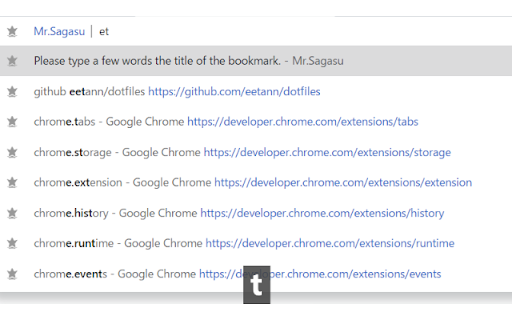
* search to only titles of bookmarks at the address bar
  * fuzzy match = All you have to do is type a few characters

Usage

Bookmark Nickname
0. Add hashtag to the title of bookmark
1. Enter key bindings(default Ctrl + Shift + Y)
2. Enter hashtags on the popup screen
3. Press Enter key or Enter button on the screen

Search titles of bookmarks at the address bar
1. Move at the address bar
2. Type "b" and space key
3. Type a few characters
4. Choice a suggest by using arrow keys and enter key
Technical
- Version
- 22.10.30
- Manifest
- V3
- Size
- 63.06KiB
- Min Chrome
- 88
- Languages
- 1
- Featured
- Yes
Metadata
- ID
- kkendaacffjgfnjaolejgaopcoakacpb
- Developer ID
- uac9dbc2cefd3fdabffe21e33f0b61ddb
- Developer Email
- [email protected]
- Created
- Aug 12, 2020
- Last Updated (Store)
- Oct 30, 2022
- Last Scraped
- May 29, 2026
- Website
- —
- Support URL
- https://github.com/eetann/mrsagasu
- Privacy Policy
- —
Similar extensions
Alternatives to Mr.Sagasu, ranked by description similarity.

Booktagr
Tag your bookmarks
3

Bookmark Search
Navigate bookmarks easily from the search bar
264
★ 4.0

yo/links
Smarter bookmarks for navigating the web
4
★ 5.0

Fuzzy Mark
Fuzzy search your bookmarks
4
★ 5.0

Omnibookmarks
Omnibookmarks is the fastest way to save and open bookmarks. Just type a keyword into the address bar to quickly open or add a…
54

Wow Bookmark
Instantly search bookmarks with real-time results and a modern Material Design interface.
—

Zenmark: Instantly find, organize and manage your bookmarks
Smart bookmark search with intelligent suggestions
22
★ 5.0

Better Bookmarks Golinks
Create short bookmarks that can be typed in the search bar.
30
★ 5.0
Data sourced from the Chrome Web Store · last verified May 29, 2026.