
Chatzy AI - Linkedin Assistant
A customizable One Click comment generator. Free to use !
As of June 2026, Chatzy AI - Linkedin Assistant has 173 users and a 5.00/5 rating from 8 reviews in the Productivity category.
Usersdown 3.4 percent−3.4%
173
173
Ratingno change0%
5.00
8 reviews
Reviewsno change0%
8
Version
7.2.0
Manifest V3
90-day change · In the last 90 days this extension 1 version update, changed permissions.
History
5 snapshotsTracking since Apr 1, 2026.
View as table
| Date | Users | Rating | Reviews | Version |
|---|---|---|---|---|
| Apr 1, 2026 | 179 | 5.00 | 8 | 7.1.0 |
| May 1, 2026 | 184 | 5.00 | 8 | 7.1.0 |
| May 29, 2026 | 172 | 5.00 | 8 | 7.1.0 |
| Jun 5, 2026 | 169 | 5.00 | 8 | 7.2.0 |
| Jun 11, 2026 | 184 | 5.00 | 8 | 7.2.0 |
| Now | 173 | 5.00 | 8 | 7.2.0 |
Changelog
- May 29, 2026description
Individuals can use it to increase engagement and develop more meaningful connections.

Brands can utilize this tool to offer prompt and efficient responses to customer complaints, adhering to their internal guidelines. Ensuring timely, consistent, and high-quality interactions will strengthen and maintain a positive brand image.

🔑 Key Features:
1️⃣ One click comment generator with optimized default settings
2️⃣ Unlimited comments
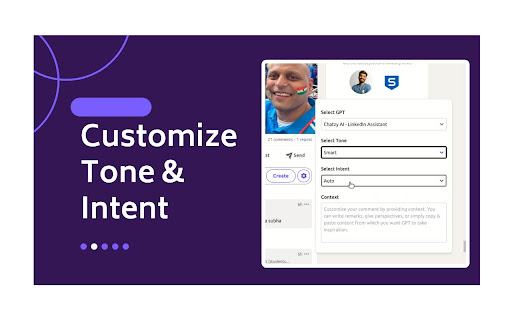
3️⃣ Customize Tone and Intent
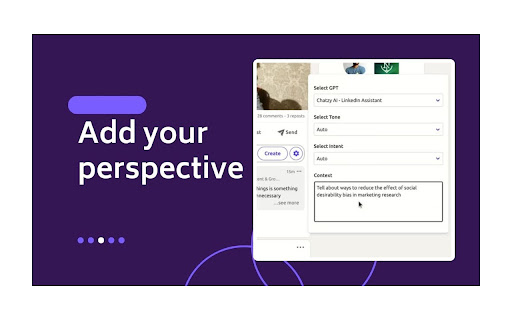
4️⃣ Customize your comment by providing context. You can write remarks, give perspectives, or simply copy & paste content from which you want GPT to take inspiration.
5️⃣ Generate comment replies, enabling you to further continue the conversation in comments
6️⃣ Create custom GPTs trained on your writing style, mimicking famous influencers, and adhering to your brand guidelines.

🛠️ Setup Process:
1️⃣ Click on 'Add to Chrome', accept permissions and you will be redirected to Chatzy AI login.
2️⃣ After logging in to Chatzy AI, you can head back to LinkedIn and start using the extension.

📘 How to use:
1️⃣ You can use optimized default settings, by just clicking on the Comment button to generate the comment.
2️⃣ To customize settings, click on the Chatzy AI setting icon in your comment box. You can customize the comment by selecting/providing
a. GPT
b. Tone
c. Intent
d. Context.
3️⃣ Select GPT: In the free plan “Select GPT” is disabled and set to GPT 3.5 by default. Whereas in the paid plan you also have option to select a custom GPT.
4️⃣ Select Tone from drop down
5️⃣ Select Intent from drop down
6️⃣ Provide Context

Starter Plan (GPT 3.5) is always free!!

💰 Pricing and Plans:
Chatzy AI offers various pricing options and subscription plans, allowing you to choose the best fit for your needs and budget.
1️⃣ Starter Plan: Always free, works on GPT 3.5.
2️⃣ Basic Plan: Use Chatzy AI no-code platform to create custom bots trained on your data. Uses GPT 4.0.

🚀 Benefits:
Using Chatzy AI - LinkedIn Assistant can significantly enhance your LinkedIn experience and professional networking strategy.
1️⃣ Efficient Engagement: Quickly generate responses and increase engagement.
2️⃣ Enhanced Quality of Interactions: Produce relevant and thoughtful comments.
3️⃣ Personalization: Customize responses to maintain authenticity.
4️⃣ Consistency in Engagement: Maintain a regular presence with quality interactions.
5️⃣ Ease of Use: User-friendly interface and quick learning curve.
6️⃣ Innovative Edge: Leverage the latest AI technology.
7️⃣ Growth Opportunities: Engage meaningfully for collaboration and business opportunities.

📪 Contact us:
Any questions or suggestions? Please contact us at 💌 [email protected] or [email protected].
Individuals can use it to increase engagement and develop more meaningful connections.

Brands can utilize this tool to offer prompt and efficient responses to customer complaints, adhering to their internal guidelines. Ensuring timely, consistent, and high-quality interactions will strengthen and maintain a positive brand image.

🔑 Key Features:
1️⃣ One click comment generator with optimized default settings
2️⃣ Unlimited comments
3️⃣ Customize Tone and Intent
4️⃣ Customize your comment by providing context. You can write remarks, give perspectives, or simply copy & paste content from which you want GPT to take inspiration.
5️⃣ Generate comment replies, enabling you to further continue the conversation in comments
6️⃣ Create custom GPTs trained on your writing style, mimicking famous influencers, and adhering to your brand guidelines.

🛠️ Setup Process:
1️⃣ Click on 'Add to Chrome', accept permissions and you will be redirected to Chatzy AI login.
2️⃣ After logging in to Chatzy AI, you can head back to LinkedIn and start using the extension.

📘 How to use:
1️⃣ You can use optimized default settings, by just clicking on the Comment button to generate the comment.
2️⃣ To customize settings, click on the Chatzy AI setting icon in your comment box. You can customize the comment by selecting/providing
a. GPT
b. Tone
c. Intent
d. Context.
3️⃣ Select GPT: In the free plan “Select GPT” is disabled and set to GPT 4.1 Mini by default. Whereas in the paid plan you also have option to select a custom GPT.
4️⃣ Select Tone from drop down
5️⃣ Select Intent from drop down
6️⃣ Provide Context

Starter Plan (GPT 4.1 Mini) is always free!!

💰 Pricing and Plans:
Chatzy AI offers various pricing options and subscription plans, allowing you to choose the best fit for your needs and budget.
1️⃣ Starter Plan: Always free, works on GPT 4.1 Mini
2️⃣ Basic Plan: Use Chatzy AI no-code platform to create custom bots trained on your data.

🚀 Benefits:
Using Chatzy AI - LinkedIn Assistant can significantly enhance your LinkedIn experience and professional networking strategy.
1️⃣ Efficient Engagement: Quickly generate responses and increase engagement.
2️⃣ Enhanced Quality of Interactions: Produce relevant and thoughtful comments.
3️⃣ Personalization: Customize responses to maintain authenticity.
4️⃣ Consistency in Engagement: Maintain a regular presence with quality interactions.
5️⃣ Ease of Use: User-friendly interface and quick learning curve.
6️⃣ Innovative Edge: Leverage the latest AI technology.
7️⃣ Growth Opportunities: Engage meaningfully for collaboration and business opportunities.

📪 Contact us:
Any questions or suggestions? Please contact us at 💌 [email protected] or [email protected].
- May 29, 2026name
Chatzy AI – Linkedin Assistant
Chatzy AI - Linkedin Assistant
- May 29, 2026permissions
scripting, activeTab, storage, tabs
activeTab, storage
Permissions & access
- Permissions
- activeTabstorage
- Host access
- None declared
Screenshots


About
Individuals can use it to increase engagement and develop more meaningful connections.

Brands can utilize this tool to offer prompt and efficient responses to customer complaints, adhering to their internal guidelines. Ensuring timely, consistent, and high-quality interactions will strengthen and maintain a positive brand image.

🔑 Key Features:
1️⃣ One click comment generator with optimized default settings
2️⃣ Unlimited comments
3️⃣ Customize Tone and Intent
4️⃣ Customize your comment by providing context. You can write remarks, give perspectives, or simply copy & paste content from which you want GPT to take inspiration.
5️⃣ Generate comment replies, enabling you to further continue the conversation in comments
6️⃣ Create custom GPTs trained on your writing style, mimicking famous influencers, and adhering to your brand guidelines.

🛠️ Setup Process:
1️⃣ Click on 'Add to Chrome', accept permissions and you will be redirected to Chatzy AI login.
2️⃣ After logging in to Chatzy AI, you can head back to LinkedIn and start using the extension.

📘 How to use:
1️⃣ You can use optimized default settings, by just clicking on the Comment button to generate the comment.
2️⃣ To customize settings, click on the Chatzy AI setting icon in your comment box. You can customize the comment by selecting/providing
a. GPT
b. Tone
c. Intent
d. Context.
3️⃣ Select GPT: In the free plan “Select GPT” is disabled and set to GPT 4.1 Mini by default. Whereas in the paid plan you also have option to select a custom GPT.
4️⃣ Select Tone from drop down
5️⃣ Select Intent from drop down
6️⃣ Provide Context

Starter Plan (GPT 4.1 Mini) is always free!!

💰 Pricing and Plans:
Chatzy AI offers various pricing options and subscription plans, allowing you to choose the best fit for your needs and budget.
1️⃣ Starter Plan: Always free, works on GPT 4.1 Mini
2️⃣ Basic Plan: Use Chatzy AI no-code platform to create custom bots trained on your data.

🚀 Benefits:
Using Chatzy AI - LinkedIn Assistant can significantly enhance your LinkedIn experience and professional networking strategy.
1️⃣ Efficient Engagement: Quickly generate responses and increase engagement.
2️⃣ Enhanced Quality of Interactions: Produce relevant and thoughtful comments.
3️⃣ Personalization: Customize responses to maintain authenticity.
4️⃣ Consistency in Engagement: Maintain a regular presence with quality interactions.
5️⃣ Ease of Use: User-friendly interface and quick learning curve.
6️⃣ Innovative Edge: Leverage the latest AI technology.
7️⃣ Growth Opportunities: Engage meaningfully for collaboration and business opportunities.

📪 Contact us:
Any questions or suggestions? Please contact us at 💌 [email protected] or [email protected].
Technical
- Version
- 7.2.0
- Manifest
- V3
- Size
- 505KiB
- Min Chrome
- 88
- Languages
- 1
- Featured
- No
Metadata
- ID
- kjffpdeflcpflmilnjgfhiheonjnalfo
- Developer ID
- ud31a6f24d1cb655aeff5db1057b52e77
- Developer Email
- [email protected]
- Created
- Mar 29, 2023
- Last Updated (Store)
- May 12, 2026
- Last Scraped
- Jun 11, 2026
- Website
- chatzy.ai
- Support URL
- —
- Privacy Policy
- https://chatzy.ai/legal/privacy-policy
Similar extensions
Alternatives to Chatzy AI - Linkedin Assistant, ranked by description similarity.

LinkMate - Automate Linkedin Comments
Easily Skyrocket your Linkedin with the Power of AI
670
★ 5.0

Gromming: AI LinkedIn Comment & Reply Writer
AI-powered LinkedIn comment & reply generator. Instantly write authentic, engaging responses and grow your professional network.
66
★ 5.0

Engage Smarter – LinkedIn AI Assistant
Boost LinkedIn visibility with AI-powered comments and replies that save time and grow your network.
29

Replya - FREE LinkedIn Comment Generator & AI Assistant
Generate perfect LinkedIn comments instantly with AI. Free comment suggestions, personalized tone, and one-click apply.
387
★ 4.7

LinkedGage
Generates personalized comments on LinkedIn posts based on user-selected tones.
3
★ 5.0

Cultuly - AI Engagement Assistant
AI writing assistant that learns your voice. Generate comments, connection notes, and posts across LinkedIn and 10+ platforms.
2
★ 5.0

Linky AI Assistant
A Chrome extension that enhances LinkedIn with AI-powered features.
5

Theshoutify.com — AI LinkedIn Comment Generator
Generate AI-powered, tone-based LinkedIn comments that boost engagement and grow your professional presence.
9
★ 5.0
Data sourced from the Chrome Web Store · last verified Jun 11, 2026.