
Mystic Simple TODO
Create and manage a simple to-do list directly in your browser popup.
As of June 2026, Mystic Simple TODO has — users in the Functionality & UI category.
Usersno change0%
—
—
Ratingno change0%
—
— reviews
Reviewsno change0%
—
Version
1.0
Manifest V3
History
2 snapshotsTracking since Apr 17, 2026.
Not enough history yet for this metric — the chart fills in as we collect more snapshots.
View as table
| Date | Users | Rating | Reviews | Version |
|---|---|---|---|---|
| Apr 17, 2026 | — | — | — | 1.0 |
| Apr 27, 2026 | — | — | — | 1.0 |
| Now | — | — | — | 1.0 |
Permissions & access
- Permissions
- None declared
- Host access
- None declared
Screenshots
About
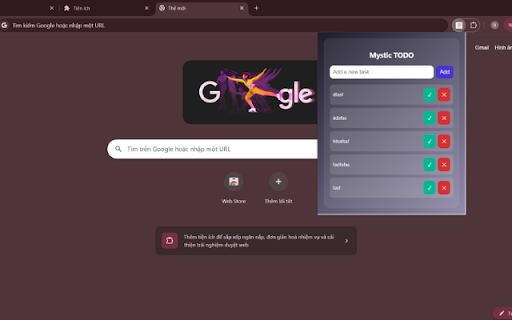
Mystic Simple TODO is a lightweight Chrome extension that allows users to create and manage a simple to-do list directly inside the browser popup. Designed with a modern and mystical visual style, the extension provides a calm and focused space for organizing daily tasks.

Users can quickly add new tasks, mark them as completed, or remove them with a single click. The interface is clean and intuitive, making it easy to manage short task lists without distractions. The extension runs entirely within the popup and does not require any special permissions.

All functionality operates locally in the browser. The extension does not collect, store, or transmit personal information. It does not access browsing history, website content, or external services. No background scripts or external connections are used.

Key features:

Add and manage simple tasks instantly

Mark tasks as completed

Remove tasks easily

Clean and modern mystical design

No data collection

No external connections

No unnecessary permissions

Mystic Simple TODO focuses on simplicity, privacy, and ease of use, providing a lightweight task management tool directly inside your browser.
Technical
- Version
- 1.0
- Manifest
- V3
- Size
- 18.0KiB
- Min Chrome
- 88
- Languages
- 1
- Featured
- No
Metadata
- ID
- kjboocjakbgdaomkjnfigngenkjdjiho
- Developer ID
- u8b9f6926e6a78e277336227943c9455d
- Developer Email
- [email protected]
- Created
- Feb 15, 2026
- Last Updated (Store)
- Mar 1, 2026
- Last Scraped
- Jun 4, 2026
- Website
- —
- Support URL
- https://zo88.health/
- Privacy Policy
- —
Data sourced from the Chrome Web Store · last verified Jun 4, 2026.