
LoiLo Web Card
Easily create Web Cards in LoiLoNote School!
As of June 2026, LoiLo Web Card has 900,000 users and a 3.50/5 rating from 8 reviews in the Workflow & Planning category.
Usersno change0%
900.0K
900,000
Ratingno change0%
3.50
8 reviews
Reviewsno change0%
8
Version
0.7.0
Manifest V3
History
8 snapshotsTracking since Apr 1, 2026.
View as table
| Date | Users | Rating | Reviews | Version |
|---|---|---|---|---|
| Apr 1, 2026 | — | 3.50 | 8 | 0.7.0 |
| Apr 5, 2026 | 200.0K | 3.50 | 8 | 0.7.0 |
| Apr 17, 2026 | 100.0K | 3.50 | 8 | 0.7.0 |
| Apr 26, 2026 | 600.0K | 3.50 | 8 | 0.7.0 |
| May 7, 2026 | 700.0K | 3.50 | 8 | 0.7.0 |
| May 13, 2026 | — | 3.50 | 8 | 0.7.0 |
| Jun 1, 2026 | 800.0K | 3.50 | 8 | 0.7.0 |
| Jun 9, 2026 | — | 3.50 | 8 | 0.7.0 |
| Now | 900.0K | 3.50 | 8 | 0.7.0 |
Permissions & access
- Permissions
- tabsactiveTabstorage
- Host access
- None declared
Screenshots
About
About LoiLo Web Card
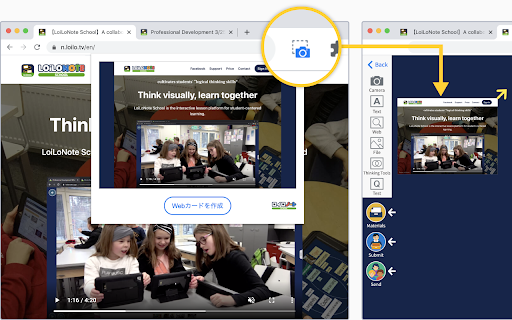
LoiLo Web Card is a browser extension that makes it easy to create Web Cards—URL links with webpage snapshots.
Simply click the camera icon to create a Web Card.

Using the Web Card Extension
1. Pin the extension
After installing the Web Card extension, it needs to be pinned on each device.
① Click the puzzle piece icon in the top-right corner of the browser.
② Click the pin icon next to LoiLo Web Card to add it to the toolbar.
*When pinned, the icon turns blue.
2. Create a Web Card from a website
Open the website you want to save, then click the camera icon in the extension.
Choose a LoiLoNote note to save it to.

Notes
A destination note in LoiLoNote must be selected to save a Web Card.
The captured image may differ depending on how the website is structured.
Technical
- Version
- 0.7.0
- Manifest
- V3
- Size
- 129KiB
- Min Chrome
- 88
- Languages
- 3
- Featured
- No
Metadata
- ID
- kjafdcgbeaoamegadobmjdlllmlgfina
- Developer ID
- u2a389438f639e007bb09aefc403438ea
- Developer Email
- [email protected]
- Created
- Mar 31, 2021
- Last Updated (Store)
- Jan 13, 2026
- Last Scraped
- Jun 9, 2026
- Website
- https://n.loilo.tv/
- Privacy Policy
- https://n.loilo.tv/en/privacy
Data sourced from the Chrome Web Store · last verified Jun 9, 2026.