
Web Clipper (Nimbus)
Web Clipper that works! The easiest way to clip text, pics, links, email and pdf from internet pages and save them.
As of June 2026, Web Clipper (Nimbus) has 50,000 users and a 3.37/5 rating from 153 reviews in the Workflow & Planning category.
Usersno change0%
50.0K
50,000
Ratingdown 0.6 percent−0.6%
3.37
153 reviews
Reviewsup 0.7 percent+0.7%
153
Version
4.9.9.3
Manifest V3
90-day change · In the last 90 days this extension 1 version update.
History
3 snapshotsTracking since Apr 23, 2026.
View as table
| Date | Users | Rating | Reviews | Version |
|---|---|---|---|---|
| Apr 23, 2026 | 50.0K | 3.39 | 152 | 4.9.9.1 |
| May 12, 2026 | 60.0K | 3.39 | 152 | 4.9.9.1 |
| May 22, 2026 | 50.0K | 3.39 | 152 | 4.9.9.3 |
| Now | 50.0K | 3.37 | 153 | 4.9.9.3 |
Permissions & access
- Permissions
- activeTabtabscontextMenuscookiesstorage
- Host access
- *://*/*
Screenshots



About
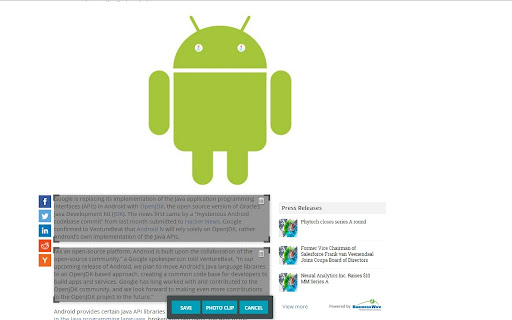
A Web Clipper that works! Grab all kinds of content from web pages. We have created a Nimbus Web Clipper, so you could save text, images, links, email addresses from the Internet.

It is not just a pdf clipper! Nimbus Web Clipper is a Chrome extension that can help you save text, images, links, email addresses, and other content from web pages. Add your notes and save them to your Nimbus Note account for future references.

You can easily organize your clutter with a Nimbus Note and a Web Clipper! Create a note or folder in your Nimbus Note account and save your web clipping there. Access content that you've made with a clipper even offline. Use any devices and read later files, documents, articles and so on.

Do you want to save some web pages without any ads and links? Use a Web Clipper to clip the needed pages or their fragments and edit them before sending them to your Nimbus Note account. Easily delete any ads, images, or links from clipped content.

Look at all you can do with Nimbus:

- Capture the entire web page and store it for future use
- Capture only a part of the web page
- Highlight text before saving the web clipping
- Add tasks to the clipping before sending it to a colleague
- Clip images from a web page
- Clip PDF files and annotate them before saving (a function that many PDF clippers lack)
- Clip emails, including all responses and attachments (Gmail, Outlook, Mail.com, Yahoo)
- Clip anything, with just one click!
Technical
- Version
- 4.9.9.3
- Manifest
- V3
- Size
- 904KiB
- Min Chrome
- 88
- Languages
- 1
- Featured
- Yes
Metadata
- ID
- kiokdhlcmjagacmcgoikapbjmmhfchbi
- Developer ID
- u2d322dd91c445746ba52ac64f57af3ab
- Developer Email
- [email protected]
- Created
- Nov 1, 2013
- Last Updated (Store)
- Apr 30, 2026
- Last Scraped
- Jun 15, 2026
- Website
- thefusebase.com
- Privacy Policy
- https://nimbusweb.me/privacy.php
Similar extensions
Alternatives to Web Clipper (Nimbus), ranked by description similarity.

Evernote Web Clipper
Use the Evernote extension to save things you see on the web into your Evernote account.
2.0M
★ 4.7

OneNote Web Clipper
Save anything on the web to OneNote. Clip it to OneNote, organize and edit it, then access it from any device.
900.0K
★ 4.8

Note’n’do Web Clipper
Create snippets of websites
—

Clipper
Easy click to copy & pase text clips from extension, dedicated 'Email' button. Create notes, bookmarks, email templates, etc.
5.0K
★ 4.2

Notesnook Web Clipper
Clip web pages & save interesting things you find on the web directly into Notesnook in a private & secure way.
3.0K
★ 4.2

Save To Note
Capture every web wonder, turn them into personal notes.Let your favorite things orbit around you like digital constellations.
2

XCelsior Clipper
XCelsior Clipper: Effortlessly Save and Organize Web Content
Overview
XCelsior Clipper is a powerful browser extension that…
22
★ 5.0

NoteSkrib Clipper
Capture web content, videos, and images to your NoteSkrib account
6
Data sourced from the Chrome Web Store · last verified Jun 15, 2026.