
Pretty Js
Pretty print your Javascript and JSON. Format your code for easier reading. Convert between XML and JSON.
As of June 2026, Pretty Js has 6,000 users and a 4.75/5 rating from 8 reviews in the Developer Tools category.
Usersno change0%
6.0K
6,000
Ratingno change0%
4.75
8 reviews
Reviewsno change0%
8
Version
1.0.12
Manifest V3
History
1 snapshotsTracking since Apr 23, 2026.
View as table
| Date | Users | Rating | Reviews | Version |
|---|---|---|---|---|
| Apr 23, 2026 | 6.0K | 4.75 | 8 | 1.0.12 |
| Now | 6.0K | 4.75 | 8 | 1.0.12 |
Permissions & access
- Permissions
- clipboardReadcontextMenus
- Host access
- None declared
Screenshots

About
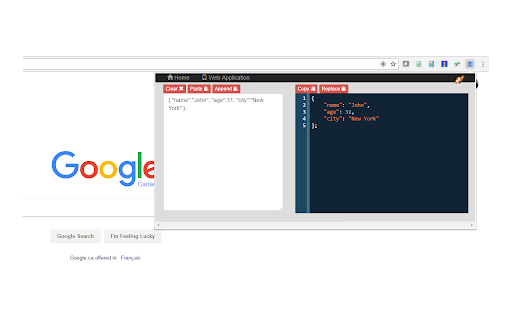
A simple tool to quickly and easily format your JavaScript and JSON. See your code formatted as you type! Or have your code instantly converted when you paste into the text area. Also lets you convert between JSON and XML.

This tool is useful if you :
-  want a quick way to format JSON that is, for example, returned as a single line by a Web service call.
-  have a JSON structure that's just badly formatted,
-  just want to prototype a JSON structure and have it formatted as you type rather than worry about formatting it yourself.
-  want to see the formatted JSON while debugging a web service call
-  need your JSON as XML or want to convert some XML to JSON

Features:
- available as an icon on your Chrome toolbar
- remembers the current state so when you reopen the tool you can carry on where you left off- you won't lose any of your work when you close the tool
- convenient buttons for copy and pasting to and from the clipboard
- provides a useful button for replacing the JSON in your work area with the formatted version - useful when prototyping a JSON structure
- formats Javascript
- basic json validation errors are shown
- provides links to other tools from LinangData from the More tools menu
- It's free!
Technical
- Version
- 1.0.12
- Manifest
- V3
- Size
- 1.75MiB
- Min Chrome
- 88
- Languages
- 1
- Featured
- Yes
Metadata
- ID
- kililblhcfpodipkcbobnbgnbbhgbkji
- Developer ID
- u0d278c1b85dfdeb85a4ec169d3ee8c1f
- Developer Email
- [email protected]
- Created
- Jun 18, 2017
- Last Updated (Store)
- Oct 19, 2022
- Last Scraped
- Jun 7, 2026
- Website
- http://linangdata.com/
- Support URL
- https://linangdata.com/json-formatter/
- Privacy Policy
- https://linangdata.com/privacy.html
Similar extensions
Alternatives to Pretty Js, ranked by description similarity.

Inline JSON Formatter
Format selected text into JSON as a collapsible tree
23
★ 5.0

JSON Formatter Pro
Professional JSON formatting tool. Supports syntax highlighting, data validation, context menu and popup mode.
6

JSON Formatter & Viewer for Chrome
JSON Formatter & Beautifier for Chrome.
222

JSON Formatter and Viewer
Instantly transform raw JSON into a beautifully structured and color-coded format.
307
★ 4.0

JSON Formatter - Simple & Clean
Automatically formats JSON responses in the browser with themes, collapsible nodes, and other helpful features.
7
★ 5.0

JSON Formatter
Open a separate window to parse and format JSON.
2

Simple JSON Checker
Format, validate, and edit JSON easily in Chrome’s side panel. A simple and powerful tool for developers.
9
★ 5.0

JSON Formatter
Format, validate, minify, and copy JSON locally with fast ShiftShift command-palette access in Chrome.
55
Data sourced from the Chrome Web Store · last verified Jun 7, 2026.