
PhantomAI - Instant AI Answers
Get AI-powered answers for anything on your screen. Highlight text, select images, or ask questions instantly from any webpage.
As of June 2026, PhantomAI - Instant AI Answers has 18 users and a 5.00/5 rating from 1 reviews in the Education category.
Usersup 350.0 percent+350.0%
18
18
Ratingno change0%
5.00
1 reviews
Reviewsno change0%
1
Version
1.1
Manifest V3
90-day change · In the last 90 days this extension 1 version update.
History
8 snapshotsTracking since Apr 16, 2026.
View as table
| Date | Users | Rating | Reviews | Version |
|---|---|---|---|---|
| Apr 16, 2026 | 4 | — | — | 1.0 |
| Apr 22, 2026 | 4 | — | — | 1.0 |
| Apr 29, 2026 | 4 | — | — | 1.0 |
| May 6, 2026 | 6 | — | — | 1.0 |
| May 11, 2026 | 7 | — | — | 1.1 |
| May 17, 2026 | 8 | 5.00 | 1 | 1.1 |
| Jun 5, 2026 | 12 | 5.00 | 1 | 1.1 |
| Jun 13, 2026 | 14 | 5.00 | 1 | 1.1 |
| Now | 18 | 5.00 | 1 | 1.1 |
Permissions & access
- Permissions
- storageunlimitedStoragecontextMenusidentity
- Host access
- <all_urls>
Screenshots



About
Instant AI answers on any screen ⚡ highlight text, capture screenshots, and paste answers without ever leaving the page.

Stop wasting time switching between tabs, searching for answers, and copying things back and forth. PhantomAI brings AI directly into every webpage you visit. Select text, drag a box around anything, and get accurate answers in seconds.

Why choose PhantomAI? 🤔

🖥️ Built to Be Invisible
PhantomAI runs quietly in the background on every page. No popups, no new tabs, no clutter. Answers appear as floating text right where you're working, then fade away. Designed to stay out of your way while giving you exactly what you need.

🔍 Instant Text Answers
Highlight any text on any webpage and press a single key. AI reads it, processes it, and gives you a concise answer instantly. Works on Google Forms, Canvas, Blackboard, Coursera, and every other site.

📸 Screenshot Queries
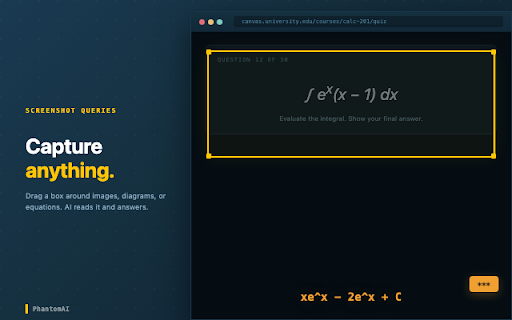
Some questions aren't just text. Drag a box around images, diagrams, math equations, charts, or anything else on screen. AI reads everything inside the box and answers it. No copy-pasting, no describing what you see.

📋 One-Key Paste
Click into any text field and press a key. Your last AI answer gets typed in automatically, character by character. Looks natural, works everywhere.

🧠 Context Documents
Upload PDFs, notes, study guides, or lecture slides directly into the extension. AI searches your documents every time you ask a question, pulling in the most relevant information to give you better answers.

🖼️ Reference Images
Capture screenshots of formula sheets, reference tables, or notes. AI sees them alongside every future question you ask, so you never have to re-explain your context.

⚡ Three Plans for Every Need

Free:
20 queries/day with a standard AI model. All features included, no credit card needed.

Pro ($8/mo):
200 queries/day with a smarter AI model and priority support.

Unlimited ($20/mo):
No daily limits with the most powerful AI model available.

🎨 Fully Customizable
Remap every hotkey, change answer text color, size, opacity, adjust display duration, customize the capture indicator, and more. Make it look and feel exactly how you want.

How to Use 📚

1. Install the extension and click the icon to sign in.
2. Highlight text on any page and press ] to get an AI answer.
3. Hold Ctrl/Cmd + ] and drag a box for screenshot answers.
4. Click into a text field and press [ to paste the answer.

Watch demo videos and read the full guide at:
phantom-ai.app/docs

....................................

📞 Need Help?

Visit our website to learn more and reach out with any questions.

💬 Support:
https://phantom-ai.app/support

📖 Terms of Use:
https://phantom-ai.app/terms

🔐 Privacy Policy:
https://phantom-ai.app/privacy
Technical
- Version
- 1.1
- Manifest
- V3
- Size
- 1.67MiB
- Min Chrome
- 88
- Languages
- 1
- Featured
- No
Metadata
- ID
- kihbegphhihiakanecimgmliihelajdh
- Developer ID
- u726787f088ffe25dfc4b8677d153c266
- Developer Email
- [email protected]
- Created
- Apr 10, 2026
- Last Updated (Store)
- May 6, 2026
- Last Scraped
- Jun 13, 2026
- Website
- phantom-ai.app
- Support URL
- https://phantom-ai.app/support/
- Privacy Policy
- https://phantom-ai.app/privacy/
Data sourced from the Chrome Web Store · last verified Jun 13, 2026.