Bookmark All Tabs
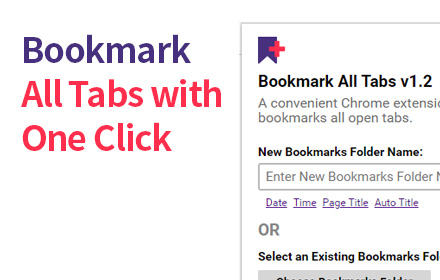
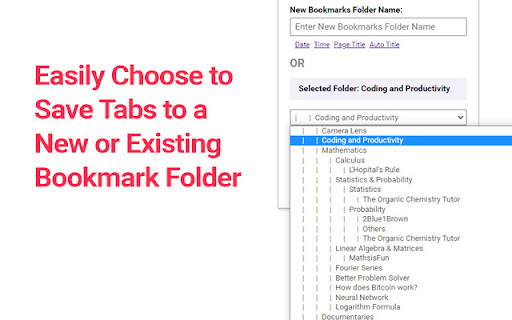
A Chrome extension that allows you to bookmark all open tabs with one click. Choose to save to a new or existing bookmark folder.
As of June 2026, Bookmark All Tabs has 1,000 users and a 4.08/5 rating from 12 reviews in the Workflow & Planning category.
Usersno change0%
1.0K
1,000
Ratingno change0%
4.08
12 reviews
Reviewsno change0%
12
Version
1.6
Manifest V3
History
1 snapshotsTracking since Apr 23, 2026.
View as table
| Date | Users | Rating | Reviews | Version |
|---|---|---|---|---|
| Apr 23, 2026 | 1.0K | 4.08 | 12 | 1.6 |
| Now | 1.0K | 4.08 | 12 | 1.6 |
Permissions & access
- Permissions
- tabsbookmarksstorage
- Host access
- None declared
Screenshots

About
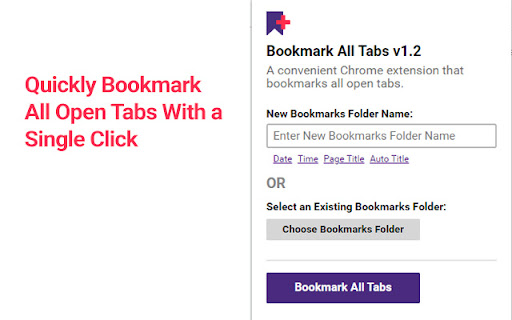
Bookmark All Tabs is a simple and convenient Chrome extension that allows you to bookmark all open tabs with just one click.

Key Features:
1. Save Tabs to Folders: Choose to save tabs in a new bookmark folder or an existing one.
2. Auto-Title Folders: Automatically title the folder with the current date, time, or the most common words found in the tab titles.
3. Access Recent Folders: Select a recently opened bookmark folder for quick saving.
4. View and Select Tabs: View all open tabs in a list and pick the ones you’d like to bookmark.
5. Copy URLs and Titles: Copy URLs or titles of selected tabs to the clipboard for easy sharing or organization.

How to Use:
1. Open the Extension: Click the extension icon in your browser.
2. Choose a Folder: Select an existing bookmark folder or create a new one.
For new folders, you can auto-title them with the current date, time, or common words from tab titles.
3. Bookmark Tabs: Once a folder is selected, click "Bookmark All Tabs" to save the tabs.

We hope you find Bookmark All Tabs to be a useful and time-saving extension. Thank you for using it!
Technical
- Version
- 1.6
- Manifest
- V3
- Size
- 50.78KiB
- Min Chrome
- 88
- Languages
- 1
- Featured
- Yes
Metadata
- ID
- kholnocpmeiaehlajdppbakjdibiokeg
- Developer ID
- u0a41af19715cb57a0d7e624f6f749ff2
- Developer Email
- [email protected]
- Created
- Jan 9, 2023
- Last Updated (Store)
- Nov 11, 2024
- Last Scraped
- Jun 7, 2026
- Website
- stratadigital.com
- Privacy Policy
- —
Similar extensions
Alternatives to Bookmark All Tabs, ranked by description similarity.

Copy All Tabs Urls
Copy all tabs urls in multiple formats or Open multiple URLs at once.
14
★ 5.0

Copy All URLs (Free)
A simple Chrome extension to copy URLs of all open tabs.
80.0K
★ 4.0

Copy All URLs - Tab URL Manager
Professional tab URL management tool by StartAndGrow.co. Copy URLs from all open tabs with a single click.
623
★ 5.0

CopyTab URLs
Effortlessly copy and organize the URLs of your open tabs in one click.
10.0K
★ 4.6

Bookmark & Tab Manager
Save tabs, find duplicates, export bookmarks & analyze visit history. Side panel, dark mode, EN/TR.
61
★ 5.0

Beludia - Save All Open Tabs
Save all currently open tabs, and reopen them on restart!
143
★ 5.0

Bookmark Tracker
Bookmark Tracker Chrome Extension is a handy bookmark extension that will bookmark the tabs that you want to remember and be able…
—
★ 5.0

Copy All Tabs
Copy all tab URLs in various formats
816
★ 5.0
Data sourced from the Chrome Web Store · last verified Jun 7, 2026.