
Video Companion
AI companion that summarizes and explains videos as you watch.
As of June 2026, Video Companion has 2 users and a 5.00/5 rating from 1 reviews in the Productivity category.
Usersno change0%
2
2
Ratingno change0%
5.00
1 reviews
Reviewsno change0%
1
Version
0.1.0
Manifest V3
History
3 snapshotsTracking since May 22, 2026.
View as table
| Date | Users | Rating | Reviews | Version |
|---|---|---|---|---|
| May 22, 2026 | 2 | — | — | 0.1.0 |
| Jun 4, 2026 | 2 | — | — | 0.1.0 |
| Jun 10, 2026 | 3 | 5.00 | 1 | 0.1.0 |
| Now | 2 | 5.00 | 1 | 0.1.0 |
Changelog
- Jun 4, 2026description
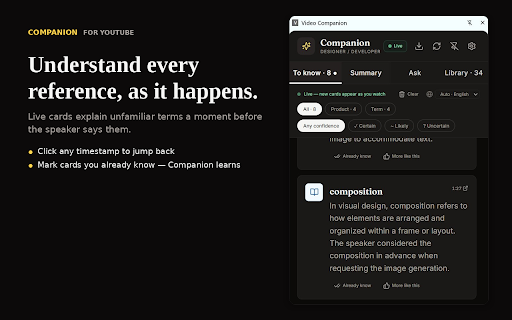
Companion is a side panel that watches YouTube with you. As the video plays, it
quietly flags people, places, products, technical terms, and references you might
not recognize — explained briefly, with a click-to-jump timestamp. By the time the
speaker says the term, the card is already there.

WHY IT'S DIFFERENT

Most AI tools for YouTube hand you a wall of text after the video ends. Companion
works AS YOU WATCH, and it adapts to YOU. A doctor and a software engineer watching
the same lecture see different cards. An ESL learner sees idioms and slang flagged
that native speakers don't need.

HOW IT WORKS

1. Open any YouTube video.
2. Click the Companion icon. Cards begin appearing in the side panel.
3. Each card explains a term that just came up — with a timestamp you can click
   to jump back to that moment.
4. Tap "Already know" on cards you find obvious. Tap "More like this" on cards
   that were just right. Companion learns your background and gets sharper over time.

FOUR BUILT-IN PROFILES, PLUS CUSTOM

— General audience: everything non-obvious gets flagged
— Designer / Developer: skips basic web terms, keeps the niche ones
— Learning English: adds idioms, slang, casual phrasings
— AI/ML expert: skips familiar model names, surfaces obscure tools
— Custom: write your own ("Cardiologist comfortable with most medical terminology...")

USE YOUR OWN AI KEY

Companion supports Claude, OpenAI GPT, Google Gemini, and DeepSeek. You bring your
own API key — keys are stored locally on your device and used only to call the
provider you choose. Gemini has a free tier; Claude Haiku costs about 3 cents per
video.

FEATURES

— Live rolling cards that appear just before the term is spoken
— Summary tab with TL;DR plus a 3-4 sentence arc
— Ask tab: chat with the video, answers grounded in the transcript
— Library tab: every analyzed video saved locally, instantly re-openable
— Export to Markdown for any analysis
— Click any card or timestamp in chat to jump the player there
— Dark mode, 12 output languages, auto language detection
— Auto-close when you leave YouTube (with a pin button to keep it open)
— Per-video cost transparency — never wonder how many tokens were used

PRIVACY

Your API keys live only on your device. Transcripts are sent only to the AI provider
you chose, only when you analyze a video. Companion does not sell, share, or transmit
any data to us. Cached analyses are stored locally in your browser.

WORKS BEST ON

— Long-form videos: lectures, podcasts, technical talks, documentaries
— Foreign-language videos when you want explanations in your own language
— Content outside your expertise — the kind where you usually pause to Google

Companion does not work on private/age-restricted videos or videos without captions.
Companion is a side panel that watches YouTube with you. As the video plays, it quietly flags people, places, products, technical terms, and references you might not recognize — explained briefly, with a click-to-jump timestamp. By the time the speaker says the term, the card is already there. Unlike summarizer extensions that replace watching with reading, Companion is for videos you actually want to watch — it explains unfamiliar terms as the speaker says them, tuned to your background. No more pausing to look things up. WHY IT'S DIFFERENT Most AI tools for YouTube hand you a wall of text after the video ends. Companion works AS YOU WATCH, and it adapts to YOU. A doctor and a software engineer watching the same lecture see different cards. An ESL learner sees idioms and slang flagged that native speakers don't need. HOW IT WORKS 1. Open any YouTube video. 2. Click the Companion icon. Cards begin appearing in the side panel. 3. Each card explains a term that just came up — with a timestamp you can click to jump back to that moment. 4. Tap "Already know" on cards you find obvious. Tap "More like this" on cards that were just right. Companion learns your background and gets sharper over time. FOUR BUILT-IN PROFILES, PLUS CUSTOM — General audience: everything non-obvious gets flagged — Designer / Developer: skips basic web terms, keeps the niche ones — Learning English: adds idioms, slang, casual phrasings — AI/ML expert: skips familiar model names, surfaces obscure tools — Custom: write your own ("Cardiologist comfortable with most medical terminology...") USE YOUR OWN AI KEY Companion supports Claude, OpenAI GPT, Google Gemini, and DeepSeek. You bring your own API key — keys are stored locally on your device and used only to call the provider you choose. Gemini has a free tier; Claude Haiku costs about 3 cents per video. FEATURES — Live rolling cards that appear just before the term is spoken — Summary tab with TL;DR plus a 3-4 sentence arc — Ask tab: chat with the video, answers grounded in the transcript — Library tab: every analyzed video saved locally, instantly re-openable — Export to Markdown for any analysis — Click any card or timestamp in chat to jump the player there — Dark mode, 12 output languages, auto language detection — Auto-close when you leave YouTube (with a pin button to keep it open) — Per-video cost transparency — never wonder how many tokens were used PRIVACY Your API keys live only on your device. Transcripts are sent only to the AI provider you chose, only when you analyze a video. Companion does not sell, share, or transmit any data to us. Cached analyses are stored locally in your browser. WORKS BEST ON — Long-form videos: lectures, podcasts, technical talks, documentaries — Foreign-language videos when you want explanations in your own language — Content outside your expertise — the kind where you usually pause to Google Companion does not work on private/age-restricted videos or videos without captions.
Permissions & access
- Permissions
- storagesidePanelactiveTabscripting
- Host access
- https://*.youtube.com/*, https://api.anthropic.com/*, https://api.openai.com/*, https://generativelanguage.googleapis.com/*, https://api.deepseek.com/*
Screenshots


About
Companion is a side panel that watches YouTube with you. As the video plays, it
quietly flags people, places, products, technical terms, and references you might
not recognize — explained briefly, with a click-to-jump timestamp. By the time the
speaker says the term, the card is already there.

Unlike summarizer extensions that replace watching with reading, Companion is for
videos you actually want to watch — it explains unfamiliar terms as the speaker
says them, tuned to your background. No more pausing to look things up.

WHY IT'S DIFFERENT

Most AI tools for YouTube hand you a wall of text after the video ends. Companion
works AS YOU WATCH, and it adapts to YOU. A doctor and a software engineer watching
the same lecture see different cards. An ESL learner sees idioms and slang flagged
that native speakers don't need.

HOW IT WORKS

1. Open any YouTube video.
2. Click the Companion icon. Cards begin appearing in the side panel.
3. Each card explains a term that just came up — with a timestamp you can click
   to jump back to that moment.
4. Tap "Already know" on cards you find obvious. Tap "More like this" on cards
   that were just right. Companion learns your background and gets sharper over time.

FOUR BUILT-IN PROFILES, PLUS CUSTOM

— General audience: everything non-obvious gets flagged
— Designer / Developer: skips basic web terms, keeps the niche ones
— Learning English: adds idioms, slang, casual phrasings
— AI/ML expert: skips familiar model names, surfaces obscure tools
— Custom: write your own ("Cardiologist comfortable with most medical terminology...")

USE YOUR OWN AI KEY

Companion supports Claude, OpenAI GPT, Google Gemini, and DeepSeek. You bring your
own API key — keys are stored locally on your device and used only to call the
provider you choose. Gemini has a free tier; Claude Haiku costs about 3 cents per
video.

FEATURES

— Live rolling cards that appear just before the term is spoken
— Summary tab with TL;DR plus a 3-4 sentence arc
— Ask tab: chat with the video, answers grounded in the transcript
— Library tab: every analyzed video saved locally, instantly re-openable
— Export to Markdown for any analysis
— Click any card or timestamp in chat to jump the player there
— Dark mode, 12 output languages, auto language detection
— Auto-close when you leave YouTube (with a pin button to keep it open)
— Per-video cost transparency — never wonder how many tokens were used

PRIVACY

Your API keys live only on your device. Transcripts are sent only to the AI provider
you chose, only when you analyze a video. Companion does not sell, share, or transmit
any data to us. Cached analyses are stored locally in your browser.

WORKS BEST ON

— Long-form videos: lectures, podcasts, technical talks, documentaries
— Foreign-language videos when you want explanations in your own language
— Content outside your expertise — the kind where you usually pause to Google

Companion does not work on private/age-restricted videos or videos without captions.Technical
- Version
- 0.1.0
- Manifest
- V3
- Size
- 98.0KiB
- Min Chrome
- 88
- Languages
- 1
- Featured
- No
Metadata
- ID
- khkmjkjdfijijeidomdcppbjkcihcpca
- Developer ID
- u7137cbddce9691c8e20ac13d5531f47c
- Developer Email
- [email protected]
- Created
- May 18, 2026
- Last Updated (Store)
- May 29, 2026
- Last Scraped
- Jun 10, 2026
- Website
- —
- Support URL
- —
Data sourced from the Chrome Web Store · last verified Jun 10, 2026.