
Video Information Extractor for Webflow
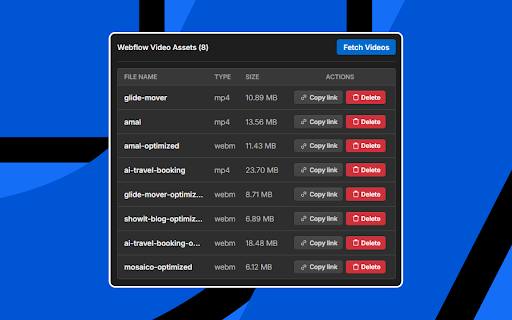
Lists all video assets from the Webflow Designer. Allows copying their links and deleting them.
As of June 2026, Video Information Extractor for Webflow has 38 users and a 5.00/5 rating from 3 reviews in the Developer Tools category.
Usersup 52.0 percent+52.0%
38
38
Ratingno change0%
5.00
3 reviews
Reviewsno change0%
3
Version
0.0.1
Manifest V3
History
8 snapshotsTracking since Apr 1, 2026.
View as table
| Date | Users | Rating | Reviews | Version |
|---|---|---|---|---|
| Apr 1, 2026 | 25 | 5.00 | 3 | 0.0.1 |
| Apr 17, 2026 | 26 | 5.00 | 3 | 0.0.1 |
| Apr 24, 2026 | 29 | 5.00 | 3 | 0.0.1 |
| May 1, 2026 | 30 | 5.00 | 3 | 0.0.1 |
| May 9, 2026 | 31 | 5.00 | 3 | 0.0.1 |
| May 17, 2026 | 54 | 5.00 | 3 | 0.0.1 |
| May 26, 2026 | 35 | 5.00 | 3 | 0.0.1 |
| Jun 5, 2026 | 32 | 5.00 | 3 | 0.0.1 |
| Now | 38 | 5.00 | 3 | 0.0.1 |
Permissions & access
- Permissions
- scripting
- Host access
- *://*.design.webflow.com/*
Screenshots

About
Webflow is an amazing design tool, but the default asset panel often hides video-specific details. Typically, accessing this raw asset data requires setting up the complex Webflow Data API—a major hurdle if you aren't a developer.

Video Information Extractor for Webflow eliminates that technical barrier. It gives you "API-level" access to your video files without requiring any API keys, setup, or coding knowledge. It streamlines your workflow by providing a dedicated panel that lists every video file in your current project.

Key Features:
- 📄 Instant Asset List: Automatically fetches and lists all video files (MP4, WebM, MOV, etc.) in your project.
- 🔗 One-Click Copy: Get the direct CDN URL for any video instantly. Perfect for using in custom code embeds or external players.
- 📏 Size & Type Info: See file sizes (in MB) and file types at a glance to help you optimize your site's performance.
- 🗑️ Quick Delete: Remove unused or duplicate video assets directly from the extension interface to keep your project clean.
- 🔒 Secure & Private: Runs entirely within your browser. No data is sent to external servers. It only interacts with the specific Webflow Designer tab you are working on.

Who is this for?
- Webflow Developers who need direct video links for custom code.
- Designers who need to audit file sizes for site optimization.
- Anyone who wants a faster way to manage media in Webflow.

How to use:
1. Open your project in the Webflow Designer.
2. Click the extension icon in the toolbar.
3. Click "Fetch Videos" to see your assets.
Technical
- Version
- 0.0.1
- Manifest
- V3
- Size
- 14.43KiB
- Min Chrome
- 88
- Languages
- 1
- Featured
- No
Metadata
- ID
- khkagiaafciefiminfjcohefpeimfdkf
- Developer ID
- u9846fd793f9d6f26ee9833bcdd03c256
- Developer Email
- [email protected]
- Created
- Jan 28, 2026
- Last Updated (Store)
- Jan 28, 2026
- Last Scraped
- Jun 5, 2026
- Website
- —
- Support URL
- —
- Privacy Policy
- —
Similar extensions
Alternatives to Video Information Extractor for Webflow, ranked by description similarity.

Flowdrive Webflow CMS Widget
Adds a button inside Webflow CMS fields.
11

Media Hunter - Pro Assets Toolkit
Detect and download images from any webpage. Hover to save instantly or bulk download all assets with filters.
3
★ 5.0

Webflow Extension Minimizer
Minimize, resize, and manage your Webflow Designer extension.
21
★ 5.0

Webflow Attribute Editor
Visual attribute editor for Webflow. Edit attributes in a sleek modal with instant updates in the Designer.
22
★ 5.0

Flowgiri - Webflow chrome extension
Just Copy & Paste Webflow components and start building your website easily, and effortlessly with Flowgiri Chrome Extension.
781
★ 5.0

Cloud Canal Extension for Webflow
Build web apps inside the Webflow Designer with Cloud Canal, an ecosystem of tools to supercharge your Webflow development process.
12
★ 5.0

Webflow Optimize Exporter
Export all Webflow Optimize experiment data with AI-powered analysis and PDF reports
7

Extract video playback link
Web media sniffing tool
3.0K
★ 3.9
Data sourced from the Chrome Web Store · last verified Jun 5, 2026.