
Copy the text from the search box dropdown list
Copy the select element and Google, Bing, Baidu engines, and copy the content of the search suggestion keyword dropdown menu related
As of June 2026, Copy the text from the search box dropdown list has 1,000 users and a 3.50/5 rating from 6 reviews in the Productivity category.
Usersno change0%
1.0K
1,000
Ratingno change0%
3.50
6 reviews
Reviewsno change0%
6
Version
2.1
Manifest V3
History
2 snapshotsTracking since Apr 23, 2026.
View as table
| Date | Users | Rating | Reviews | Version |
|---|---|---|---|---|
| Apr 23, 2026 | 1.0K | 3.50 | 6 | 2.1 |
| May 12, 2026 | 1.0K | 3.50 | 6 | 2.1 |
| Now | 1.0K | 3.50 | 6 | 2.1 |
Permissions & access
- Permissions
- sidePanelcontextMenusscriptingactiveTab
- Host access
- None declared
Screenshots


About
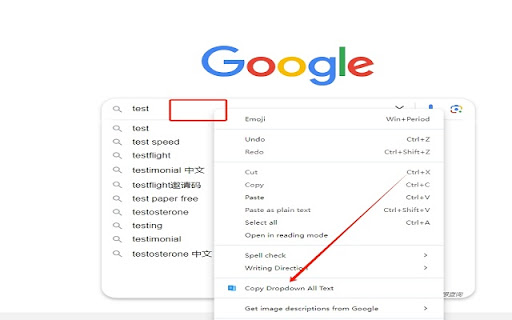
Copy the select element, Google, bing, baidu, search engine all text drop-down box copied to the clipboard.

When you wish to copy the dropdown box or the predictive text from the search box, this is an efficient way to do so. For example, suppose you are visiting various search engines, such as Google, Bing, Baidu, and YouTube that are compatible with this software, and you wish to swiftly copy all options in the dropdown box to the clipboard. You can follow these steps:

1、Open the search engine webpage from which you would like to copy.
2、Enter the keywords in the search box, and the related search suggestions will appear in the dropdown box.
3、Place your cursor over the input area, right-click, and find the "Copy Dropdown All Text" menu and click on it.
4、In this way, you can copy the content of the related search suggestions in the dropdown box to your clipboard.
Technical
- Version
- 2.1
- Manifest
- V3
- Size
- 458KiB
- Min Chrome
- 88
- Languages
- 13
- Featured
- No
Metadata
- ID
- khjplfeenogbefkbcaehnbdangjalaoh
- Developer ID
- u12fb2e0ea1f65e3bd9b22db60c65cc13
- Developer Email
- [email protected]
- Created
- Jan 8, 2024
- Last Updated (Store)
- Aug 12, 2024
- Last Scraped
- Jun 7, 2026
- Website
- copysearchdropdown.com
- Support URL
- https://copysearchdropdown.com
- Privacy Policy
- —
Similar extensions
Alternatives to Copy the text from the search box dropdown list, ranked by description similarity.

Dropdown Copy Helper / 下拉复制助手
A Chrome extension to copy all dropdown options from input fields on supported websites like Google and YouTube. 从支持网站的下拉选项中复制所有内容。
19

Search Scribe
Boost your keyword research with Search Scribe. Instantly copy search suggestions from Google, Bing, and YouTube.
11
★ 5.0

Selection Search - Quick Search
Easily search 🔎 for selected text in different search engines.
159
★ 4.4

Context Search
Search for a highlighted word on selected websites
6

SearchKeywordShare
This tool makes search convenient by sharing keyword across multiple search engines, including Google, Bing, Amazon, ChatGPT, etc.
—

Select to Search – AI Search for Selected Text (ChatGPT, Claude, Google)
Search highlighted text instantly with ChatGPT, Claude, or Google. No copy-paste, no tab switching.
57
★ 5.0

CopyKeywords - Copy Google Search Suggestions
Copy Google search keywords and suggestions with Alt+C hotkey or right-click menu
52

Context Search
An enhanced context menu search. Add and customize multiple search engines to your right-click pop-up menu.
2.0K
★ 5.0
Data sourced from the Chrome Web Store · last verified Jun 7, 2026.