
YouTube Screenshot Gallery
Take screenshots of YouTube videos with Alt+S shortcut. Gallery appears above recommended videos.
As of June 2026, YouTube Screenshot Gallery has 17 users and a 5.00/5 rating from 1 reviews in the Education category.
Usersup 41.7 percent+41.7%
17
17
Ratingno change0%
5.00
1 reviews
Reviewsno change0%
1
Version
1.3
90-day change · In the last 90 days this extension 2 version updates.
History
8 snapshotsTracking since Apr 20, 2026.
View as table
| Date | Users | Rating | Reviews | Version |
|---|---|---|---|---|
| Apr 20, 2026 | 12 | 5.00 | 1 | 1.1 |
| May 5, 2026 | 14 | 5.00 | 1 | 1.1 |
| May 10, 2026 | 17 | 5.00 | 1 | 1.2 |
| May 16, 2026 | 15 | 5.00 | 1 | 1.2 |
| May 22, 2026 | 15 | 5.00 | 1 | 1.3 |
| May 29, 2026 | 17 | 5.00 | 1 | 1.3 |
| Jun 4, 2026 | 16 | 5.00 | 1 | 1.3 |
| Jun 10, 2026 | 20 | 5.00 | 1 | 1.3 |
| Now | 17 | 5.00 | 1 | 1.3 |
Changelog
- May 16, 2026description
📸 **YouTube Screenshot Gallery & Drag-and-Drop**
Enhance your note-taking on any device — including Android! This extension adds a dedicated screenshot button directly to the YouTube player controls.

✨ **Features**

* 📷 **One-Click Capture** — Instantly grab the current video frame.
* 🖼️ **Instant Gallery** — Screenshots appear in a convenient gallery below the player.
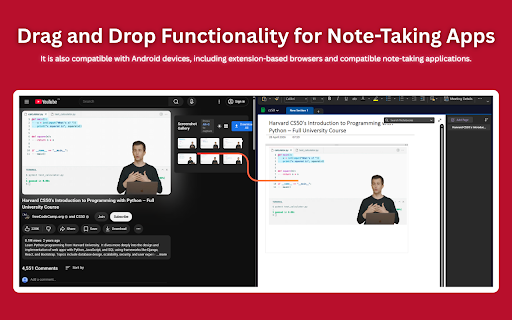
* 📝 **Direct Drag & Drop** — Simply drag screenshots from the gallery into your notes app (or other compatible apps).
* 🚫 **No File Saving Needed** — Add visuals to your notes without cluttering your downloads folder.
* 📱 **Kiwi Browser Tested** — Designed for Android browsers that support extensions, such as Kiwi Browser.
* 📦 **Batch Download Support** — You can now download multiple screenshots at the same time.

⚠️ **Android / Split View Notes**

* 📐 On some Android devices, the extension may not position itself correctly in split-screen mode and could overlap the YouTube player.
* 🔄 If this happens, simply exit split view and use the **Dock Alignment** button next to the screenshot gallery to reposition it properly.
* ❗ Avoid pressing the **Dock Alignment** button repeatedly on Android while in split view. In some cases, the button may disappear temporarily, and you’ll need to refresh the page to restore it.
* 🧩 Drop compatibility depends on your specific note-taking app.

** If you don't see any dock on the screen just refresh the tab.
YouTube Screenshot Gallery & Drag-and-Drop
Enhance your note-taking on Any device including Android! This extension adds a dedicated screenshot button to the YouTube player controls.
One-Click Capture: Instantly grab the current video frame.
Instant Gallery: Screenshots appear in a convenient gallery below the player.
Direct Drag & Drop: Simply drag screenshots from the gallery and drop them into your notes app (or other compatible apps).
No File Saving Needed: Streamlines adding visuals to your notes without cluttering downloads.
Kiwi Browser Tested: Designed for Android browsers supporting extensions like Kiwi.
Note: Drop compatibility depends on your specific note-taking app.
Now comes with its Own taking feature.
- May 5, 2026description
YouTube Screenshot Gallery & Drag-and-Drop
Enhance your note-taking on Any device including Android! This extension adds a dedicated screenshot button to the YouTube player controls.
One-Click Capture: Instantly grab the current video frame.
Instant Gallery: Screenshots appear in a convenient gallery below the player.
Direct Drag & Drop: Simply drag screenshots from the gallery and drop them into your notes app (or other compatible apps).
No File Saving Needed: Streamlines adding visuals to your notes without cluttering downloads.
Kiwi Browser Tested: Designed for Android browsers supporting extensions like Kiwi.
Note: Drop compatibility depends on your specific note-taking app.
📸 **YouTube Screenshot Gallery & Drag-and-Drop**
Enhance your note-taking on any device — including Android! This extension adds a dedicated screenshot button directly to the YouTube player controls.

✨ **Features**

* 📷 **One-Click Capture** — Instantly grab the current video frame.
* 🖼️ **Instant Gallery** — Screenshots appear in a convenient gallery below the player.
* 📝 **Direct Drag & Drop** — Simply drag screenshots from the gallery into your notes app (or other compatible apps).
* 🚫 **No File Saving Needed** — Add visuals to your notes without cluttering your downloads folder.
* 📱 **Kiwi Browser Tested** — Designed for Android browsers that support extensions, such as Kiwi Browser.
* 📦 **Batch Download Support** — You can now download multiple screenshots at the same time.

⚠️ **Android / Split View Notes**

* 📐 On some Android devices, the extension may not position itself correctly in split-screen mode and could overlap the YouTube player.
* 🔄 If this happens, simply exit split view and use the **Dock Alignment** button next to the screenshot gallery to reposition it properly.
* ❗ Avoid pressing the **Dock Alignment** button repeatedly on Android while in split view. In some cases, the button may disappear temporarily, and you’ll need to refresh the page to restore it.
* 🧩 Drop compatibility depends on your specific note-taking app.

** If you don't see any dock on the screen just refresh the tab.
- May 5, 2026short_description
Take screenshots of YouTube videos and view them in a gallery below the player helps user to make better notes
Take screenshots of YouTube videos with Alt+S shortcut. Gallery appears above recommended videos.
- May 5, 2026name
YouTube Drag Shot Gallery
YouTube Screenshot Gallery
Permissions & access
- Permissions
- None declared
- Host access
- None declared
Screenshots



About
YouTube Screenshot Gallery & Drag-and-Drop
Enhance your note-taking on Any device including Android! This extension adds a dedicated screenshot button to the YouTube player controls.
One-Click Capture: Instantly grab the current video frame.
Instant Gallery: Screenshots appear in a convenient gallery below the player.
Direct Drag & Drop: Simply drag screenshots from the gallery and drop them into your notes app (or other compatible apps).
No File Saving Needed: Streamlines adding visuals to your notes without cluttering downloads.
Kiwi Browser Tested: Designed for Android browsers supporting extensions like Kiwi.
Note: Drop compatibility depends on your specific note-taking app.
Now comes with its Own taking feature.
Technical
- Version
- 1.3
- Manifest
- —
- Size
- 1.46MiB
- Min Chrome
- 88
- Languages
- 1
- Featured
- No
Metadata
- ID
- khiappiglccagdjclhkhdpdifnjmngok
- Developer ID
- ud9a64b4d222809c818466ce961f73943
- Developer Email
- [email protected]
- Created
- Apr 30, 2025
- Last Updated (Store)
- May 15, 2026
- Last Scraped
- Jun 10, 2026
- Website
- —
Similar extensions
Alternatives to YouTube Screenshot Gallery, ranked by description similarity.
Video-Notes
Your personal youtube notes making assistant
135
★ 5.0

ScreenShot Snap
Capture a ScreenShot of a video and Convert it to Pdf or download it as Image
290
★ 4.1

ClickShot - Note-taking for lectures
ClickShot makes it easy to take notes while watching video lectures.
Hit a single hotkey to grab a screenshot of the current frame…
16
★ 5.0

YouTube Notes
Take timestamped notes on YouTube videos.
10
★ 5.0

EzNote - YouTube Note Taking Extension
EzNote Chrome Extension for easy note-taking
4

LectureSnap Sidekick
Capture YouTube video frames instantly with Shift+S. Perfect for taking notes from online lectures without pausing.
5
★ 5.0

SnapStream: Screenshot for YouTube
Capture video frames and transform them into convenient PDF notes, perfect for students and professionals.
102
★ 1.0

LectureCapture Tube
Capture, save, and manage YouTube video screenshots with timestamps.
122
★ 4.2
Data sourced from the Chrome Web Store · last verified Jun 10, 2026.