
Simple Exporter for Gemini™
Export Gemini chats to HTML, JSON, and Markdown with a single click.
As of June 2026, Simple Exporter for Gemini™ has 535 users and a 5.00/5 rating from 2 reviews in the Productivity category.
Usersup 68.2 percent+68.2%
535
535
Ratingno change0%
5.00
2 reviews
Reviewsno change0%
2
Version
1.0.2
Manifest V3
History
5 snapshotsTracking since Apr 20, 2026.
View as table
| Date | Users | Rating | Reviews | Version |
|---|---|---|---|---|
| Apr 20, 2026 | 318 | 5.00 | 2 | 1.0.2 |
| May 5, 2026 | 608 | 5.00 | 2 | 1.0.2 |
| May 15, 2026 | 925 | 5.00 | 2 | 1.0.2 |
| May 29, 2026 | 459 | 5.00 | 2 | 1.0.2 |
| Jun 9, 2026 | 494 | 5.00 | 2 | 1.0.2 |
| Now | 535 | 5.00 | 2 | 1.0.2 |
Permissions & access
- Permissions
- activeTabdownloads
- Host access
- None declared
Screenshots



About
One-Click Export for Your Gemini Conversations.

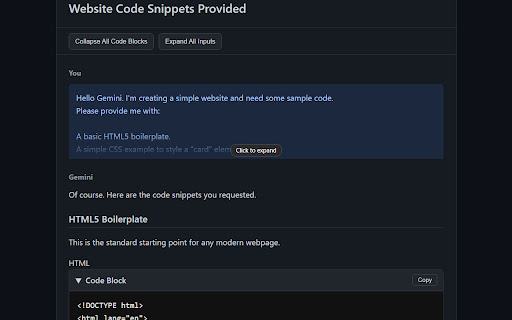
Simple Exporter for Gemini™ is an efficient tool for archiving and repurposing your Gemini conversations. With a single click, export any chat into three formats: HTML, JSON, or Markdown.

---------- IMPORTANT NOTE & USAGE TIP ----------
To ensure a complete export of very long conversations, please scroll to the very top of the chat before using the extension. This loads all messages, allowing the extension to capture the full conversation.

---------- FEATURES ----------
* HTML (Interactive Archive):
Saves a rich, interactive HTML file with dark mode, code copying, and collapsible sections. Perfect for creating readable archives and for sharing.

* Markdown (For Content Creators & Developers):
Creates clean, portable Markdown, ready for technical documentation or personal notes.

* JSON (For Data & Backup):
Exports a structured JSON file with the conversation data. Ideal for backups, data analysis, or use in other applications.

---------- PRIVACY & SECURITY ----------
- 100% Local Processing: All data processing occurs entirely within your browser.
- No Data Collection: Your chat history and personal data are never collected, stored, or transmitted.
- Open Source: The full source code is available for review, providing complete transparency.

---------- USAGE ----------
1. Navigate to an active Gemini chat page.
2. Click the extension icon in your toolbar.
3. Select your desired export format.
4. The file will be downloaded via your browser's "Save As" dialog.

---
Disclaimer: This extension is not developed, affiliated with, endorsed, or sponsored by Google. All trademarks related to Gemini™ are the property of Google LLC.
Technical
- Version
- 1.0.2
- Manifest
- V3
- Size
- 307KiB
- Min Chrome
- 88
- Languages
- 1
- Featured
- No
Metadata
- ID
- khgjgbneefjbbocjhakfamgmcjpkmoej
- Developer ID
- ue0c68c2462f7e9f866dafd6a54dc6c89
- Developer Email
- [email protected]
- Created
- Jun 18, 2025
- Last Updated (Store)
- Jul 9, 2025
- Last Scraped
- Jun 9, 2026
- Website
- —
- Support URL
- —
Similar extensions
Alternatives to Simple Exporter for Gemini™, ranked by description similarity.

GEMINI TO PDF, DOCX, MARKDOWN, CSV, HTML AND ETC. FREE FOREVER
Export Gemini AI conversations to multiple formats: PDF, HTML, Markdown, DOCX, Text, CSV, JSON - Free Forever
350
★ 5.0

Export Gemini Chat
Export Gemini discussions to PDF format, including specific questions and answers.
46

Gemini Chat Copy
One-click copy entire Gemini conversation to Markdown
302
★ 3.5

Gemini Chat Exporter
Export Gemini chats to HTML/Markdown. Batch delete conversations
42
★ 5.0

Gemini Chat Exporter
Use this extension to export Gemini chats in PDF, Text, CSV, and Excel formats instantly.
9.0K
★ 3.1

Gemini Conversation Saver
Save Gemini chat history with images to JSON, Markdown, or PDF.
252
★ 5.0

Gemini Chat Exporter
导出您与 Google Gemini 的对话内容,支持 Markdown、TXT、JSON 和 PDF 格式
20

Gemini Chat Exporter
Export your Gemini AI chat conversations as Markdown or directly to Notion
69
★ 5.0
Data sourced from the Chrome Web Store · last verified Jun 9, 2026.