
FocusTube
Helps you watch only learning content instead of random videos on YouTube.
As of June 2026, FocusTube has 7 users and a 5.00/5 rating from 1 reviews in the Productivity category.
Usersup 16.7 percent+16.7%
7
7
Ratingno change0%
5.00
1 reviews
Reviewsno change0%
1
Version
1.0.0
Manifest V3
History
6 snapshotsTracking since Apr 18, 2026.
View as table
| Date | Users | Rating | Reviews | Version |
|---|---|---|---|---|
| Apr 18, 2026 | 6 | 5.00 | 1 | 1.0.0 |
| Apr 27, 2026 | 9 | 5.00 | 1 | 1.0.0 |
| May 7, 2026 | 8 | 5.00 | 1 | 1.0.0 |
| May 14, 2026 | 9 | 5.00 | 1 | 1.0.0 |
| May 23, 2026 | 6 | 5.00 | 1 | 1.0.0 |
| Jun 5, 2026 | 8 | 5.00 | 1 | 1.0.0 |
| Now | 7 | 5.00 | 1 | 1.0.0 |
Permissions & access
- Permissions
- storagewebNavigation
- Host access
- *://www.youtube.com/*, *://youtube.com/*
Screenshots

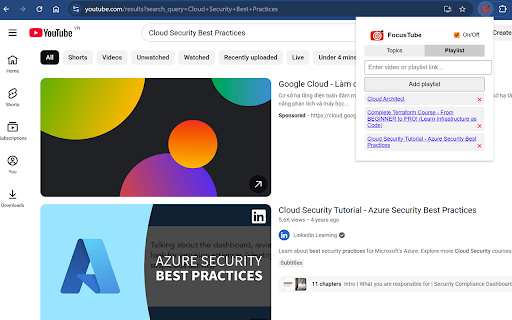
About
FocusTube Chrome Extension – User Guide

FocusTube is a Chrome extension designed to help you stay focused on learning by automatically redirecting you to educational or productivity-focused YouTube searches.

Installation

Go to the Chrome Web Store.

Search for FocusTube.

Click Add to Chrome and confirm.

Getting Started

Once installed, click the FocusTube icon in your Chrome toolbar.

Toggle the extension ON to activate it.

Add your list of learning queries in the extension’s settings (e.g., "Python tutorial", "History documentary", "Math tricks").

How It Works

FocusTube automatically redirects your YouTube homepage visits to a random learning video based on your saved queries.

Automatic Redirection

When you navigate to youtube.com (homepage only):

FocusTube checks if the extension is enabled.

It selects a random query from your saved learning queries.

It redirects your tab to the search results page for that query.

This ensures that every time you visit YouTube, you are encouraged to view content aligned with your learning goals.

Manual Random Search

You can manually trigger a random learning search by clicking the “Go To Random Query” button in the extension popup.

This will take you directly to a random learning search on YouTube from your saved queries.

Managing Learning Queries

Open the FocusTube popup.

Click Settings or Manage Queries.

Add or remove search queries to customize your learning experience.

Notes

FocusTube only works on the main YouTube homepage (youtube.com/). It does not redirect other sites or video pages.

Ensure the extension is enabled for automatic redirection to work.

Queries are stored locally on your browser for privacy.
Technical
- Version
- 1.0.0
- Manifest
- V3
- Size
- 427KiB
- Min Chrome
- 88
- Languages
- 1
- Featured
- No
Metadata
- ID
- khfbdhbhnoibjpgncbnpccekkkljgikn
- Developer ID
- ua7d2901512aede15f9cdbddcb1b59da0
- Developer Email
- [email protected]
- Created
- Nov 20, 2025
- Last Updated (Store)
- Nov 20, 2025
- Last Scraped
- Jun 5, 2026
- Website
- —
- Support URL
- —
- Privacy Policy
- —
Similar extensions
Alternatives to FocusTube, ranked by description similarity.

FocusTube
Filter YouTube recommendations based on your goals.
—
★ 5.0

FocusTube: Skip Ads & Recommendations
Stay focused on YouTube by hiding distractions and skipping ads automatically.
18
★ 3.7

FocusTube – YouTube Distraction Blocker
Hide distractions and stay focused on the current Youtube video with Focus and Strict Focus modes.
5
★ 5.0

FocusTube
FocusTube: Stay Focused on What Matters
Tired of getting distracted by endless YouTube recommendations, comments, or other…
14
★ 4.7

YT Focus - Learning Made Easy
YouTube Without The Distractions | Focus Homepage, Hide Shorts/Comments/Recommendations and more...
1.0K
★ 5.0

FocusTube
Transform YouTube into a distraction-free, intentional learning platform
17
★ 5.0

FocusTube
A browser extension to automatically skip ads on YouTube.
—

DF Tube New (Distraction Free for YouTube™)
Allow yourself to focus while using YouTube™ for work, recreation or education.
20.0K
★ 3.3
Data sourced from the Chrome Web Store · last verified Jun 5, 2026.