
TabEater
AI-powered tab manager with smart grouping, duplicate detection, and Auto-Pilot to organize tabs automatically.
As of June 2026, TabEater has 4 users and a 5.00/5 rating from 1 reviews in the Workflow & Planning category.
Usersup 33.3 percent+33.3%
4
4
Ratingno change0%
5.00
1 reviews
Reviewsno change0%
1
Version
1.0.2
Manifest V3
History
5 snapshotsTracking since Apr 27, 2026.
View as table
| Date | Users | Rating | Reviews | Version |
|---|---|---|---|---|
| Apr 27, 2026 | 3 | 5.00 | 1 | 1.0.2 |
| May 7, 2026 | 2 | 5.00 | 1 | 1.0.2 |
| May 14, 2026 | 3 | 5.00 | 1 | 1.0.2 |
| May 23, 2026 | 4 | 5.00 | 1 | 1.0.2 |
| Jun 2, 2026 | 3 | 5.00 | 1 | 1.0.2 |
| Now | 4 | 5.00 | 1 | 1.0.2 |
Permissions & access
- Permissions
- tabstabGroupsstoragesidePanelscriptingactiveTabsystem.memory
- Host access
- None declared
Screenshots


About
Stop drowning in tabs. Start focusing.
TabEater is an AI-powered Chrome extension that automatically organizes your browser tabs as you work. No more manual sorting or endless scrolling—just a clean, organized workspace.

🚀 KEY FEATURES
🤖 Auto-Pilot Mode
Set it and forget it. TabEater continuously monitors your tabs and automatically groups related pages by domain and topic in the background. Open 20 GitHub tabs? They're instantly organized together. Browsing multiple Google Docs? Grouped automatically. Your browser stays clean without you lifting a finger.
✨ Smart Organize
One-click tab grouping by domain. Turn chaos into clarity instantly—all your related tabs (GitHub, Stack Overflow, Google Docs, etc.) are automatically sorted into clean groups.
🔍 Duplicate Detection
Find and close duplicate tabs in seconds. TabEater identifies exact duplicates across all your windows, helping you reclaim memory and reduce clutter.
💬 Tab Chat
Ask questions about your open tabs using AI. "What's the main topic of my research tabs?" or "Summarize the articles I have open." Get instant insights without reading every page.
📱 Side Panel
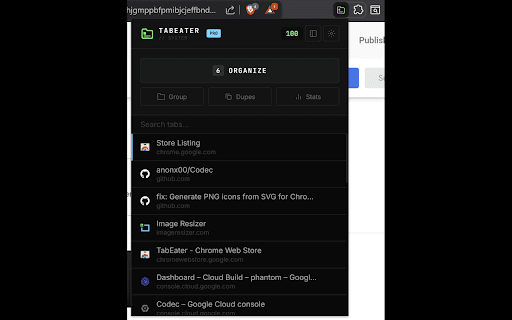
Full command center in Chrome's side panel. Manage all your tabs without leaving your current page—search, organize, and clean up from a persistent sidebar.

🧠 AI PROVIDERS
TabEater supports multiple AI options:
🌟 Google Gemini
Fast and reliable | Free API key available
⚡ OpenAI GPT
Powerful analysis | Pay-as-you-go pricing
🎯 Anthropic Claude
Advanced reasoning | Pay-as-you-go pricing
Configure your preferred AI provider in Options. Get free API keys from Google Gemini at aistudio.google.com/app/apikey
🔒 Local AI Option (Advanced Users)
Chrome Gemini Nano runs entirely on your device for maximum privacy. Requires Chrome 128+ (Dev/Canary) or Chrome 131+ (Stable with high-end hardware), 8GB+ RAM, and ~2GB disk space. Most users should use cloud AI providers with their own API keys.

⌨️ KEYBOARD SHORTCUTS
Ctrl+Shift+T (Cmd+Shift+T on Mac) | Quick Actions
Ctrl+Shift+E (Cmd+Shift+E on Mac) | Command Center

🛡️ PRIVACY GUARANTEE
Your browsing data belongs to you.
🚫 No tracking
We never collect or sell your browsing history
🔐 Direct API calls
Requests go directly from your browser to your chosen provider
💾 Local storage
API keys are stored only on your device
📖 Open source
Audit the code yourself on GitHub

💎 PRICING
Free to try. Pay once if you love it.
🆓 Free Version
20 AI-powered actions per day during 7-day trial. Full features, limited usage.
⭐ Pro Version | $6.00 AUD one-time payment
Unlimited AI grouping | Unlimited Auto-Pilot mode | Lifetime access | No subscriptions
Note: You'll need your own API key for cloud AI providers (free tiers available from Google Gemini)

👥 PERFECT FOR
💻 Developers
Managing dozens of documentation tabs
📚 Researchers
Organizing sources and references
🎓 Students
Juggling assignments and study materials
⚡ Power users
Who want a clean, distraction-free browser
🌐 Everyone
Tired of tab chaos and endless searching

🎯 WHY TABEATER?
Other tab managers require manual work. TabEater works for you.
🎨 Action-first design
No complex charts or confusing dashboards
🖥️ Native feel
Integrates seamlessly with Chrome's UI
🧘 Smart, not aggressive
Organizes without closing or disrupting your work
🔐 Privacy-first
Your data stays yours

📦 GET STARTED
Step 1 | Install TabEater from Chrome Web Store
Step 2 | Get a free API key from Google Gemini, OpenAI, or Anthropic
Step 3 | Configure your API key in TabEater Options
Step 4 | Start organizing!

🌟 GET BACK TO WORK
Stop managing tabs. Start focusing on what matters.
Technical
- Version
- 1.0.2
- Manifest
- V3
- Size
- 203KiB
- Min Chrome
- 88
- Languages
- 1
- Featured
- No
Metadata
- ID
- khehjgmppbfpmibjcjeffbndjcnbogfj
- Developer ID
- u5ba2d2dc730b61567015ab2a5462ac36
- Developer Email
- [email protected]
- Created
- Dec 8, 2025
- Last Updated (Store)
- Dec 17, 2025
- Last Scraped
- Jun 2, 2026
- Support URL
- https://anonx00.github.io/tabeater/#
Similar extensions
Alternatives to TabEater, ranked by description similarity.

Tab-it
Organize 100+ tabs instantly. Smart grouping, Tab scrolling, crash recovery, and RAM saving. Stay focused and clutter-free.
90
★ 5.0

TabMerge
Auto-group tabs by topic. Collapse clutter. Breathe again.
32
★ 5.0

TabSpace
AI-powered tab workspace with focus mode and session control.
3

Group My Tabs
Hybrid tab organization through domain-based rules and AI-powered categorization
7

Smart Tab Groups Manager for Chrome
Organize and manage your chrome tabs automatically into smart groups.
21

TabGenius – Non-Intrusive Tab Management
Declutter your browser tabs with AI-powered grouping, filtering & bulk closing.
37
★ 2.0

TabAI — AI Task manager for All Your Tools
Collect tasks from Notion, Gmail, Slack & 1000+ tools. Stay focused with AI knowing how you work, and reduce workspace chaos.
3.0K
★ 4.8

TabSage
Organizes, summarizes, filters, and manages open tabs using AI.
2
Data sourced from the Chrome Web Store · last verified Jun 2, 2026.