
YouTube to MP3 Converter
Convert YouTube videos to MP3. Build queues, import playlists, and batch download audio locally.
As of June 2026, YouTube to MP3 Converter has — users in the Productivity category.
Usersno change0%
—
—
Ratingno change0%
—
— reviews
Reviewsno change0%
—
Version
1.0.0
Manifest V3
History
1 snapshotsTracking since Jun 29, 2026.
Not enough history yet for this metric — the chart fills in as we collect more snapshots.
View as table
| Date | Users | Rating | Reviews | Version |
|---|---|---|---|---|
| Jun 29, 2026 | — | — | — | 1.0.0 |
| Now | — | — | — | 1.0.0 |
Permissions & access
- Permissions
- activeTabstoragedownloadsscripting
- Host access
- https://www.youtube.com/*, https://m.youtube.com/*, https://youtu.be/*, https://*.googlevideo.com/*, https://ytmp3-payments-prod.yazanbaker.workers.dev/*
Screenshots



About
YouTube to MP3 Converter lets you save audio from YouTube videos as MP3 files directly in your browser.

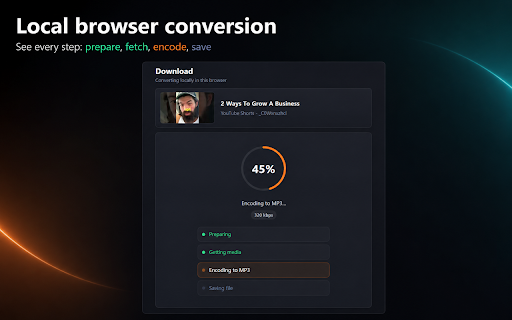
It is built for speed, simplicity, and local conversion. Open a YouTube video, click the extension, choose your quality, and download an MP3.

Key features:
- One-click YouTube to MP3 conversion
- High-quality MP3 output up to 320 kbps
- Local browser-based conversion
- No account required for single video downloads
- Queue videos before downloading
- Import YouTube playlists into your queue
- Batch download playlist or queued videos
- Simple progress screen for each download
- Works with regular YouTube videos and Shorts
- Keeps single video downloads free

Free plan:
- Unlimited single video MP3 downloads
- Add videos to your queue
- Import playlist links
- Start up to 3 batch downloads per day

Pro plan:
- Unlimited queue downloads
- Unlimited playlist batch downloads
- Monthly and yearly plans available

How it works:
1. Open a YouTube video.
2. Click the YouTube to MP3 Converter extension.
3. Choose MP3 quality.
4. Click Download MP3.

For playlists:
1. Open the queue page.
2. Paste a YouTube playlist URL.
3. Add the playlist to your queue.
4. Start the batch download.

This extension converts audio locally in your browser where possible. Single video downloads do not require an account.

Please use this extension only for content you own, content you have permission to download, or content that is legally available for offline use. You are responsible for following YouTube’s terms and applicable copyright laws.
Technical
- Version
- 1.0.0
- Manifest
- V3
- Size
- 10.87MiB
- Min Chrome
- 88
- Languages
- 1
- Featured
- No
Metadata
- ID
- kgfdacnkkopabjkldcngegljjnelgcgk
- Developer ID
- u54eb2ed7be183cf6ad40b7c56974bfcd
- Developer Email
- [email protected]
- Created
- Jun 28, 2026
- Last Updated (Store)
- Jun 28, 2026
- Last Scraped
- Jun 29, 2026
- Website
- —
- Support URL
- —
Data sourced from the Chrome Web Store · last verified Jun 29, 2026.