
Laser Eyes
Outline every element on your website with the help of Laser Eyes
As of May 2026, Laser Eyes has 614 users and a 5.00/5 rating from 2 reviews in the Developer Tools category.
Usersup 10.8 percent+10.8%
614
614
Ratingno change0%
5.00
2 reviews
Reviewsno change0%
2
Version
1.0
Manifest V3
History
2 snapshotsTracking since Apr 24, 2026.
View as table
| Date | Users | Rating | Reviews | Version |
|---|---|---|---|---|
| Apr 24, 2026 | 554 | 5.00 | 2 | 1.0 |
| May 21, 2026 | 592 | 5.00 | 2 | 1.0 |
| Now | 614 | 5.00 | 2 | 1.0 |
Permissions & access
- Permissions
- storageactiveTabscripting
- Host access
- None declared
Screenshots
About
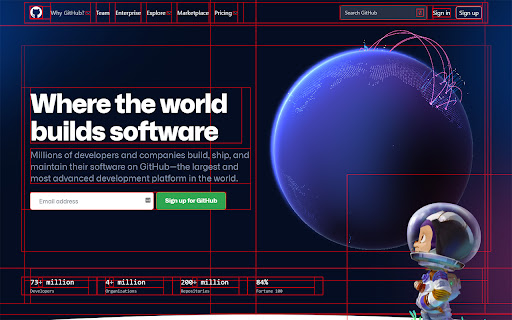
An extension that aids Front-end Developers by visualizing elements in the DOM. Activating Laser Eyes will inject custom CSS onto the current tab, allowing developers to see how elements align and stack up. By using the CSS "outline" property, as opposed to "border", the elements won't grow in size and the original alignment is preserved. The CSS that Laser Eyes injects is customizable and synced across multiple browsers.
Technical
- Version
- 1.0
- Manifest
- V3
- Size
- 28.72KiB
- Min Chrome
- 88
- Languages
- 1
- Featured
- Yes
Metadata
- ID
- kfpknakmpilhdaoiecgelegmbadacmod
- Developer ID
- u837580c51c6ea763341f1cd020911288
- Developer Email
- [email protected]
- Created
- Feb 24, 2022
- Last Updated (Store)
- Feb 24, 2022
- Last Scraped
- May 21, 2026
- Website
- layerworks.com
- Support URL
- https://github.com/dthunziker/laser-eyes
- Privacy Policy
- —
Similar extensions
Alternatives to Laser Eyes, ranked by description similarity.

Outline HTML Element
Outlining each HTML element to help audit your CSS
41

CSS Debugger
Instantly debug CSS layouts by adding colorful outlines to HTML elements. Easily identify and inspect elements with a simple click.
617
★ 5.0

Focus: The Elements - DOM Inspector & Editor
DOM Inspector & Editor, inspect and edit HTML element styles directly on any page.
63
★ 5.0

Slash Mark — LayerFX Interface Manager
Instantly add modern glassmorphism and background blur effects to any webpage element using clicks, presets, or CSS selectors.
—

StyleLens
StyleLens captures typography details from page elements, including transient tooltips and popovers.
2

CSS Lens
Inspect, edit, and export styles with a clean, workflow-first panel.
6
★ 5.0

CSS Debug with Pesticide
Toggle outlines on all elements to help debug CSS
431
★ 5.0

CSS Lens
Highlights page elements with outlines and backgrounds.
174
★ 5.0
Data sourced from the Chrome Web Store · last verified May 21, 2026.