
Anywhere Search
Add a search bar to all pages.
As of June 2026, Anywhere Search has 11 users in the Productivity category.
Usersup 83.3 percent+83.3%
11
11
Ratingno change0%
—
— reviews
Reviewsno change0%
—
Version
1.1.3
Manifest V3
History
3 snapshotsTracking since Apr 21, 2026.
View as table
| Date | Users | Rating | Reviews | Version |
|---|---|---|---|---|
| Apr 21, 2026 | 6 | — | — | 1.1.3 |
| May 11, 2026 | 9 | — | — | 1.1.3 |
| Jun 6, 2026 | 15 | — | — | 1.1.3 |
| Now | 11 | — | — | 1.1.3 |
Permissions & access
- Permissions
- tabsscriptingstorage
- Host access
- <all_urls>
Screenshots

About
Add a search bar to all pages.

By default, you can open the search bar with Alt+S.
By default, you can open the settings popup using Alt+Shift+S.

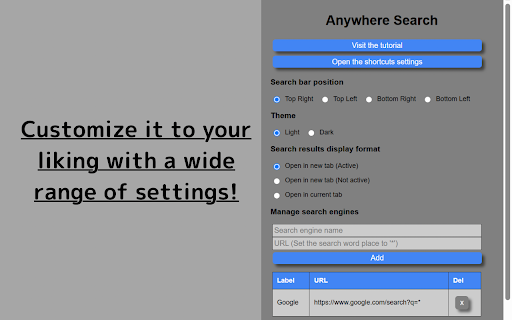
The Settings pop-up lets you set the location and appearance of the search bar, how search results are displayed, search engines, and more.

With the search bar displayed, press '/' to move to the search bar.
In the search bar, you can use the '↑' and '↓' keys to switch between registered search engines, and 'Enter' to search.
Press 'Esc' to leave the search bar.

By adding this extension, you can reduce the troublesome mouse operations and enjoy a smooth, easy-to-use internet surfing!

[v1.1.0~]
You can import/export settings!
You can keep your settings even after changing or reinstalling your browser!
Technical
- Version
- 1.1.3
- Manifest
- V3
- Size
- 26.34KiB
- Min Chrome
- 88
- Languages
- 2
- Featured
- No
Metadata
- ID
- kfmamlgbolcnplllcjpkmjfjmgcjghml
- Developer ID
- u85eddbffd6c449860ad9f5a353c11323
- Developer Email
- [email protected]
- Created
- Mar 21, 2025
- Last Updated (Store)
- Apr 7, 2025
- Last Scraped
- Jun 6, 2026
- Website
- otoho.me
- Privacy Policy
- https://www.otoho.me/
Similar extensions
Alternatives to Anywhere Search, ranked by description similarity.

QuickBar
A quick searchbar, can search websites in tabs, bookmarks, histories, Raindrop and EasyNav, also can search TOC in web page.
14
★ 5.0

SearchBar.pro - search like a pro
Use smart shortcuts for quick access to images, websites, and ChatGPT queries. Find what you need faster!
14

Search Switch
Seamlessly switch from search engines to Microsoft Bing directly in the Chrome browser address bar
13

SearchBar
The most efficient way to use your favourite search engines. Search selected text, use customizable hotkeys and much more.
60.0K
★ 4.5

Selection Search - Quick Search
Easily search 🔎 for selected text in different search engines.
159
★ 4.4

Explore To Search
Your search results only from popular search engines
141
★ 5.0

All in one web searcher
Search anything on the internet easily by typing into ONE unified search box
3.0K
★ 4.5

Search Bar
A simple search bar overlay.
10
Data sourced from the Chrome Web Store · last verified Jun 6, 2026.