Interactive screen captures by HowdyGo.com
HowdyGo helps you create Interactive product demos that convert. Capture your SaaS in HTML, show them a story.
As of June 2026, Interactive screen captures by HowdyGo.com has 9,000 users and a 5.00/5 rating from 7 reviews in the Productivity category.
Usersup 350.0 percent+350.0%
9.0K
9,000
Ratingno change0%
5.00
7 reviews
Reviewsno change0%
7
Version
2.8.9
Manifest V3
90-day change · In the last 90 days this extension gained 7.0K users, 6 version updates.
History
9 snapshotsTracking since Apr 1, 2026.
View as table
| Date | Users | Rating | Reviews | Version |
|---|---|---|---|---|
| Apr 1, 2026 | 2.0K | 5.00 | 7 | 2.8.0 |
| Apr 16, 2026 | 2.0K | 5.00 | 7 | 2.8.1 |
| Apr 22, 2026 | 2.0K | 5.00 | 7 | 2.8.3 |
| Apr 26, 2026 | 2.0K | 5.00 | 8 | 2.8.5 |
| May 27, 2026 | 2.0K | 5.00 | 8 | 2.8.5 |
| Jun 1, 2026 | 2.0K | 5.00 | 8 | 2.8.6 |
| Jun 6, 2026 | 2.0K | 5.00 | 8 | 2.8.7.1 |
| Jun 10, 2026 | 2.0K | 5.00 | 8 | 2.8.9 |
| Jun 21, 2026 | 2.0K | 5.00 | 7 | 2.8.9 |
| Now | 9.0K | 5.00 | 7 | 2.8.9 |
Permissions & access
- Permissions
- activeTabstoragecookiesscriptingwebNavigationsystem.displayunlimitedStorage
- Host access
- <all_urls>
Screenshots


About
✅ Create a self-guided, interactive click through demo of your SaaS app.

✅ We capture a pixel-perfect copy of your web app that looks, feels and behaves as though the viewer is really in your app.

✅ Your prospects and customers will be immersed in a replay that they can scroll around in, hover over elements, select text and type into input boxes.

✅ You can start recording and editing your immersive demonstrations immediately by downloading the HowdyGo browser extension today! :)

⭐️ Interactive screen captures are better than a video or slide deck ⭐️

Before HowdyGo, showing off your app to prospects and leads would require you to share login details, videos and slide decks.

Leads and prospects often don't bother to login, and it can be difficult to fill your sandbox environment with data and context that shows off your app in its best light.

Videos and screenshots don't let them explore the app for themselves and engagement can be quite poor.

With HowdyGo you can capture walk-throughs of your app with demonstration data and descriptive annotations, then share the recording without making them login.

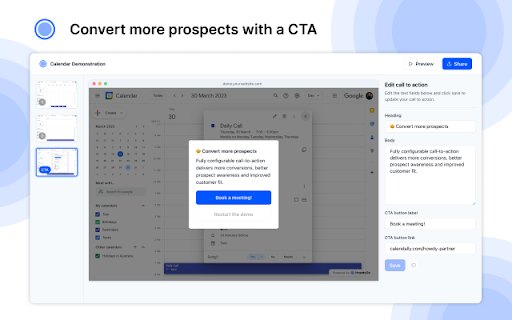
In addition, you can deliver a call-to-action at the perfect moment to carry that prospect/lead to the next stage of the funnel.

⭐️ Easy to use, easy to edit ⭐️

With the HowdyGo browser extension, you simply navigate to the website you want to record and click "Start Recording".

From that point on, every time you click, we create an annotation in your recording.

Once you've finished recording it becomes available in the HowdyGo.com editor. From there you can adjust your annotations and auto-play through steps in the flow that don't need to be explained.

Once you've finished editing, you can publish your demonstration which lets you share the annotated recording with the world. 🌏

⭐️ Call-to-Action: Close more deals! ⭐️

An important element to any marketing funnel is making sure you deliver a call-to-action at the right time.

With HowdyGo, you can easily configure a CTA that displays to your most engaged viewers. Allowing you to link out to any website and close more deals.

⭐️ What happens to my images, videos, styles, fonts, etc? ⭐️

As you record, we perform some magic in the background which stores every image, video, style, font and asset that gets displayed in your recording.

We store these files in a lightning-fast cache which lets us replay a perfect snapshot of your website at that point in time. Even if those files, or your app changes in the background, we will still be able to replay your recording perfectly.
Technical
- Version
- 2.8.9
- Manifest
- V3
- Size
- 1.04MiB
- Min Chrome
- 88
- Languages
- 1
- Featured
- No
Metadata
- ID
- kflpgokojhjknkikmnclhcpepnhgkcno
- Developer ID
- ud117cb9df9c0ef499f89bee4a8c44936
- Developer Email
- [email protected]
- Created
- Mar 14, 2023
- Last Updated (Store)
- Jun 3, 2026
- Last Scraped
- Jun 21, 2026
- Website
- howdygo.com
- Support URL
- https://docs.howdygo.com
- Privacy Policy
- https://howdygo.com/legal/privacy-policy
Similar extensions
Alternatives to Interactive screen captures by HowdyGo.com, ranked by description similarity.

DemoFast - Interactive Demo Recorder
Create interactive product demos in minutes. Record clicks, add annotations, and share step-by-step guides.
11
★ 5.0

Recly.io
Record, edit, and share beautiful interactive product demos in minutes.
29

Propels Demo Capturer
Capture your screen and create interactive product demos
52

MakeDemoFast - Screen Recorder & Demo Video Editor
Screen recorder with auto-zoom, custom cursors, and a built-in video editor. Turn screen recordings into polished demo videos.
29
★ 5.0
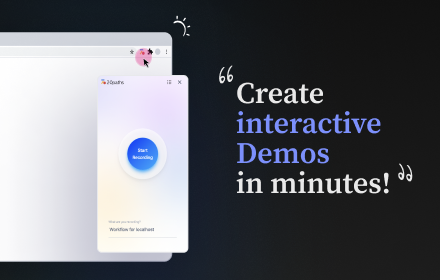
20Paths - Make Demos & Guides fast
Create interactive Demos & guides instantly. Share and gather feedback
40
★ 5.0

Ghost Cursor
Automates mouse movements and creates cinematic demos.
25
★ 5.0

Saltfish AI
A tool for Saltfish AI studio to pick css elements on your website. Making it easier to build & develop your Saltfish experience
460
★ 5.0

Guideflow
Guideflow
6.0K
★ 5.0
Data sourced from the Chrome Web Store · last verified Jun 21, 2026.