
Game Emulator with Google Drive
Emulator of NES, Super Nintendo, Sega Mega and GameBoy video consoles. Open a ROM file from computer, URL or from Google Drive.
As of May 2026, Game Emulator with Google Drive has 3,000 users and a 3.64/5 rating from 130 reviews.
Usersno change0%
3.0K
3,000
Ratingno change0%
3.64
130 reviews
Reviewsno change0%
130
Version
1.0.1.5
Manifest V2
History
1 snapshotsTracking since Apr 24, 2026.
View as table
| Date | Users | Rating | Reviews | Version |
|---|---|---|---|---|
| Apr 24, 2026 | 3.0K | 3.64 | 130 | 1.0.1.5 |
| Now | 3.0K | 3.64 | 130 | 1.0.1.5 |
Permissions & access
- Permissions
- unlimitedStorage
- Host access
- None declared
Screenshots
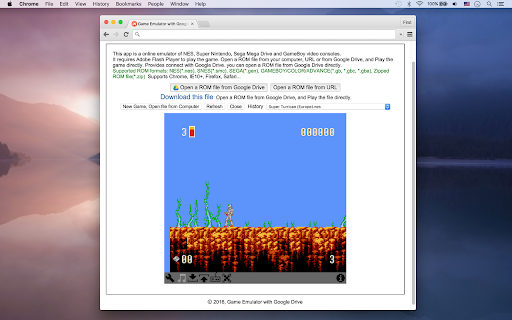
About
This app is an emulator of NES, Super Nintendo, Sega Mega Drive and GameBoy video consoles.
Open a ROM file from your computer, URL or from Google Drive, and Play the game directly. Provides connect with Google Drive. you can open a ROM file from Google Drive directly.
It requires Adobe Flash Player to play the game.

Supported ROM formats: NES(*.nes), SNES(*.smc), SEGA(*.gen), GAMEBOY/COLOR/ADVANCE(*.gb, *.gbc, *.gba), Zipped ROM file(*.zip)
Supports Chrome, IE10+, Firefox, Safari...
Technical
- Version
- 1.0.1.5
- Manifest
- V2
- Size
- 12.73KiB
- Min Chrome
- —
- Languages
- 1
- Featured
- No
Metadata
- ID
- kfhjbbmfcmphjjnmankeliekbnhmjhlg
- Developer ID
- uc7a7b1035153219518f0f02222e97a9d
- Developer Email
- [email protected]
- Created
- Feb 29, 2016
- Last Updated (Store)
- Aug 4, 2016
- Last Scraped
- May 21, 2026
- Support URL
- —
- Privacy Policy
- —
Similar extensions
Alternatives to Game Emulator with Google Drive, ranked by description similarity.
Personal Game Emulators for Browser
This app is an emulator of Nintendo, Super Nintendo, Sega, GameBoy, GameBoy Advance, MAME32, and DOS Game in your browser.
237
★ 2.3

DGen
Sega Genesis (Mega Drive) emulator
224
★ 3.3

Snes9X
Super Nintendo Entertainment System emulator
1.0K
★ 3.5

GNGEO
SNK Neo Geo emulator
40
★ 4.7

PC Classic Game Emulators
PC game emulator of Amstrad CPC, KC85, ZX Spectrum, NEC PC98 for 1980s~90s. Supported ROMs: dsk, sna, bin, kcc, 853, tap, z80, zip.
131
★ 5.0
Googulator
A gameboy emulator that runs directly inside chrome!
20.0K
★ 3.4

Chrome Extension Retro Emulator
24 Retro Emulator in 1 Extension: NES, SNES, GB/A/C, NDS, N64, PSX and many more
1.0K
★ 3.3

GPemu
A video game emulator for Chrome supporting NES, SNES, Gameboy, and Gameboy Advance ROMs.
30.0K
★ 3.9
Data sourced from the Chrome Web Store · last verified May 21, 2026.