
Canva Focus — Hide Pro elements, see what you can use
Hide or dim Pro elements on Canva so you see only what you can use. Cleaner, focused design experience.
As of June 2026, Canva Focus — Hide Pro elements, see what you can use has 5 users in the art category.
Usersup 400.0 percent+400.0%
5
5
Ratingno change0%
—
— reviews
Reviewsno change0%
—
Version
2.0.2
Manifest V3
History
8 snapshotsTracking since Apr 17, 2026.
View as table
| Date | Users | Rating | Reviews | Version |
|---|---|---|---|---|
| Apr 17, 2026 | 1 | — | — | 2.0.2 |
| Apr 27, 2026 | 2 | — | — | 2.0.2 |
| May 4, 2026 | 2 | — | — | 2.0.2 |
| May 10, 2026 | 3 | — | — | 2.0.2 |
| May 21, 2026 | 4 | — | — | 2.0.2 |
| May 28, 2026 | 6 | — | — | 2.0.2 |
| Jun 4, 2026 | 8 | — | — | 2.0.2 |
| Jun 9, 2026 | 7 | — | — | 2.0.2 |
| Now | 5 | — | — | 2.0.2 |
Permissions & access
- Permissions
- storagescriptingtabsmanagement
- Host access
- *://*.canva.com/*
Screenshots



About
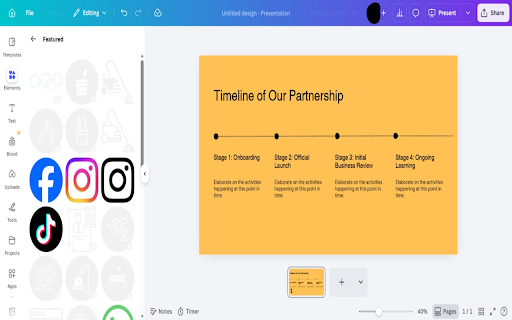
Canva Focus helps free Canva users see a cleaner canvas.

What it does
• Runs only on canva.com.
• Detects Pro/premium-locked elements in the interface.
• Lets you hide them completely or dim them (your choice).
• Does not unlock or grant access to paid content — it only changes how locked elements are shown so you can focus on what you can use.

Why use it
• Less visual clutter from “Pro” labels and locked items.
• Easier to browse templates and elements without distraction.
• One toggle to turn the extension on or off; optional Dim or Hide mode.

How it works
• Install and open Canva. Click the extension icon to enable and choose Dim or Hide.
• The extension only changes the visibility of Pro elements on the page; it does not modify your account or unlock paid features.

Privacy & permissions
• Storage: save your on/off and Dim/Hide preference.
• canva.com: required so the extension can run only on Canva.
• No data is sent to third parties for advertising. No account access.

Who it’s for
• Canva free users who want a less cluttered, more focused design experience.
Technical
- Version
- 2.0.2
- Manifest
- V3
- Size
- 118KiB
- Min Chrome
- 88
- Languages
- 17
- Featured
- No
Metadata
- ID
- kfgpcenpohlbpcaffnicicockjcddnjb
- Developer ID
- u215f348aa60a4383043c3ec19f908b67
- Developer Email
- [email protected]
- Created
- Mar 21, 2026
- Last Updated (Store)
- Mar 21, 2026
- Last Scraped
- Jun 9, 2026
- Website
- —
Similar extensions
Alternatives to Canva Focus — Hide Pro elements, see what you can use, ranked by description similarity.

Canva Freeshow
Shows free elements in Canva. Toggle on/off with a button.
14

Text2Color for Canva
Transform text descriptions into colors directly in Canva's color picker. Enhance your workflow with AI-powered color selection.
72

SVG Importer for Canva
Search and import free SVG files directly to Canva
17

Coloracci
See through any website. Inspect colors, typography, assets, and download icons in seconds.
18
★ 5.0

Easy Blur
Blur parts of a web page, before taking screenshots or screen recordings
1.0K
★ 5.0

VisualCleanser Pro
VisualCleanser Pro removes those annoying AI pages from Google image search results for you!
843
★ 3.1

Pixel Perfect by Workflow.design
Make sure your websites are pixel perfect with your designs
131
★ 5.0

Fast Photo Cropper: No Servers, Just Privacy
Crop photos in any aspect ratio, privately.
44
Data sourced from the Chrome Web Store · last verified Jun 9, 2026.