
Showesome
Quickly and simply, with just one click, showcase your website designs.
As of June 2026, Showesome has 36 users and a 5.00/5 rating from 1 reviews in the Productivity category.
Usersdown 10.0 percent−10.0%
36
36
Ratingno change0%
5.00
1 reviews
Reviewsno change0%
1
Version
1.0.7
Manifest V3
History
10 snapshotsTracking since Apr 18, 2026.
View as table
| Date | Users | Rating | Reviews | Version |
|---|---|---|---|---|
| Apr 18, 2026 | 40 | 5.00 | 1 | 1.0.7 |
| Apr 23, 2026 | 44 | 5.00 | 1 | 1.0.7 |
| Apr 30, 2026 | 42 | 5.00 | 1 | 1.0.7 |
| May 7, 2026 | 38 | 5.00 | 1 | 1.0.7 |
| May 11, 2026 | 33 | 5.00 | 1 | 1.0.7 |
| May 17, 2026 | 36 | 5.00 | 1 | 1.0.7 |
| May 24, 2026 | 41 | 5.00 | 1 | 1.0.7 |
| May 30, 2026 | 38 | 5.00 | 1 | 1.0.7 |
| Jun 5, 2026 | 41 | 5.00 | 1 | 1.0.7 |
| Jun 14, 2026 | 39 | 5.00 | 1 | 1.0.7 |
| Now | 36 | 5.00 | 1 | 1.0.7 |
Permissions & access
- Permissions
- activeTabdebuggercontextMenustabsstorageunlimitedStorageactiveTab
- Host access
- None declared
Screenshots


About
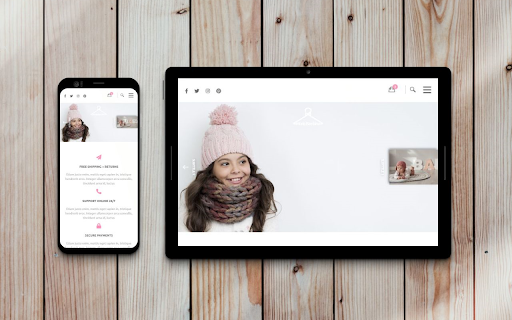
📸 Create stunning previews of your website designs — all with a single click.

Showesome helps designers, developers, and marketers preview websites in mobile, tablet, and desktop views with just a click — no export tools or manual resizing.


✨ Key Features

✅ One-click multi-viewport capture — instantly generate mobile + tablet + desktop versions.
✅ 12+ theme layouts — choose frames that match your style or portfolio design.
✅ Custom backgrounds — solid colors, gradients, or upload your own images.
✅ Device reflections & shadows — add or remove reflections; choose full, short, or none.
✅ Responsive preview simulation — see how elements scale across devices.


🎨 Why Designers & Creators Use Showesome
	•	Perfect for portfolio showcases, client mockups, code reviews, and pitches
	•	Saves time: no manual resizing, image editing, or external tools needed
	•	Adds polish: lets you present your work professionally, not just raw screenshots


🛠️ How It Works

The extension uses the Chrome Debugger API to simulate screen sizes and take captures. You may see a brief popup “Chrome is debugging this tab” — this closes automatically after the capture finishes.


Start showcasing better now — install Showesome and make your website previews shine.
Technical
- Version
- 1.0.7
- Manifest
- V3
- Size
- 36.24MiB
- Min Chrome
- 88
- Languages
- 1
- Featured
- No
Metadata
- ID
- kfdloakmbocfpnfjmlkodlenjfllefed
- Developer ID
- ufaf8ada3a7e9cedc07f69bc70d8a922d
- Developer Email
- [email protected]
- Created
- Mar 4, 2020
- Last Updated (Store)
- Apr 10, 2026
- Last Scraped
- Jun 14, 2026
- Website
- showesome.com
- Support URL
- —
- Privacy Policy
- http://showesome.com/Home/Policy
Similar extensions
Alternatives to Showesome, ranked by description similarity.

SnapMock
Screenshot to device mockup in one click. No watermark. Add annotations, pick device frames, and export in HD.
—

Mobile Simulator for Chrome
Switch any Chrome tab to mobile view with 38 device options in one click.
604
★ 5.0

Mobile/Tablet/PC Responsive Builder
Generate a real responsive preview screenshot of the current web page according to the size of mobile phone/tablet/PC, three-in-one…
60

Zenshotz - Capture & Beautify
Capture any webpage screenshot and beautify it with Zenshotz. 1-click to professional mockups.
45
★ 5.0

Snapshot - Screenshot & Annotate
Capture, annotate and beautify screenshots with area selection, full page capture, annotations, browser frames and more.
54
★ 5.0

Awesome Screenshot – Free Screenshot & Screen Capture Tool
Select an area of the current page and then copy, save, or draw on the screenshot.
94

Full Page Screenshot
Capture full page screenshots and edit with powerful image editor
7

SimuLovice - Mobile Simulator & Mockup Generator
Simulate mobile devices, test responsive designs, and generate high-quality mockups directly from your browser tab.
177
★ 1.0
Data sourced from the Chrome Web Store · last verified Jun 14, 2026.