
Carousel Control
Take control of any image carousel: Fullscreen, Zoom, Pan, and Freeze animations.
As of June 2026, Carousel Control has 8 users and a 5.00/5 rating from 1 reviews in the Functionality & UI category.
Usersdown 20.0 percent−20.0%
8
8
Ratingno change0%
5.00
1 reviews
Reviewsno change0%
1
Version
1.01
Manifest V3
History
5 snapshotsTracking since Apr 18, 2026.
View as table
| Date | Users | Rating | Reviews | Version |
|---|---|---|---|---|
| Apr 18, 2026 | 10 | 5.00 | 1 | 1.01 |
| Apr 28, 2026 | 12 | 5.00 | 1 | 1.01 |
| May 15, 2026 | 9 | 5.00 | 1 | 1.01 |
| May 24, 2026 | 10 | 5.00 | 1 | 1.01 |
| Jun 5, 2026 | 9 | 5.00 | 1 | 1.01 |
| Now | 8 | 5.00 | 1 | 1.01 |
Permissions & access
- Permissions
- contextMenusactiveTabscripting
- Host access
- None declared
Screenshots


About
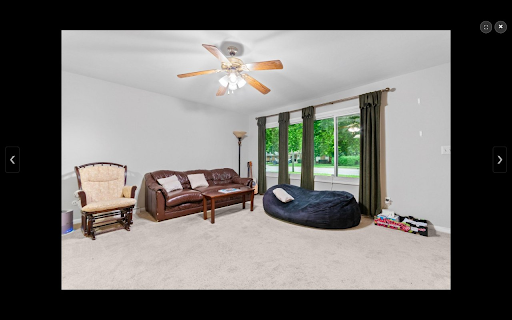
Frustrated by image carousels that move too fast or won't let you zoom? Carousel Control gives you complete power over images on the web, specifically designed to handle complex sliders found on Real Estate, E-commerce, and Portfolio websites.

Universal Zoom & Pan: Open any image in a distraction-free full-screen overlay. Use your mouse wheel to zoom and click-and-drag to inspect details.
Freeze Animations: Automatically pauses the background page. No more struggling to look at a photo while the carousel slides it away.
Smart Gallery Detection: Intelligently scans the page to find related images, creating an instant slideshow. Navigate with on-screen buttons or your keyboard arrows.
Penetrates Overlays: Works on difficult websites where transparent "click shields" usually block you from accessing the image directly.
Lazy Load Support: Detects high-resolution versions of images hidden behind lazy-loading scripts (common on modern fast-loading websites).

How to Use:
Right-click on any image (or carousel item).
Select "Full Screen & Zoom Image" from the menu.
Enjoy the view! Press Esc to close.

This extension runs entirely locally on your browser. No image data is sent to any server.
Technical
- Version
- 1.01
- Manifest
- V3
- Size
- 35.84KiB
- Min Chrome
- 88
- Languages
- 1
- Featured
- No
Metadata
- ID
- kfbkmobkmdhganlnpjaokfhhiplbcpgf
- Developer ID
- u0f14dc7508a2912b6fb5362943575174
- Developer Email
- [email protected]
- Created
- Nov 21, 2025
- Last Updated (Store)
- Nov 22, 2025
- Last Scraped
- Jun 5, 2026
- Website
- —
- Support URL
- —
- Privacy Policy
- —
Similar extensions
Alternatives to Carousel Control, ranked by description similarity.

PicZoomer
Advanced image zoom with Download feature.
478
★ 4.5

Closely: Image Hover Zoom
Scroll to zoom any image on any website. Drag to pan. Double-click to reset. Works on Instagram, Reddit, and everywhere else.
24

Immersive Image Viewer
Transform Google Images into an immersive dark-themed full-screen viewing experience with zoom, search, and keyboard navigation.
2

BetterViewer
A browser extension for better image viewing experience
9.0K
★ 4.7

SmartZoom
SmartZoom without touchpad
11
★ 2.0

Image Zoom Lightbox
Open an image zoom lightbox with a configurable double-press shortcut while hovering an image.
7

Instagram Fullscreen Viewer
Enables fullscreen mode for Instagram videos, reels, and images with enhanced controls
9.0K
★ 4.0

Hover Zoom+
Zoom images/videos on all your favorite websites (Facebook, Amazon, etc). Simply hover your mouse over the image to enlarge it.
300.0K
★ 4.0
Data sourced from the Chrome Web Store · last verified Jun 5, 2026.