
Fero — transfer AI chats
Transfer AI chat context between ChatGPT, Claude, Gemini & Copilot
As of July 2026, Fero — transfer AI chats has — users in the Productivity category.
Usersno change0%
—
—
Ratingno change0%
—
— reviews
Reviewsno change0%
—
Version
1.0.0
Manifest V3
History
1 snapshotsTracking since Jul 2, 2026.
Not enough history yet for this metric — the chart fills in as we collect more snapshots.
View as table
| Date | Users | Rating | Reviews | Version |
|---|---|---|---|---|
| Jul 2, 2026 | — | — | — | 1.0.0 |
| Now | — | — | — | 1.0.0 |
Permissions & access
- Permissions
- activeTabscriptingstorageclipboardWrite
- Host access
- None declared
Screenshots



About
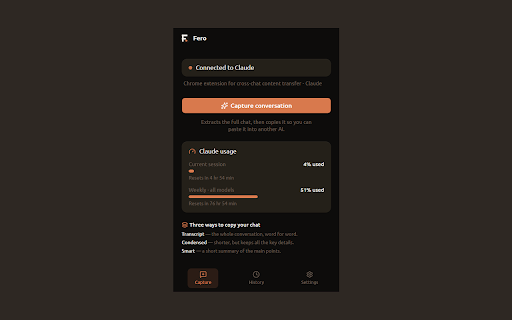
Move a conversation from one AI to another in two clicks. Fero captures your current chat with ChatGPT, Claude, Gemini, or Copilot and copies it — cleanly formatted and ready to paste into a different assistant, so you never lose context when you switch.

Three ways to copy your chat:
• Transcript — the whole conversation, word for word.
• Condensed — shorter, but keeps all the context.
• Smart — a short summary of the main points, generated on-device by Chrome's built-in AI (Gemini Nano).

Built for privacy:
• 100% local — everything runs in your browser; nothing is uploaded, tracked, or sent to any server.
• On-device AI — Condensed and Smart use Chrome's built-in Gemini Nano, so your conversation never leaves your machine.
• Secret-safe — Fero automatically hides obvious secrets (API keys, tokens) before you copy.
• Condensed and Smart mode only works in Chrome browser.

Also: a fit meter shows how big the copy(Token size) is for the destination, a usage card shows how much of your Claude/Gemini limit is left, and your capture history is stored locally.

Free. No account, no sign-up.
Technical
- Version
- 1.0.0
- Manifest
- V3
- Size
- 106KiB
- Min Chrome
- 88
- Languages
- 1
- Featured
- No
Metadata
- ID
- kfbdopbomgmfpdlbjchmohgchdlnmdhd
- Developer ID
- u10016ae752a14d7d7ae570f67a7947d5
- Developer Email
- [email protected]
- Created
- Jul 1, 2026
- Last Updated (Store)
- Jul 1, 2026
- Last Scraped
- Jul 2, 2026
- Website
- —
- Support URL
- —
Data sourced from the Chrome Web Store · last verified Jul 2, 2026.