
Word Scramble Game
Unscramble letters to form words under a time limit for points.
As of June 2026, Word Scramble Game has 1,000 users and a 5.00/5 rating from 1 reviews in the Games category.
Usersno change0%
1.0K
1,000
Ratingno change0%
5.00
1 reviews
Reviewsno change0%
1
Version
0.1.9
Manifest V3
90-day change · In the last 90 days this extension 1 version update.
History
2 snapshotsTracking since Apr 17, 2026.
View as table
| Date | Users | Rating | Reviews | Version |
|---|---|---|---|---|
| Apr 17, 2026 | 1.0K | 5.00 | 1 | 0.1.8 |
| May 28, 2026 | 1.0K | 5.00 | 1 | 0.1.8 |
| Now | 1.0K | 5.00 | 1 | 0.1.9 |
Changelog
- May 28, 2026description
Word Scramble Challenge is an engaging and mind-stimulating game where players unravel the mystery of scrambled letters to form a valid word. The game tests your vocabulary and quick-thinking skills under a time constraint.

How to Play:

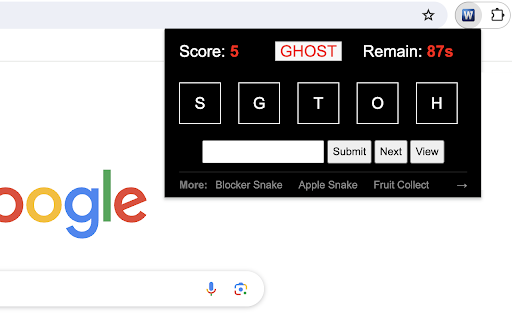
1) Starting the Game: When you launch the game, you'll see a randomized set of letters on the screen. These letters are a scrambled version of a non-anagrammatic word (a word that can't form another valid word when its letters are rearranged) that's 5 letters long.

2) Making a Guess: Look at the scrambled letters and try to form a valid word. Type your guess into the provided input box.

3) Submitting Your Answer: Type your guess and click "Submit" to verify it. Correct answers increase your score by 5 points, while incorrect guesses don't affect the score."

4) Keeping an Eye on the Timer: The game begins with a 60-second timer, displayed at the top right corner of the game screen. This timer counts down, and you must try to score as many points as possible before it reaches 0.

5) Game Over: When the timer hits 0, the game is over. An overlay will appear with a "Restart" button. Click the button to begin a new game. The timer will reset to 60 seconds, and your score will reset to 0.

Other Functions:

1) Using the "Next" Button: If you're stumped and can't figure out the word, click the "Next" button. This will present a new set of scrambled letters from the pre-prepared word list for you to solve.

2) Viewing the Answer: If you're curious about the correct word for a particularly challenging scramble, click the "View" button. The answer will be displayed at the top of the screen.

Tips for Success:

- Take quick glances at the letters and trust your first instinct. Often, the correct word might just pop into your mind.
- If a word doesn't immediately come to mind, shuffle the letters in your head or on a piece of paper.
- Practice makes perfect. The more you play, the better you'll get at spotting words quickly.

Have fun playing the word game! If you'd like to play the next level with longer words, simply click related link below the 'Restart' button. Plus, we've showcased our featured game extensions after the game ends to bring you even more fun!

CHANGELOG
==========
Version 0.1.2 - 0.1.8
- Update word list
- Add google analytics
- Add next level link
- Add featured games after game over
- Dynamic update of featured games
- Prettify code and styles

Version 0.1.0 - 0.1.1
- Initial release of game
- Update game timer
Word Scramble Challenge is an engaging and mind-stimulating game where players unravel the mystery of scrambled letters to form a valid word. The game tests your vocabulary and quick-thinking skills under a time constraint.

How to Play:

1) Starting the Game: When you launch the game, you'll see a randomized set of letters on the screen. These letters are a scrambled version of a non-anagrammatic word (a word that can't form another valid word when its letters are rearranged) that's 5 letters long.

2) Making a Guess: Look at the scrambled letters and try to form a valid word. Type your guess into the provided input box.

3) Submitting Your Answer: Type your guess and click "Submit" to verify it. Correct answers increase your score by 5 points, while incorrect guesses don't affect the score."

4) Keeping an Eye on the Timer: The game begins with a 60-second timer, displayed at the top right corner of the game screen. This timer counts down, and you must try to score as many points as possible before it reaches 0.

5) Game Over: When the timer hits 0, the game is over. An overlay will appear with a "Restart" button. Click the button to begin a new game. The timer will reset to 60 seconds, and your score will reset to 0.

Other Functions:

1) Using the "Next" Button: If you're stumped and can't figure out the word, click the "Next" button. This will present a new set of scrambled letters from the pre-prepared word list for you to solve.

2) Viewing the Answer: If you're curious about the correct word for a particularly challenging scramble, click the "View" button. The answer will be displayed at the top of the screen.

Tips for Success:

- Take quick glances at the letters and trust your first instinct. Often, the correct word might just pop into your mind.
- If a word doesn't immediately come to mind, shuffle the letters in your head or on a piece of paper.
- Practice makes perfect. The more you play, the better you'll get at spotting words quickly.

Have fun playing the word game! If you'd like to play the next level with longer words, simply click related link below the 'Restart' button. Plus, we've showcased our featured game extensions after the game ends to bring you even more fun!

CHANGELOG
==========
Version 0.1.2 - 0.1.9
- Update word list
- Add google analytics
- Add next level link
- Add featured games after game over
- Dynamic update of featured games
- Prettify code and styles

Version 0.1.0 - 0.1.1
- Initial release of game
- Update game timer
Permissions & access
- Permissions
- storage
- Host access
- None declared
Screenshots



About
Word Scramble Challenge is an engaging and mind-stimulating game where players unravel the mystery of scrambled letters to form a valid word. The game tests your vocabulary and quick-thinking skills under a time constraint.

How to Play:

1) Starting the Game: When you launch the game, you'll see a randomized set of letters on the screen. These letters are a scrambled version of a non-anagrammatic word (a word that can't form another valid word when its letters are rearranged) that's 5 letters long.

2) Making a Guess: Look at the scrambled letters and try to form a valid word. Type your guess into the provided input box.

3) Submitting Your Answer: Type your guess and click "Submit" to verify it. Correct answers increase your score by 5 points, while incorrect guesses don't affect the score."

4) Keeping an Eye on the Timer: The game begins with a 60-second timer, displayed at the top right corner of the game screen. This timer counts down, and you must try to score as many points as possible before it reaches 0.

5) Game Over: When the timer hits 0, the game is over. An overlay will appear with a "Restart" button. Click the button to begin a new game. The timer will reset to 60 seconds, and your score will reset to 0.

Other Functions:

1) Using the "Next" Button: If you're stumped and can't figure out the word, click the "Next" button. This will present a new set of scrambled letters from the pre-prepared word list for you to solve.

2) Viewing the Answer: If you're curious about the correct word for a particularly challenging scramble, click the "View" button. The answer will be displayed at the top of the screen.

Tips for Success:

- Take quick glances at the letters and trust your first instinct. Often, the correct word might just pop into your mind.
- If a word doesn't immediately come to mind, shuffle the letters in your head or on a piece of paper.
- Practice makes perfect. The more you play, the better you'll get at spotting words quickly.

Have fun playing the word game! If you'd like to play the next level with longer words, simply click related link below the 'Restart' button. Plus, we've showcased our featured game extensions after the game ends to bring you even more fun!

CHANGELOG
==========
Version 0.1.2 - 0.1.9
- Update word list
- Add google analytics
- Add next level link
- Add featured games after game over
- Dynamic update of featured games
- Prettify code and styles

Version 0.1.0 - 0.1.1
- Initial release of game
- Update game timer
Technical
- Version
- 0.1.9
- Manifest
- V3
- Size
- 55.78KiB
- Min Chrome
- 88
- Languages
- 1
- Featured
- Yes
Metadata
- ID
- kenapidglechhkgphplibhcjacaapghd
- Developer ID
- ue8dc9741c229591bba28c1ac424b53cc
- Developer Email
- [email protected]
- Created
- Nov 27, 2023
- Last Updated (Store)
- May 25, 2026
- Last Scraped
- Jun 12, 2026
- Website
- gameanything.com
- Support URL
- https://www.gameanything.com/contact-us/
- Privacy Policy
- https://www.gameanything.com/privacy-policy/
Similar extensions
Alternatives to Word Scramble Game, ranked by description similarity.

Word Search Game
Discover all the hidden words within the 2-D character grid.
884
★ 2.8

Wordle
Wordle Puzzle Game.
62

Popular Words Game - Swipe, Match, and Build Your Vocabulary!
Challenge your word skills in a thrilling Chrome puzzle game—swipe and match! 🧩
174

Letter Swap Game
Swap letters to eliminate groups of three identical ones.
280
★ 4.0
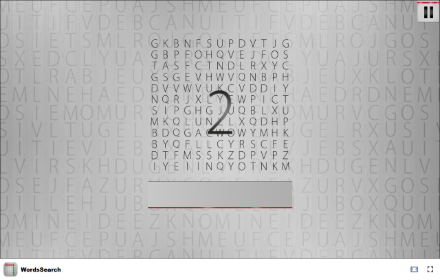
WordsSearch - Find hidden words in this engaging puzzle!
Test your word-finding skills in this fun and free offline word search puzzle game!
21

Scrabble Word Finder
Official Chrome Extension for Scrabble Word Finder UK
89
★ 5.0

Wordle IO
Play Wordle right in your Chrome
—

8 Letters 30 Seconds 1 Guess
Guess an eight-letter word in 30 seconds
2
Data sourced from the Chrome Web Store · last verified Jun 12, 2026.