
TabDiff
Compare differences between two tabs
As of May 2026, TabDiff has 30 users in the Productivity category.
Usersup 50.0 percent+50.0%
30
30
Ratingno change0%
—
— reviews
Reviewsno change0%
—
Version
1.2.1
History
4 snapshotsTracking since Apr 1, 2026.
View as table
| Date | Users | Rating | Reviews | Version |
|---|---|---|---|---|
| Apr 1, 2026 | 20 | — | — | 1.2.1 |
| Apr 21, 2026 | 24 | — | — | 1.2.1 |
| May 6, 2026 | 22 | — | — | 1.2.1 |
| May 17, 2026 | 20 | — | — | 1.2.1 |
| Now | 30 | — | — | 1.2.1 |
Permissions & access
- Permissions
- None declared
- Host access
- None declared
Screenshots

About
TabDiff - Compare the contents of two tabs (focused on <article> only)

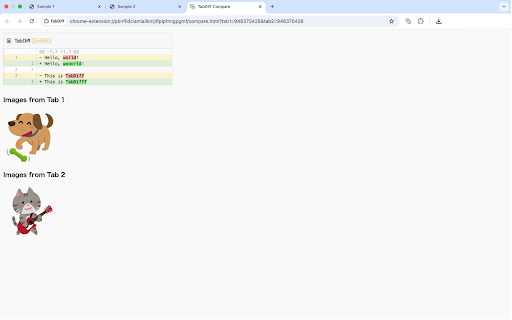
TabDiff is a Chrome extension that allows you to easily compare the contents of the <article> tag in two open tabs. It visually highlights the differences in text and images within the article area, helping you spot content changes quickly. This tool is ideal for checking updates to blog posts, news articles, or other structured content areas.

Key Features:
	•	Focused Comparison: Compares only the content inside the <article> tag.
	•	Text Difference Highlighting: Clearly shows changes in text between two tabs.
	•	Image Comparison: Displays images from both tabs as thumbnails for visual confirmation.
	•	Simple UI: Just select two tabs and press the “Compare” button.

Useful for:
	•	Reviewing content updates to structured areas like articles or blogs.
	•	Verifying image replacements inside the main content area.
	•	Comparing versions of the same article for editing and proofreading.

⸻

TabDiff - 2つのタブの <article> タグ内の差分を簡単に比較

TabDiff は、Google Chromeで開いている2つのタブの中で、<article> タグに含まれる内容のみを比較できる拡張機能です。記事本文やコンテンツエリアのテキスト・画像の違いを視覚的にハイライトし、変更点をすばやく把握できます。ブログやニュース記事など、構造化されたページの更新確認に最適です。

主な特徴:
	•	記事エリアに特化:<article> タグの中身だけを比較対象に。
	•	テキストの差分比較:文章の変更点を視覚的に強調。
	•	画像の表示:コンテンツ内の画像をサムネイル表示。
	•	シンプルなUI:2つのタブを選んで「比較」ボタンを押すだけ。

こんなときに便利:
	•	記事・ブログなどの本文エリアの変更確認
	•	画像の差し替え確認をしたいとき
	•	編集・校正などのバージョン比較に
Technical
- Version
- 1.2.1
- Manifest
- —
- Size
- 39.63KiB
- Min Chrome
- 88
- Languages
- 1
- Featured
- No
Metadata
- ID
- kemokocfcodiopcelbmncnbboiilkbdf
- Developer ID
- u81804b8c6aaa06dffbf104498b49af6b
- Developer Email
- [email protected]
- Created
- Mar 31, 2025
- Last Updated (Store)
- May 10, 2025
- Last Scraped
- May 17, 2026
- Website
- —
- Support URL
- —
- Privacy Policy
- —
Similar extensions
Alternatives to TabDiff, ranked by description similarity.

slimDiff
テキストの差分をローカルで安全に比較します。サイドパネルで常に表示可能。
6

Clone Twin Tab
Clone Twin Tab は現在のタブを左右に並べて2つのウィンドウに複製します。
344

Text Comparison Tool
Compare and analyze differences between two text inputs.
305
★ 5.0

TextCompare - Code/Text Comparator
A powerful text and code comparison tool with syntax highlighting. Compare text, code, and web content with side-by-side view.
26
★ 5.0

Diff Checker
Diffchecker will compare text to find the difference between two text files. Just paste your files and click Find Difference!
940
★ 1.0

Bitab
Collect all open tabs into a single, saved list and view them on a simple HTML page.
1

Text Compare
Online Text Compare: Compare two texts, code or files to find the difference between them.
588
★ 5.0

Text Compare
Compare text, code, and JSON in your browser with color-coded diffs, inline changes, synced panes, and line statistics.
93
Data sourced from the Chrome Web Store · last verified May 17, 2026.