
Canva Free Filter
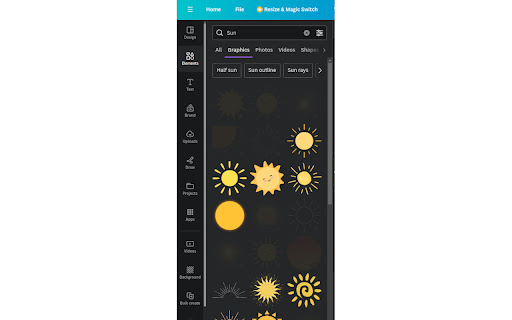
Chrome Extension for canva.com filter free resources
As of May 2026, Canva Free Filter has 10,000 users and a 2.33/5 rating from 105 reviews in the Productivity category.
Usersno change0%
10.0K
10,000
Ratingdown 2.1 percent−2.1%
2.33
105 reviews
Reviewsup 1.9 percent+1.9%
105
Version
0.2.3
Manifest V3
History
2 snapshotsTracking since Apr 24, 2026.
View as table
| Date | Users | Rating | Reviews | Version |
|---|---|---|---|---|
| Apr 24, 2026 | 10.0K | 2.38 | 103 | 0.2.3 |
| May 21, 2026 | 10.0K | 2.36 | 103 | 0.2.3 |
| Now | 10.0K | 2.33 | 105 | 0.2.3 |
Permissions & access
- Permissions
- None declared
- Host access
- https://www.canva.com/*
Screenshots
About
Overview:
Unlock the full potential of your creativity on a budge with our Chrome Extension, the Canva Free Resource Filter. This tool is meticulously designed for Canva users who wish to streamline their design process by focusing exclusively on free resources. Say goodbye to the frustration of finding the perfect design element, only to discover it's behind a paywall. Our extension seamlessly integrates with your Canva interface, ensuring you have access to a vast array of free images, templates, icons, and fonts, all at your fingertips.

Key Features:
- Exclusive Focus on Free Resources: Automatically filters out paid resources, allowing you to browse through Canva's extensive library of free elements without any distractions.
- Seamless Integration: Designed to blend perfectly with Canva's user interface, providing a smooth and intuitive user experience that feels native to the platform.
Privacy-Focused: We value your privacy. The extension operates without collecting or storing any personal data, ensuring your design process remains private and secure.

Benefits:
- Maximize Creativity on a Budget: Perfect for freelancers, small business owners, students, and anyone looking to create professional designs without financial constraints.
- Save Time: Eliminates the need to manually sift through paid resources, significantly speeding up your design process.
- Enhance Productivity: By focusing on free resources, you can streamline your workflow, making your design process more efficient and productive.

How It Works:
Once installed, the Canva Free Resource Filter automatically filters out all paid resources from your search results in Canva.
Technical
- Version
- 0.2.3
- Manifest
- V3
- Size
- 25.33KiB
- Min Chrome
- 88
- Languages
- 1
- Featured
- No
Metadata
- ID
- kekpcmnonffnjfijpkbnmjcemjejnlih
- Developer ID
- u97f4f2bf0cd4f48ad653d5c6a3a4fca0
- Developer Email
- [email protected]
- Created
- Feb 11, 2024
- Last Updated (Store)
- Oct 7, 2024
- Last Scraped
- May 21, 2026
- Website
- —
- Privacy Policy
- —
Similar extensions
Alternatives to Canva Free Filter, ranked by description similarity.

Canva Free Filter
Use this extension to easily spot free filters in Canva, if extension is on, that only highlights the free filter.
38

Canva Premium Element Remover
An extension to remove premium elements on Canva.
1.0K
★ 3.1

CanvaClean
An extension to automatically remove backgrounds in Canva.
62

Google Lens Image Search
Enable this extension to quickly search, identify image patterns, and download in one click
20.0K
★ 4.3

Canva Bulk Background Remover Pro
Professional bulk background removal tool for Canva. Free and unlimited.
47

Canva Premium Remover
You don't want to pay for Canva? Me neither.
4.0K
★ 4.4

Canva Hider - Hide Pro Items & Customize Context
Automatically hide/resize Canva Pro items while browsing, and customize your design experience effortlessly.
20

Canvabulkbg: Canva Bulk Background Remover
Easily remove backgrounds from multiple images in Canva with just one click.
1.0K
★ 3.0
Data sourced from the Chrome Web Store · last verified May 21, 2026.