
Quick Response Share (QRS)
QR Code for sharing of current broswer URI
As of May 2026, Quick Response Share (QRS) has 47 users and a 5.00/5 rating from 5 reviews in the Developer Tools category.
Usersup 4.4 percent+4.4%
47
47
Ratingno change0%
5.00
5 reviews
Reviewsno change0%
5
Version
1.2.0
Manifest V3
History
2 snapshotsTracking since Apr 24, 2026.
View as table
| Date | Users | Rating | Reviews | Version |
|---|---|---|---|---|
| Apr 24, 2026 | 45 | 5.00 | 5 | 1.2.0 |
| May 21, 2026 | 58 | 5.00 | 5 | 1.2.0 |
| Now | 47 | 5.00 | 5 | 1.2.0 |
Permissions & access
- Permissions
- activeTab
- Host access
- None declared
Screenshots

About
Quick Response Share (QRS) - Effortlessly Share Your Current Browser URL via QR Code!

In today's fast-paced digital world, sharing links across devices should be quick and convenient. Whether you're transferring a webpage from your laptop to your mobile phone, or sharing a URL with friends or colleagues nearby, Quick Response Share (QRS) makes it easy and seamless.

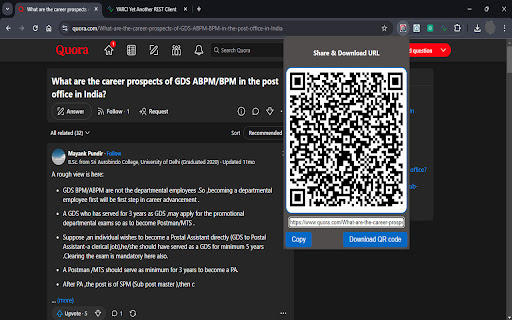
QRS is a lightweight, user-friendly Chrome extension designed to instantly generate a QR code for the current browser URL. With just a single click, the extension creates a scannable QR code that anyone can use to access the link directly from their smartphone or tablet. This eliminates the need for manual copying, pasting, or emailing links when you want to switch devices or share URLs with others.

Key Features:
One-Click QR Code Generation: Simply click the QRS icon in your Chrome toolbar, and a QR code for the current webpage will be instantly generated. No complicated settings, no delays—just one click and you're ready to share.

Instant Sharing: Whether you're sharing a news article, a YouTube video, or an important document, QRS makes it easy to share URLs in real-time. Show the QR code on your screen, and others can scan it directly using their smartphones.

Cross-Device Link Sharing: Ever found an article or a website on your computer and wanted to read it on your mobile device? With QRS, you can scan the QR code with your phone and open the link instantly on your mobile browser without needing to email or message the link to yourself.

Quick Access to Important Webpages: Bookmarking is useful, but QRS allows you to quickly access your favorite webpages on any device. Just generate a QR code and scan it for fast navigation.

Lightweight & Minimal: The QRS extension is built to be lightweight and runs smoothly in the background without affecting your browser’s performance. It consumes minimal resources and has no unnecessary features—just fast and reliable QR code generation.

Privacy First: QRS does not track or store any browsing data. The extension is designed with privacy in mind, ensuring your information remains secure while sharing links.

Convenient for Professionals & Students: Whether you're in a meeting, collaborating on projects, or sharing educational resources, QRS is the perfect tool for professionals and students alike. Quickly display a QR code on your screen and share important links during presentations, webinars, or collaborative sessions.

Perfect for Web Developers: Web developers can easily generate QR codes for local or deployed websites and test their pages across different devices quickly.

Customizable Options (Future Updates): We are working on future updates that will allow users to customize the size, color, and design of the generated QR codes to better suit your sharing needs.

Why Choose QRS?
Unlike other link-sharing methods that require extra steps, logins, or copying and pasting URLs, QRS simplifies the process by generating a QR code instantly. It's a modern, hassle-free way to share links with anyone nearby without needing to rely on messaging apps, email, or social media platforms.

Imagine these everyday scenarios:

At a conference: You're presenting a webpage to a group, and instead of sending the URL via email, you generate a QR code that the audience can scan instantly with their phones.
Sharing product links: In e-commerce, you can quickly share product pages with customers without needing them to type long URLs.
Switching devices: You're browsing an article on your desktop, but now you need to step away. Just scan the QR code on your phone and continue reading where you left off.
QRS streamlines the experience, making sharing fast, efficient, and enjoyable.

How to Use Quick Response Share (QRS):
Install the Extension: Add QRS to your Chrome browser by installing it from the Chrome Web Store.
Navigate to a Webpage: Browse any website as you normally would.
Click the QRS Icon: Once on a webpage you want to share, click the QRS icon located in your Chrome toolbar.
Scan the QR Code: The extension will instantly generate a QR code for the current URL. Scan it with your mobile device's camera, and you're good to go!
Support & Feedback:
We're committed to continuously improving Quick Response Share (QRS) based on user feedback. If you have any suggestions, feature requests, or encounter any issues, please feel free to reach out to us through the Chrome Web Store support page. We value your input and are constantly working on updates to make your experience even better.
Technical
- Version
- 1.2.0
- Manifest
- V3
- Size
- 515KiB
- Min Chrome
- 88
- Languages
- 1
- Featured
- No
Metadata
- ID
- kegenbokieldbkiocndehbhjkgaigkgn
- Developer ID
- u428e9096a80f5fe0beb5af702e7500d3
- Developer Email
- [email protected]
- Created
- Sep 9, 2024
- Last Updated (Store)
- Sep 22, 2024
- Last Scraped
- May 21, 2026
- Website
- —
- Support URL
- —
- Privacy Policy
- —
Similar extensions
Alternatives to Quick Response Share (QRS), ranked by description similarity.

QR Link Share
QR Link Share: Generate QR for current URL.
19

QR Code Generator
Generate QR codes from text or URLs quickly and easily
6

QR Code Generator
Generate QR codes for the current tab's URL
3

Quick QR Generator
Instantly generate QR codes for any webpage. One click, offline, no tracking.
—

QR Code Generator
QR Code Generator: Generate QR for any URL
—

Quick QR Code Generator
Generate a QR code for the current webpage.
4
★ 5.0

QR Super Generator
Ultimate QR code generator with auto-generation, WiFi support, batch processing, floating widget, and professional features
8
★ 5.0

1-Click QR
Scan any QR code on your screen with one click. No camera needed. Click, drag, done.
4
Data sourced from the Chrome Web Store · last verified May 21, 2026.